
As a 20-year veteran in the intrusion alarm industry, I’ve seen far too many systems ruined by false alarms simply because they lacked proper video verification. Clients complain nonstop, police refuse to respond, insurers deny claims, and contracts get lost. On the flip side, teams that master video verification technology slash false-alarm rates from 40% down to under 5%, cut police response times by 60% or more, and deliver court-admissible video evidence. In 2026, this is no longer a “nice-to-have” add-on — it is the core lifeline of any scalable alarm monitoring system.
Today I’m laying out the full story: how video verification really works, exact implementation steps, pitfall avoidance, AI upgrade paths, and real-world ROI. Whether you’re an integrator, engineer, or central station manager, you can take this guide and apply it tomorrow to solve your biggest headaches.

What Exactly Is Video Verification — and Why Is It Now Mandatory?
Video verification means that the moment any intrusion sensor (PIR, door contact, glass-break, beam detector, etc.) triggers an alarm, the system automatically pops the corresponding camera feed straight to the central station operator’s screen — plus grabs a 10-second pre-alarm + 30-second post-alarm video clip. The operator can visually confirm within 15 seconds whether it’s a real threat or just the cat stepping on the sensor.
Unlike regular CCTV (where operators stare at dozens of static screens), video verification is active linkage + automatic pop-up. Modern platforms also store every clip permanently on the central server for insurance, police CAD integration, or court use.
Real numbers that matter (2025-2026 industry stats):
- Traditional systems: 30-40% false-alarm rate
- With video verification: 65-85% reduction (AI-enhanced systems reach 90%+)
- In “Verified Response” cities, police only prioritize alarms with video proof
- Clients enjoy 10-25% lower insurance premiums thanks to solid evidence
Without video verification, your system in retail chains, banks, factories, or multi-site enterprises is basically running blind.
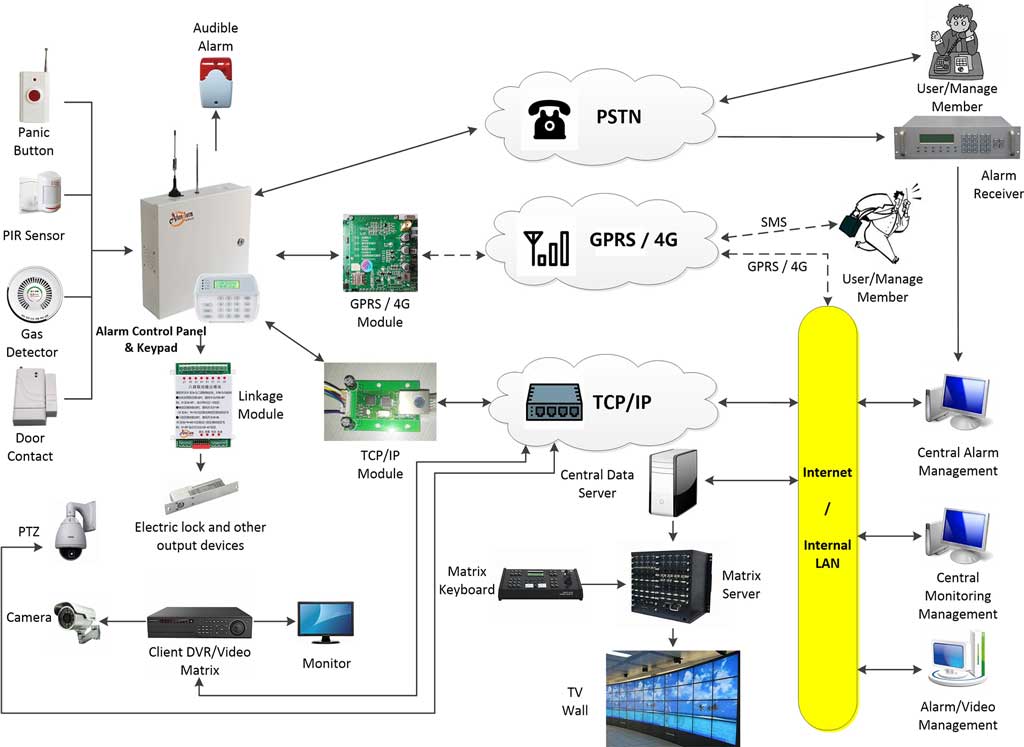
(The diagram above shows the complete signal flow: sensors → control panel → video linkage module → central station. One-to-one mapping between alarms and cameras is the foundation of video verification.)
How It Works — Core Technical Stack
- Trigger Mechanism
Alarm panel detects sensor activation → sends account + partition + zone code via SIA DC-09 or Contact ID to the central receiver → central software instantly pulls the pre-mapped RTSP/ONVIF stream from the NVR or IP camera → full-screen pop-up on every operator client + audible alert. - Video Stream Handling
- Protocols: ONVIF, RTSP, Hikvision/Dahua SDK
- Codec: H.265/H.264 (50%+ bandwidth savings)
- Pop-up latency: quality systems deliver in 2-5 seconds
- Storage: automatic “event clip” saved on the central platform server (not the site recorder — so even if the local NVR fails, evidence survives)
- Linkage Methods
- Zone mapping: one door contact linked to 1-2 cameras (face + side view)
- Multi-stream: one alarm can pop 4 simultaneous feeds
- Two-way audio: operator can speak directly through the panel microphone (“This is the monitoring center — please identify yourself”)

(Central station operator view: multiple monitors instantly display the alarm location video, map flashes, audio alerts — this is exactly how video verification lets operators confirm threats in seconds.)
Step-by-Step Implementation (Follow This and You Won’t Fail)
Preparation (1-2 days)
- Draw your risk map — mark every sensor, coverage area, and high-value zone.
- Choose cameras: at least one 4K starlight IP camera per critical zone, fully ONVIF compliant.
- Confirm panel compatibility — Athenalarm AS-9000 series or equivalent must have native video linkage support.
Hardware & Software Configuration (On-Site Checklist)
- In the control panel programming, map every alarm zone to its camera channel (Zone 01 → Camera Channel 05).
- In the central station software (AS-ALARM or equivalent):
- Enter NVR/IP address, username, password, and channel
- Set pop-up rules by alarm type (intrusion/fire/hold-up)
- Enable automatic clip recording (Pre 10 s / Post 30 s)
- Test linkage: trigger a sensor on site — central station client must show full-screen video + sound alert within 5 seconds.
- Turn on encryption: all video streams over HTTPS or AES-128.
- Multi-client test: have three operators log in simultaneously to confirm everyone receives the same pop-up and alert.
Post-Launch Optimization
- Check “video offline” reports weekly
- Monthly audit of high-false-alarm zones — adjust camera angles or add dual-tech sensors
- Automatically back up clips to cloud storage for disaster recovery
AI-Enhanced Video Verification — The 2026 Standard
Traditional verification relies on human eyes. AI version lets the system “watch” for you:
- Behavior analysis: detects loitering, climbing, tampering and auto-tags “high-confidence alarm”
- Object recognition: firearms, masks, abandoned packages
- Smart filtering: pets, tree shadows, car headlights — another 30-50% false-alarm drop
- Confidence scoring: every alarm gets a 0-100 score; scores >80 auto-forward to police
Many platforms now offer “AI first-pass → human review” — operators only handle high-score events, tripling efficiency.
(Integrated system: sensors + cameras + alarm center + video surveillance in one closed loop — exactly where AI delivers maximum power.)
Common Pitfalls & How to Avoid Them (Lessons from Real Deployments)
Pitfall 1: High latency
Cause: insufficient bandwidth or old H.264
Fix: force H.265 + dedicated line or 5G backup — target <5 seconds pop-up
Pitfall 2: Video dropout
Cause: site NVR loses power or network fluctuates
Fix: stream video directly to the central server (never rely on local recorder)
Pitfall 3: Privacy compliance issues
Fix: record only during alarm events; never store non-alarm footage; always get client consent in writing
Pitfall 4: Wrong zone mapping (most common mistake!)
Fix: physically test every single zone before go-live — otherwise the operator may see the wrong camera (or the bathroom…)
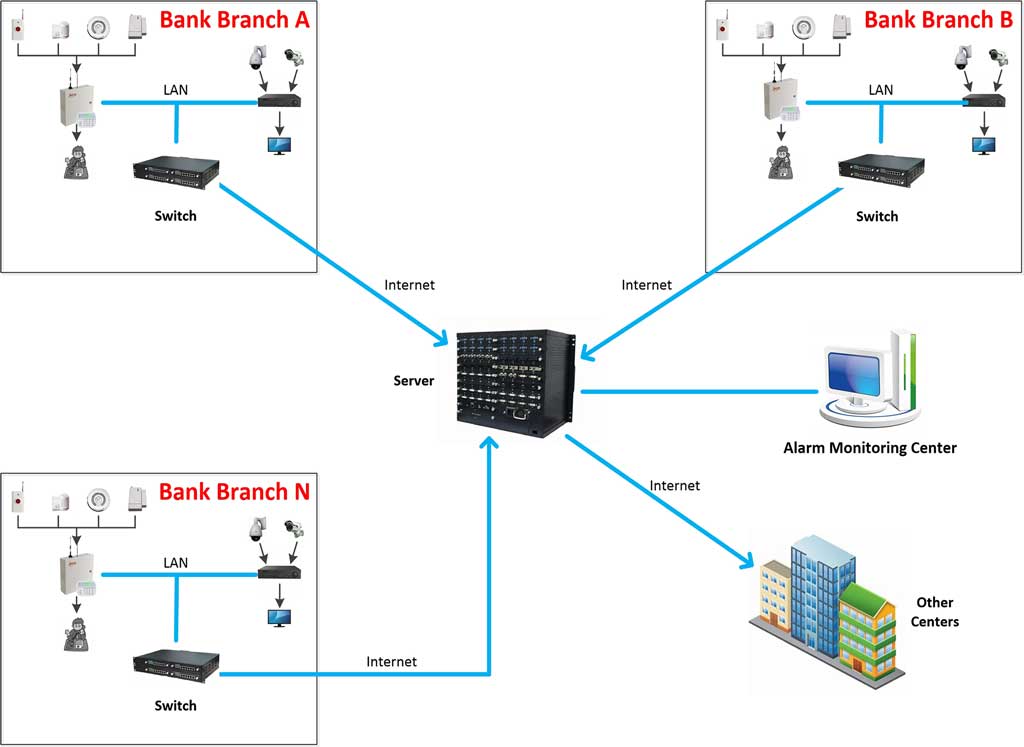
Real ROI & Client Success Stories
- Southeast Asia supermarket chain (200 stores): false alarms dropped from 1,200 to 180 per month; police response jumped from 15% to 92%; saved over $400,000 annually in fines and labor.
- Bank ATM network: video + AI provided perfect robbery attempt evidence; insurer paid immediately and police made arrests within 24 hours.
- Unmanned factory warehouses: 4G + video verification caught nighttime intruders on video and allowed immediate remote voice deterrence — zero losses.
Final Word: Stop Letting Your System “Cry Wolf”
Video verification has moved from “nice extra” to absolute must-have. In 2026, any alarm monitoring system without it will lose big contracts, insurance discounts, and fast police response.
If you are deploying or upgrading your system right now and want video verification done right — with AI, zero mistakes, and proven results — just send me your details (number of sites, current panel model, camera brands). I’ll give you a free “video linkage mapping table + configuration checklist” and get your pilot running in 30 days.
The sensors are already in place. The cameras are installed. All that’s missing is the proper connection.
Need me to review your drawings, write the exact configuration scripts, or schedule an Athenalarm/AS-ALARM video verification pilot? Reach out today — let’s eliminate false alarms together!