

Introduction
Imagine a financial services company that experienced a network outage at 3:00 a.m. due to a firewall misconfiguration. Because no monitoring system was actively watching the network, the issue went unnoticed for six hours—resulting in millions in operational losses. Incidents like this underscore why 24/7 network alarm monitoring is no longer optional but a foundational component of modern cybersecurity.
24/7 network alarm monitoring refers to the continuous surveillance of network devices, infrastructure, and security systems to detect alarms, anomalies, and threats in real time. Unlike periodic checks, it ensures uninterrupted visibility and instant notifications, allowing teams to intervene before small issues escalate.
This capability is critical for minimizing downtime, protecting sensitive data, and meeting compliance requirements such as ISO 27001, NIST SP 800-53, and industry-specific regulations.
As a seasoned security expert with more than 15 years of experience in intrusion alarm technologies and enterprise security deployment, I will guide you through a practical, technically grounded implementation approach that IT teams can use immediately. This article is structured as a step-by-step deployment blueprint, focusing on real engineering decisions, tool selection, system architecture, and troubleshooting tips.
Section 1: Understanding the Fundamentals of 24/7 Network Alarm Monitoring
Real-Time vs. Traditional Monitoring
Traditional monitoring tools rely on scheduled polling—e.g., checking device status every 5 or 10 minutes. In contrast, 24/7 alarm monitoring systems use real-time mechanisms such as SNMP traps, syslog streaming, APIs, or event-driven telemetry to push immediate alerts to a central monitoring system.
| Monitoring Type | Mechanism | Use Case |
|---|---|---|
| Periodic Polling | Scheduled checks | Basic uptime monitoring |
| Real-Time Alarm Monitoring | Event-driven alerts | Security events, device failures, intrusion attempts |
Common Challenges
Organizations typically face several issues when implementing always-on monitoring:
- False positives caused by misconfigured thresholds
- Scalability bottlenecks when networks expand
- Compatibility issues between legacy devices and modern SIEM platforms
- Alert fatigue, leading to slow response times
- Single points of failure in the monitoring architecture
Why 24/7 Alarm Monitoring Matters
Studies show that real-time monitoring reduces incident detection time by up to 50% and minimizes downtime significantly when coupled with automated escalation procedures.
Quick Readiness Checklist
Before deployment, verify:
- Do you have a complete list of critical network assets?
- Are your devices configured to support SNMP, syslog, or API-based alarms?
- Is your network segmented to prevent monitoring overload?
- Do you have a central monitoring server/SIEM in place?
- Do you have alert escalation policies?
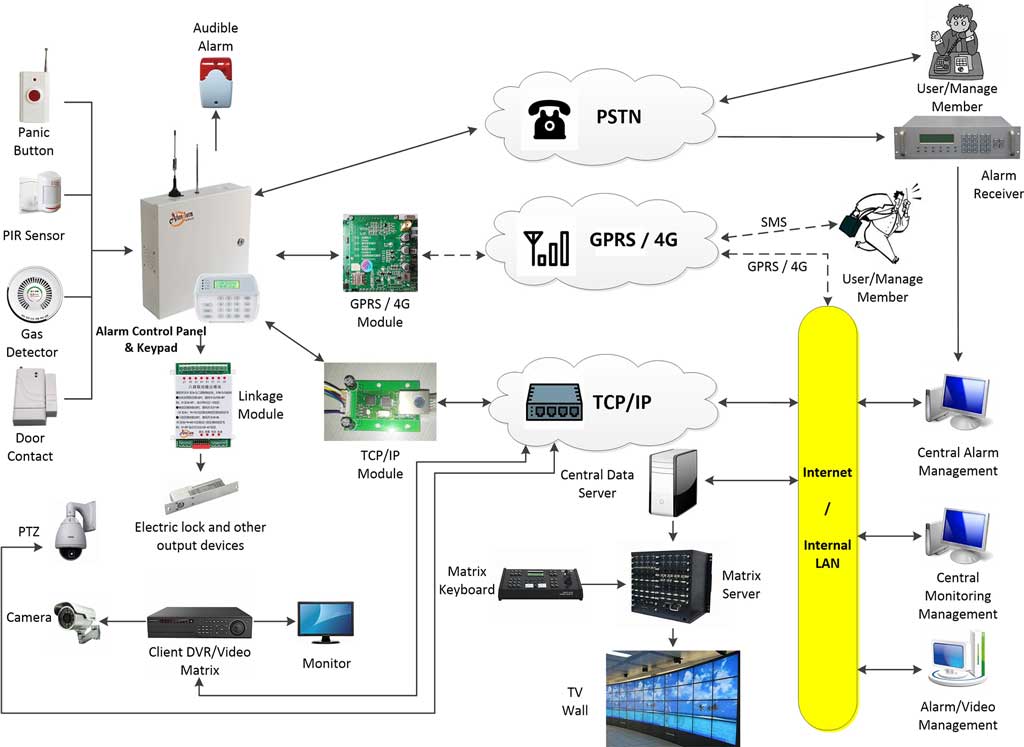
Section 2: Essential Components for Effective Deployment
1. Hardware and Software Requirements
A robust 24/7 monitoring environment typically includes:
- Network sensors (IDS/IPS, flow collectors)
- Monitoring servers (on-premise or cloud)
- SIEM platforms (e.g., Splunk, ELK Stack, IBM QRadar)
- Central Management Software for alarm visualization
- Redundant storage for log retention
2. Network Architecture Integration
To achieve full visibility:
- Connect monitoring to firewalls, routers, switches, servers
- Integrate IoT devices, which are often weak points
- Ensure north-south and east-west traffic visibility
A layered architecture improves resilience and alarm quality.
3. Alarm Delivery Protocols
Key protocols for transmitting events:
- SNMP Traps – Standard for network alarm delivery
- Syslog – Ideal for security events and audit logs
- Webhook/API Alerts – Used by modern cloud systems
- MQTT/AMQP – For IoT and distributed monitoring
- Email/SMS/Push notifications as escalation channels
4. Redundancy and Failover
To ensure uninterrupted 24/7 operation:
- Deploy dual monitoring servers (active/standby)
- Implement multi-path communication for alarms
- Use redundant power and network links
- Store logs in distributed or cloud storage (S3, Azure Blob)
Tool Comparison Table
| Tool Type | Example | Strengths | Weaknesses |
|---|---|---|---|
| Open Source | Nagios, Zabbix, ELK | Cost-effective, flexible | Requires expertise |
| Commercial | SolarWinds, PRTG, QRadar | Strong support, scalability | Higher cost |
Reference: NIST SP 800-137 guidelines for continuous monitoring.
Section 3: Step-by-Step Technical Deployment Guide
Step 1: Planning and Assessment
- Perform a full network asset inventory
- Identify critical systems requiring priority monitoring
- Define alarm thresholds (bandwidth anomalies, CPU spikes, unauthorized access attempts)
- Document network topology and interdependencies
Troubleshooting Tip:
If you discover devices that do not support SNMP/syslog, add an external sensor or upgrade firmware.
Step 2: Selecting Tools and Technologies
Choose based on your scale:
Small/Medium Networks
- Nagios Core, Zabbix, PRTG
Enterprise Networks
- Splunk ES, QRadar, SolarWinds NPM, ELK Stack + Beats
Selection Criteria:
- Real-time event handling
- Integration with existing firewalls or SOC
- Scalability
- Budget availability
- API and automation compatibility
Step 3: Installation and Configuration
1. Install Monitoring Server
Example: SNMP Trap Listener (Linux):
sudo apt install snmptrapd
sudo systemctl enable snmptrapd
2. Configure SNMP on Network Devices
Example configuration (Cisco):
snmp-server enable traps
snmp-server host 192.168.10.10 version 2c SECURECOMM
3. Configure Syslog
logging host 192.168.10.11
logging trap warnings
Troubleshooting Tip:
If no traps are received, verify UDP/162 and TCP syslog ports are open.
Step 4: Integration and Testing
- Integrate monitoring server with your SIEM/SOC
- Simulate alarms:
- Firewall rule failures
- Interface down events
- Unauthorized login attempts
- Run end-to-end alarm flow validation:
Device → Monitoring Server → SIEM → Alert Notification → Response Team
Troubleshooting Tip:
If alarm latency is high, check log ingestion queue or SIEM indexing performance.
Step 5: Automation and AI Enhancement
To reduce manual workload:
- Apply machine learning models for anomaly detection
- Use automated playbooks (SOAR platforms like Cortex XSOAR)
- Implement predictive analytics for early detection of pattern-based threats
- Enable auto-ticketing and automated remediation scripts
This ensures scalability without increasing staff workload.
Section 4: Best Practices and Optimization
1. Security Hardening
- Encrypt alarm traffic using TLS
- Apply role-based access control (RBAC)
- Isolate monitoring servers in a protected subnet
- Regularly audit logs for compromise indicators
2. Scalability Strategies
- Use distributed log collectors
- Build multi-region failover in cloud platforms
- Adopt container-based deployment (Docker/Kubernetes)
3. Maintenance and Updates
- Patch SIEM and monitoring tools monthly
- Reassess alarm thresholds biannually
- Perform scheduled device audits
4. Cost Management
- Start with open-source, scale to commercial tools as needed
- Evaluate cloud vs on-prem cost efficiency
- Calculate ROI based on incident response time reduction
Real Industry Case Example
A manufacturing enterprise reduced downtime by 40% after enabling real-time syslog integration and automated anomaly classification in their monitoring system.
Section 5: Common Pitfalls and Solutions
1. Alert Fatigue
Solution: Implement multi-level prioritization (critical/high/medium/low).
2. No Mobile Integration
Solution: Use mobile push apps (e.g., PRTG Mobile, Splunk On-Call).
3. Misconfigured Thresholds
Solution: Baseline network traffic for 7–14 days before setting limits.
4. Poor Escalation Policies
Solution: Add automated escalation based on time-to-acknowledge (TTA).
5. Single Point of Failure
Solution: Deploy mirrored monitoring nodes and dual network paths.
Conclusion
Implementing 24/7 network alarm monitoring is essential for building a resilient and secure network environment. By understanding real-time monitoring principles, selecting the right tools, configuring alarm delivery protocols, and applying best practices, organizations can significantly reduce downtime, accelerate incident response, and enhance overall cybersecurity posture.
For readers who want to put these steps into practice, we recommend downloading a free 24/7 monitoring deployment checklist to support your rollout.
Emerging trends—such as AI-driven monitoring, autonomous remediation, and predictive alerting—will push network security even further in the coming years.