
In the high-stakes world of burglar alarm systems, where a single misstep at the control panel can trigger false dispatches, leave premises vulnerable, or delay critical responses, human-panel interaction stands as the make-or-break factor between reliable protection and costly chaos. As a senior expert with over two decades in the burglar alarm industry—having designed, installed, and optimized thousands of intrusion alarm panels for commercial, industrial, and institutional clients—I’ve seen firsthand how poorly designed interfaces lead to operational errors that erode trust, inflate monitoring costs, and compromise safety. Conversely, thoughtfully engineered burglar alarm control panels transform these pain points into competitive advantages.
This comprehensive guide dives deep into the art and science of designing alarm control interfaces that prevent errors at every turn. We’ll explore keyboard layouts, prompt design, and misoperation safeguards with practical, field-tested strategies tailored for security decision-makers, technical integrators, operations managers, and procurement professionals who buy in bulk. Whether you’re specifying systems for a chain of retail stores, a high-security bank, or a sprawling industrial park, you’ll walk away with actionable blueprints to boost on-site efficiency, slash false alarms, and deliver measurable ROI.
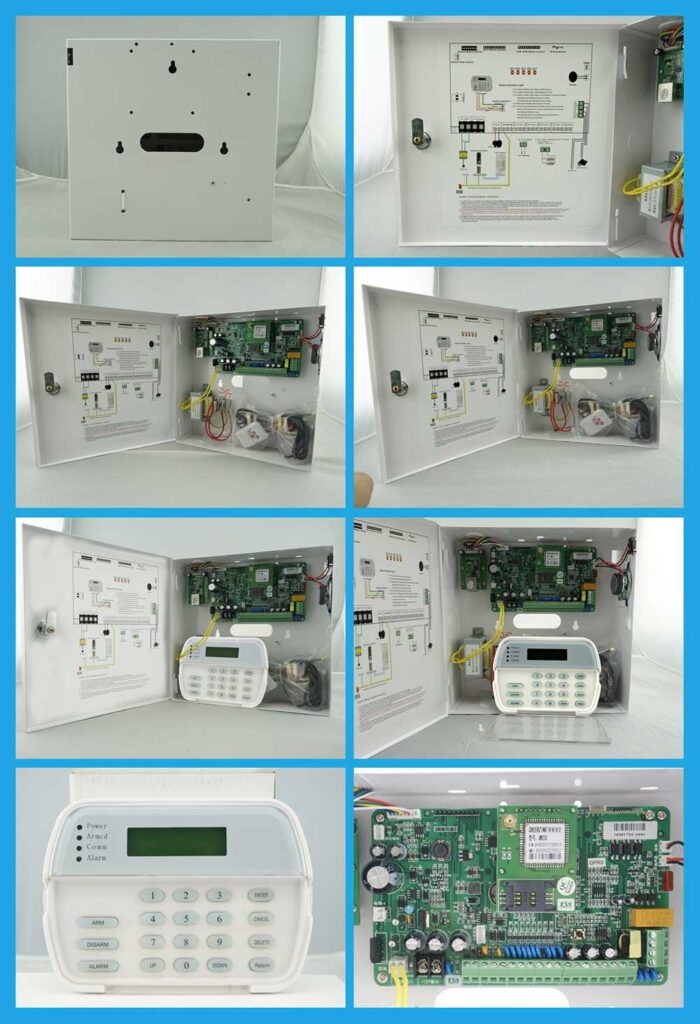
Drawing from real-world deployments—including advanced industrial-grade models like the AS-9000 series with its scalable zones, advanced LCD keypad, and intuitive voice-guided interfaces—this guide equips you to demand (and implement) panels that work with your teams, not against them. Modern burglar alarm control panels, such as those featuring interactive English and Chinese menus, multiple arming options via keypad, voice, SMS, remote control, or software, and support for up to 11 user passwords with role-based access, eliminate guesswork and build systems professionals trust. Let’s eliminate the guesswork and build burglar alarm control panels that professionals trust.
Why Human-Panel Interaction Matters More Than Ever in Burglar Alarm Systems
Operational errors in burglar alarm panels aren’t rare anomalies—they’re systemic risks baked into outdated designs. Industry data consistently shows that up to 50% of false alarms stem from user mistakes: incorrect code entry during arming, bypassing open zones without verification, or misinterpreting cryptic prompts under pressure. These errors don’t just waste responder time and trigger fines from local authorities; they desensitize staff, delay genuine threat responses, and expose your facilities to real intrusions.
The ANSI/SIA CP-01-2019 standard for control panel features explicitly targets false alarm reduction through user-friendly interfaces. It mandates features like sequential verification, cross-zoning, exit-delay progress annunciation, alarm cancel options, fail-to-exit protection, and intuitive feedback to minimize accidental activations. Yet many legacy panels ignore these principles, forcing operators into high-cognitive-load workflows that invite mistakes.
Human factors engineering—rooted in ergonomics, cognitive psychology, and usability testing—offers the solution. By prioritizing human-panel interaction, you create burglar alarm control panels that anticipate errors, guide users intuitively, and provide layered safeguards. The payoff? Reduced training time (often by 40-60% in my projects), fewer nuisance alarms, faster incident resolution, and stronger compliance with standards like UL 681 and EN 50131.
Consider a typical scenario: A night-shift guard at a warehouse rushes to arm the system after a late delivery. With a confusing keypad and ambiguous prompts, they accidentally leave a loading dock zone open. The result? A midnight false alarm, wasted security resources, and eroded confidence in the entire system. Error-proof design changes this narrative entirely by incorporating clear zone status displays, voice confirmations, and automatic safeguards that catch issues before they escalate.
In the sections ahead, we’ll break down every element—from physical keyboard layouts to digital prompts and prevention mechanisms—with detailed steps, checklists, and examples you can apply immediately when evaluating or procuring new intrusion alarm panels.
Common Operational Pitfalls in Traditional Burglar Alarm Control Panels
Before designing solutions, we must diagnose the problems. Here are the most frequent errors I encounter across thousands of installations:
- Code Entry and Authentication Failures: Operators transpose digits or forget multi-level passwords under stress. Legacy numeric keypads without tactile or visual feedback exacerbate this, especially during shift changes or emergencies.
- Zone Status Misinterpretation: Panels that bury open-zone warnings in dense menus lead to incomplete arming. Staff assume “all clear” when critical areas remain vulnerable, often because zone indicators are small, unlabelled, or lack real-time voice reinforcement.
- Arming/Disarming Sequence Confusion: Without clear step-by-step guidance or confirmation prompts, users skip exit delays or force arm systems prematurely—directly violating SIA CP-01 recommendations for progress annunciation and fail-to-exit protection.
- Alarm Acknowledgment Overload: Floods of similar-sounding alerts (without prioritization or context) cause “alarm fatigue,” where genuine events get ignored. This is especially dangerous in multi-zone industrial settings where hundreds of sensors report simultaneously.
- Multi-User Access Mishaps: Shared panels without role-based controls allow unauthorized changes or lockouts during shifts, leading to accidental reconfigurations or security gaps.
These issues aren’t user incompetence—they’re design failures. The SIA CP-01 standard addresses them head-on by requiring panels to support features that prevent accidental triggers and provide clear feedback. In my experience auditing systems, panels adhering to these guidelines—particularly those with advanced LCD interfaces and voice prompts—see false alarm rates drop dramatically.
For bulk procurers, the hidden cost is staggering: each false dispatch can exceed $100 in responder fees, plus downtime and reputational damage. Investing in superior human-panel interaction in your burglar alarm control panel pays for itself within months through lower operational overhead and higher system reliability.
Core Principles of Ergonomic Keyboard Layout for Burglar Alarm Panels
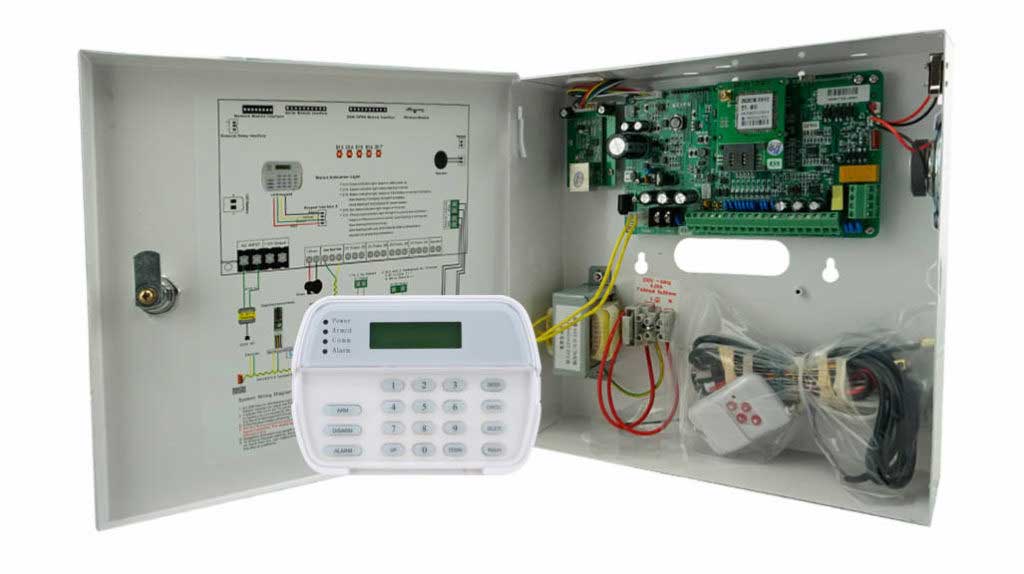
The physical interface of your burglar alarm control panel is the frontline of human interaction. A poorly laid-out keypad invites errors; a well-designed one feels intuitive from the first use, especially when paired with a large, backlit LCD screen that displays real-time zone status and system messages.
Key Design Principles:
- Tactile and Visual Feedback: Large, backlit keys with distinct shapes, audible clicks, and dedicated LEDs reduce errors in low-light or high-stress conditions common in warehouses or 24/7 facilities.
- Logical Grouping: Cluster related functions (e.g., numeric pad central, arm/disarm on the right, status indicators and zone LEDs above the display). This mirrors natural hand movements and cuts cognitive load.
- Home-Row Analogy: Position frequently used keys (like “Arm,” “Disarm,” “Bypass,” and “Menu”) within easy thumb reach, minimizing finger travel and fatigue during repeated operations.
- Scalability for Multi-Zone Systems: Support for 16+ wired and 30+ wireless zones (expandable to 1,656 bus zones in advanced models) requires dedicated zone status LEDs or soft keys on the LCD that expand without clutter, plus clear labeling for quick identification.
Step-by-Step Process to Design or Specify an Optimal Keyboard Layout:
- Task Analysis: Map every user workflow—daily arming, emergency disarm, zone bypass, event log review. Interview on-site operators to identify pain points, such as glove use in industrial environments or low-light conditions at night.
- Ergonomic Measurement: Ensure key size ≥ 15mm diameter, spacing ≥ 3mm, and viewing angle 0-30° from eye level. Test with gloves (common in industrial settings) and in simulated low-light scenarios to confirm readability.
- Prototyping: Use 3D-printed mockups or software simulators. Measure error rates and completion times with 20+ representative users across shifts.
- Incorporate Feedback Loops: Add dedicated LEDs for system status (green = ready, red = fault, flashing = alarm). Voice prompts (English/Chinese bilingual support in premium panels like the AS-9000 series) reinforce visual cues in real time, making navigation effortless even for non-native speakers.
- Accessibility and Durability: IP-rated enclosures, vandal-resistant keys, anti-tamper detection, and support for left-handed users or wheelchair access ensure long-term reliability in demanding environments.
Real-world example: The AS-9000 series exemplifies these principles with its advanced LCD keypad. The layout groups core functions logically, while interactive voice prompts guide users through menus in real time. Operators report 30% faster arming times compared to button-only legacy panels, with the bilingual interface proving invaluable for diverse teams.
Checklist for Procurement Teams:
- Does the keypad support at least 11 user passwords with hierarchical, role-based access?
- Are function keys programmable for site-specific needs, and does the LCD display custom zone names clearly?
- Does it include anti-tamper detection on the panel itself, plus support for multiple operation methods like voice command or remote control to reduce physical keypad dependency?
Implementing these yields measurable gains: one client reduced entry errors by 75% after switching to an ergonomically optimized intrusion alarm panel.
Designing Clear, Actionable Prompt Systems
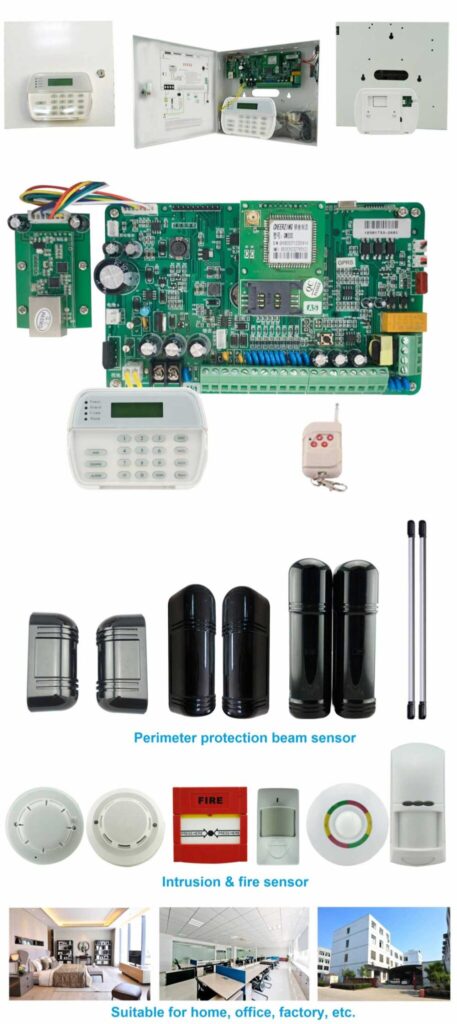
Prompts are the “voice” of your burglar alarm control panel—they bridge the gap between human intent and system state. Vague text like “Error 12” breeds frustration; precise, conversational language builds confidence and prevents misoperation.
Best Practices for Prompt Design:
- Clarity and Context: Every message must answer: What happened? Why does it matter? What should I do next? For instance, instead of a generic fault, display “Zone 5 Door Open – Secure area before arming or confirm bypass?”
- Multilingual Support: English and local languages (with seamless English/Chinese voice synthesis in premium models) for hands-free operation in multicultural workforces.
- Hierarchical Information: Critical alerts first (e.g., “Zone 5 open – Bypass or secure before arming?”), followed by details, with visual highlighting on the LCD.
- Auditory Reinforcement: Differentiated tones (short beep for confirmation, sustained for faults) paired with spoken instructions that repeat key details for verification.
Detailed Prompt Creation Workflow:
- User Persona Mapping: Define operators by role (guard, manager, technician) and scenario (normal shift vs. emergency), accounting for varying experience levels and stress factors.
- Message Library Development: Create 50+ standardized phrases tested for readability (Flesch-Kincaid score < 8th grade), including bilingual options that match exactly on the LCD and voice output.
- Dynamic Adaptation: Prompts that change based on system state—e.g., during exit delay: “System arming in 45 seconds. Close all doors now. Exit delay countdown active.”
- Error Recovery Paths: If a mistake occurs, offer one-tap “Undo” or guided correction (“Press * to cancel and return to previous step”) rather than cryptic codes.
- Testing Protocol: A/B test prompts with real users, measuring comprehension speed and error recovery time, then refine based on field logs.
In practice, panels with advanced voice prompts cut misoperation incidents by half. Operators no longer hunt through manuals mid-crisis—they receive instant, spoken guidance that reinforces the LCD display. For bulk buyers: Demand panels with customizable prompt libraries via software. This allows tailoring to your facility’s jargon, further reducing training overhead and ensuring the burglar alarm control panel speaks your team’s language.
Building Robust Misoperation Prevention Mechanisms
Prevention beats correction. Layered safeguards turn potential errors into non-events, directly supporting SIA CP-01 requirements for sequential verification and user-friendly error handling.
Key Mechanisms:
- Confirmation Dialogs: “Arm system with Zone 3 open? Yes/No” with a 5-second timeout defaulting to safe (disarmed) state.
- Sequential Verification: Require two independent actions for high-risk commands (per SIA CP-01), such as code entry plus dedicated “Confirm” key.
- Role-Based Access Control: Up to 11 distinct user passwords enable super-user vs. basic operator limits, preventing accidental reconfigurations during busy shifts.
- Event Logging and Black-Box Recording: 1500+ event history with timestamps, including voice-logged commands, for post-incident review and training.
- Tamper and Fault Detection: Automatic alerts for panel access, power loss, line cuts, or bus communication issues (e.g., “Keypad not connected – Check wiring”).
Implementation Steps for Prevention Features:
- Risk Assessment: Score every panel function by error likelihood and severity, prioritizing high-traffic areas like main entrances.
- Safeguard Integration: Embed software rules (e.g., force arm only after supervisor approval via code or remote SMS).
- Multi-Channel Alerts: Pair on-panel warnings with SMS/push notifications to supervisors for immediate oversight.
- Fail-Safe Defaults: System reverts to disarmed or partial-arm on unresolved faults, with clear voice explanation.
- Regular Firmware Audits: Ensure updates preserve (and enhance) these mechanisms without disrupting familiar workflows.
Advanced panels add cloud logging for remote audits—ideal for multi-site operations. One financial institution I consulted saw false alarms plummet 65% after implementing these layered defenses, thanks in large part to the intuitive LCD feedback and voice confirmations that make every step verifiable.
Step-by-Step Operational Procedures: Error-Proof Arming, Disarming, and Maintenance
Theory meets practice here. Here’s how operators interact with a well-designed burglar alarm control panel in the field, using features like the advanced LCD keypad and bilingual voice prompts for foolproof guidance.
Daily Arming Procedure (Exit Mode):
- Ensure all zones are secure (panel displays green “Ready” status with voice confirmation: “All zones secure. System ready to arm.”).
- Enter your 4-6 digit user code at the numeric keypad (or use voice command/SMS if supported for hands-free option).
- Press “Arm” (or dedicated key). System prompts on LCD and voice: “Exit delay started – 60 seconds remaining. Please leave premises. Close all doors and windows.”
- If any zone shows open: Panel halts, LCD highlights the specific zone, and voices “Zone X open. Secure or bypass? Press 1 to bypass or * to cancel.” Select bypass only after confirmation dialog and supervisor code if required.
- Exit within delay window. Audible countdown reinforces timing, with progress annunciation per SIA CP-01.
- System confirms: “System armed. Monitoring active.” with optional SMS to manager.
Disarming on Entry:
- Enter premises and approach panel within entry delay (typically 30-45 seconds).
- Key in code. Prompt on LCD and voice: “Welcome. Disarming in progress. Enter code to confirm.”
- If code incorrect: Three attempts trigger silent duress or local siren with central station notification, plus lockout to prevent brute-force attacks.
- System logs event and resets to ready state with clear “System disarmed” confirmation.
Bypass and Maintenance Mode:
- From disarmed state, enter code + “Bypass” key.
- Select zone via menu or soft key on LCD. Confirmation required: “Bypass Zone 7 until next disarm? Yes/No.”
- For testing: Enter installer mode (restricted access via dedicated password) and follow on-screen diagnostics with voice step-by-step guidance.
- If keypad dims after inactivity, simply press any key to wake it—no lost time or frustration.
Troubleshooting Common Faults:
- Low battery: Voice prompt “Battery fault detected – replace within 24 hours.” LCD shows exact step-by-step LED-guided replacement instructions.
- Tamper alert: Immediate lockdown with supervisor alert via SMS and on-panel display: “Tamper detected – Check panel cover.”
- Communication issue (e.g., “Connect Panel…”): Voice and LCD direct you to “Check bus wiring or keypad connection” with clear diagnostic menu.
These procedures, when supported by intuitive interfaces like those in the AS-9000 series, take under 15 seconds for trained staff—versus minutes of confusion in legacy systems. The combination of visual LCD feedback, voice reinforcement, and multiple access methods (keypad, voice, remote) makes errors almost impossible.
Case Study: Real-World Success with Advanced Intrusion Alarm Panels
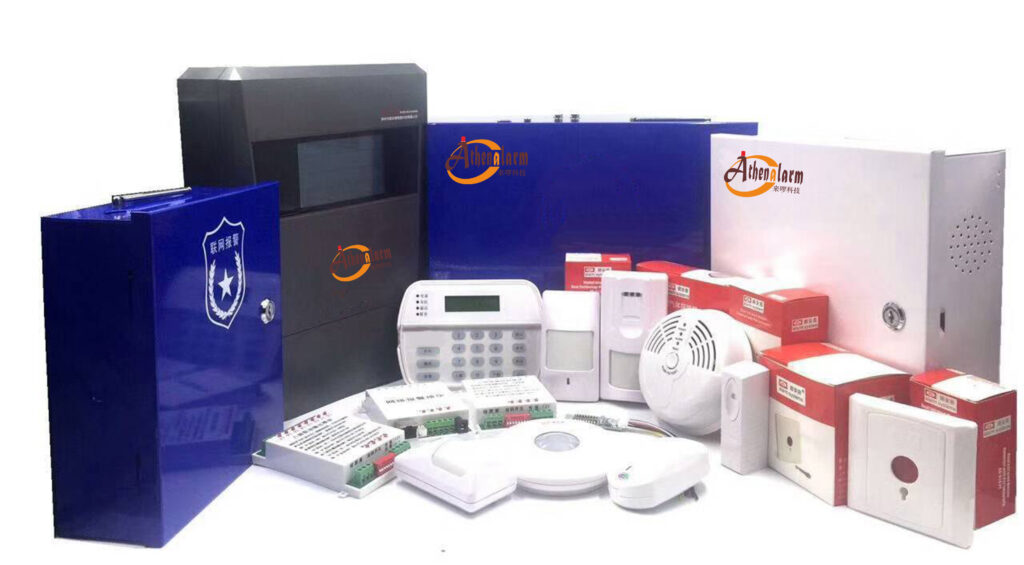
Consider deployments using scalable, user-centric panels like the AS-9000 series. With support for up to 1,656 bus zones, multi-channel transmission (PSTN/4G/TCP/IP), advanced LCD keypad featuring interactive English/Chinese voice prompts, and multiple arming options, these systems exemplify error-proof design.
In one industrial park project, operators previously struggled with zone identification and multilingual instructions. Post-upgrade, the interactive menu, real-time voice guidance, and role-based passwords (up to 11 users) reduced incomplete arming events by 82%. The 1500-event black-box log enabled rapid forensic analysis, while tamper detection and automatic alerts prevented unauthorized access. Procurement teams appreciated the plug-and-play expansion, certifications (CCC, IEC 62368-1), and user-friendly operation that required minimal training.
Results across clients: 50%+ drop in false dispatches, 35% faster staff onboarding, and seamless integration with sirens, printers, and monitoring software—proving that superior human-panel interaction delivers real security ROI.

Testing, Validation, and Ongoing Optimization
No design is complete without rigorous validation. Follow this protocol to ensure your burglar alarm control panel performs flawlessly in real conditions:
- Usability Testing: Simulate 100+ scenarios with diverse operators; track error rates and NASA-TLX cognitive load scores.
- Field Trials: 30-day pilot in live environments, monitoring voice prompt effectiveness and LCD readability under actual lighting and shift conditions.
- Compliance Audit: Verify against SIA CP-01, UL standards, and local regulations.
- KPI Monitoring: Track false alarm rates, response times, and user satisfaction quarterly using built-in event logs.
- Iterative Updates: Use logged data to refine prompts and layouts via over-the-air firmware, keeping the interface current without downtime.
Procurement Advice for Bulk Buyers and System Integrators
When sourcing burglar alarm control panels in volume:
- Prioritize models with native support for error-prevention features (confirmation prompts, voice guidance, role-based access, and multi-channel operation).
- Demand expandable architecture, advanced LCD interfaces, and multi-communication paths for reliability across sites.
- Request demo units for hands-on human-panel interaction testing in your actual environment.
- Evaluate total cost of ownership: lower false alarms, reduced training, and fewer service calls equal big savings.
Look for panels that scale effortlessly for your portfolio of sites while putting operator ease first.
Emerging Trends Shaping the Future of Alarm Panel Interfaces
Touchscreen hybrids, AI-driven anomaly detection in prompts, mobile app mirroring of the LCD interface, and biometric authentication are on the horizon. Forward-thinking designs will further blur the line between human and panel, making errors virtually impossible while maintaining the core reliability of proven systems like the AS-9000.
Conclusion: Transform Your Security Operations Today
Mastering human-panel interaction isn’t a luxury—it’s the foundation of effective burglar alarm systems. By applying the strategies in this guide—focusing on ergonomic layouts, clear bilingual prompts, and robust prevention mechanisms—you’ll design or select intrusion alarm panels that prevent errors, empower your teams, and protect what matters most.
Security professionals: ready to upgrade to error-proof burglar alarm control panels that deliver real results? Our team specializes in industrial-grade solutions tailored to your exact needs. Contact us for a no-obligation consultation, custom demonstrations, or quotations on scalable systems that put human factors first. Your next deployment could be your most reliable yet.