

Introduction
IP-based alarm panels have become a core component of modern intrusion detection, but their connectivity also exposes them to the same cyber attack surface faced by IT infrastructure. According to the 2024 Verizon DBIR and multiple ISC2 assessments, attacks on connected security devices—including alarm panels—have risen by more than 20% year-over-year, largely due to weak configurations, outdated firmware, and insecure remote access paths. As more traditional burglar alarm systems migrate to IP networks, the cybersecurity posture of these devices becomes as critical as their physical detection performance.
This article provides integrators and IT security teams with a detailed, practical guide to understanding the cyber risks affecting IP alarm systems and offers actionable steps to strengthen alarm cybersecurity. We will break down the core threat types, explain real-world exploitation methods, and provide step-by-step protection strategies based on authoritative standards such as NIST SP 800-53 and UL 2900.
Understanding Cybersecurity Risks in IP Alarm Systems
Why IP Connectivity Introduces New Attack Surface
Traditional alarm panels relied on closed, isolated communication paths such as PSTN or private radio. IP-based alarm panels, however, connect through Ethernet, Wi-Fi, or cellular IP, allowing remote configuration, event transmission, and monitoring. This convenience also creates potential exposure:
- Unauthorized remote access if panel ports or services are publicly reachable
- Data interception if alarm signaling is transmitted without encryption
- Denial-of-service (DDoS) targeting panels or alarm receivers, disrupting monitoring
NIST’s guidance on connected devices highlights that any IP-enabled device is susceptible to remote exploitation if security controls are not implemented.
Common Cyber Threats Targeting Alarm Panels
- Firmware Exploits
Attackers often target unpatched firmware vulnerabilities to gain admin-level access or inject malicious code. - Malware Injection Through Integrator Laptops
Compromised laptops used for panel programming can unknowingly upload malware or backdoors. - Credential Theft and Phishing
Integrators and IT teams are increasingly targeted with phishing aimed at stealing alarm panel portal credentials. - Weak Authentication on Cloud Alarm Platforms
Web-based panel management portals can be brute-forced or accessed through leaked passwords.
According to ISC2 and SANS Institute reports, security devices such as cameras and alarm panels are frequently among the first IoT devices compromised during network intrusions because of poor default configurations.
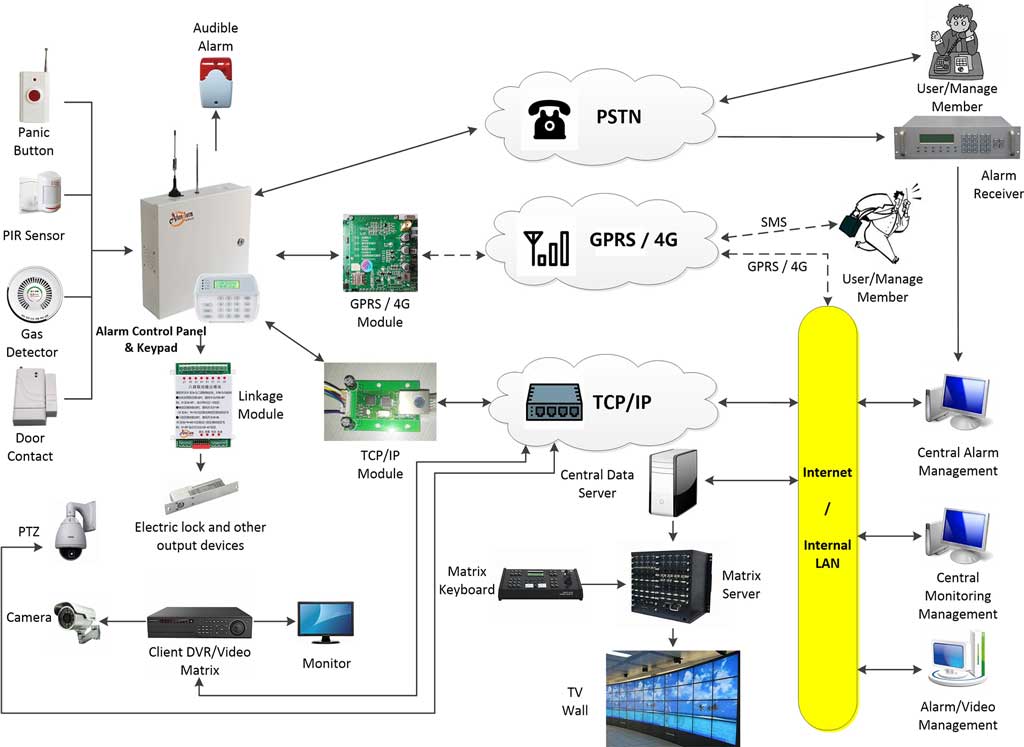
Key Cyber Threats Facing IP Alarm Panels
1. Network-Based Attacks
Man-in-the-Middle (MITM)
Attackers who gain access to local networks can intercept or modify alarm signals, potentially suppressing alarm events or spoofing acknowledgments.
How attackers exploit weak encryption:
If the alarm panel uses outdated encryption (e.g., TLS 1.0 or proprietary protocols without AES-256), attackers can capture traffic using basic packet sniffers and extract event data or authentication tokens.
2. Device-Specific Vulnerabilities
- Default or hardcoded credentials widely published online
- Unpatched firmware containing known CVEs
- Open debug ports unintentionally left enabled
- Weak local access passwords shared among technicians
Case Study (anonymized, based on SANS IoT Cyber Report):
A commercial site’s IP panel was compromised when attackers scanned for open web interfaces on port 80. The panel still used factory credentials (“admin / 1234”). Attackers logged in, disabled several zones, and created backdoor user accounts. The breach resulted in a multi-day system outage while the integrator rebuilt the configuration.
3. Human Factors
Most breaches start with configuration mistakes:
- Panels deployed directly on the corporate LAN without segmentation
- Shared passwords across technicians
- Remote access allowed without VPN
- Firmware not updated due to fear of “breaking something”
Human error is repeatedly identified by CISA as a top contributor to IoT security failures.
Essential Protections and Best Practices for Alarm Cybersecurity
1. Implementing Strong Network Security
A. Segment IP Alarm Panels Using VLANs
Beginner-friendly step-by-step guide:
- Log into your router or switch’s admin interface
Usually accessed via a browser at 192.168.x.x. - Navigate to the VLAN or Network Segmentation section.
- Create a new VLAN named Alarm_Security_Net or similar.
- Assign alarm panels and alarm communicators to this VLAN.
Use static IP addresses to avoid accidental cross-network traffic. - Enable firewall rules to block all inbound connections except authorized monitoring center IP addresses or integrator VPN.
- Disable inter-VLAN routing unless absolutely necessary.
This isolates alarm devices from general corporate traffic and reduces exposure to malware or lateral movement.
B. Use VPN for Remote Access
Remote access should never be allowed through port forwarding.
Recommended tools:
- OpenVPN
- WireGuard
- IPsec-based VPNs used in enterprise networks
Key settings:
- Require multi-factor authentication
- Force AES-256 or ChaCha20 encryption
- Restrict VPN users to the alarm VLAN only
2. Device Hardening Techniques
A. Change Default Credentials
- Log in to the panel’s web interface or configuration software.
- Go to System Settings → Users / Accounts.
- Replace default admin username if allowed.
- Create a minimum 12-character password with:
- Uppercase
- Lowercase
- Numbers
- Symbols
- Delete unused accounts.
- Enable account lockout after 5 failed attempts.
B. Update Firmware Correctly
- Visit the manufacturer’s official support site.
- Locate your panel model and download the latest firmware.
- Read release notes for security patches.
- Back up your configuration.
- Apply the update via the panel interface or USB programming tool.
- Validate that all settings remain intact.
- Schedule monthly checks for new releases.
C. Enable Strong Encryption
- Use AES-256 for IP signaling where supported.
- Disable insecure protocols (HTTP, Telnet, outdated TLS versions).
- Enable certificate-based authentication between the panel and the monitoring center.
Troubleshooting common errors:
- If encryption causes communication failure, verify time synchronization (NTP), as expired certificates often appear as “connection errors.”
3. Monitoring and Response Strategies
A. Integrate Alarm Devices into a SIEM
Recommended open-source option for small teams: ELK Stack (Elasticsearch, Logstash, Kibana)
Basic Setup Steps:
- Install ELK on a dedicated server or VM.
- Configure Logstash to receive Syslog or API alerts from the alarm panel.
- Create dashboards in Kibana showing:
- Failed login attempts
- Firmware changes
- Network anomalies
- Set up alerts for suspicious activities (high login volume, device offline events).
B. Create a Dedicated Incident Response Plan
A simple 5-step model adapted for IP alarm systems:
- Detect – SIEM logs or monitoring alerts identify abnormal behavior.
- Contain – Isolate the affected panel VLAN or shut down remote access.
- Eradicate – Remove malicious accounts, update firmware, apply patches.
- Recover – Restore configuration from a clean backup, test all zones.
- Learn – Update documentation, passwords, and response procedures.

Case Studies and Real-World Applications
1. MFA Prevents Cloud Platform Breach
An integrator received a phishing email claiming their alarm management portal required an urgent password reset. Because the company had implemented MFA, attackers were unable to authenticate even after stealing the technician’s credentials. According to CISA IoT advisories, MFA reduces unauthorized account breaches by more than 90%.
2. VLAN Segmentation Stops Lateral Movement
A manufacturing client placed their IP alarm system in a dedicated VLAN following UL 2900 guidance. During a ransomware attack that impacted the office network, the alarm VLAN remained unaffected, and monitoring operations continued uninterrupted. Downtime was effectively reduced to zero.
3. Scheduled Firmware Updates Prevent Exploitation
A regional integrator adopted a quarterly firmware-audit policy. When a high-severity vulnerability (CVE listed in a SANS bulletin) was announced affecting their alarm communicator brand, they patched all 175 affected sites within 72 hours. No compromises occurred despite widespread scanning of vulnerable devices globally.
Conclusion
As IP-based alarm panels continue to integrate deeply with enterprise networks, cybersecurity must become a core component of intrusion detection system design. Integrators and IT security teams should treat alarm systems with the same rigor applied to firewalls or servers. By understanding the real-world cyber threats facing IP alarm systems and implementing strong, practical protections—from VLAN segmentation to firmware management—you can significantly reduce exposure and maintain reliable monitoring performance.