
In today’s high-stakes security landscape, where a single breach can cost businesses millions in losses, downtime, and reputational damage, relying on outdated standalone burglar alarm systems is no longer an option. As a seasoned professional with over two decades in the intrusion detection and alarm industry, I’ve seen countless security operators—procurement managers for security firms, facility directors at retail chains, bank security leads, and technical teams at large enterprises—face the same frustrations: false alarms that waste police resources, slow response times during real incidents, integration headaches with existing CCTV, and the nightmare of managing dozens or hundreds of remote sites from a single control center.
The solution that consistently outperforms everything else? A properly deployed network alarm system. Not just any IP-connected panel, but a fully integrated network alarm solution that combines robust burglar alarm hardware, multi-path communication (TCP/IP and 4G), centralized monitoring software, and seamless video linkage. When done right, this approach turns your burglar alarm infrastructure into a proactive, scalable fortress that slashes response times, virtually eliminates false alarms, and gives you complete visibility across every location.
This is not a theoretical whitepaper. This Ultimate Network Alarm System Deployment Guide is the practical, battle-tested playbook I wish I had when I started deploying systems for major clients. You’ll get every step, every checklist, every pitfall to avoid, and every pro tip that turns a standard installation into a bulletproof enterprise-grade burglar alarm network. Whether you’re buying for 50 retail stores, outfitting 200 bank branches, or securing an entire residential community, this guide solves the exact problems you face every day: scalability without complexity, reliability under pressure, and ROI that actually shows up on your balance sheet.
By the end, you’ll know exactly how to deploy a network alarm system that not only meets but exceeds industry expectations—and you’ll understand why leading operators now insist on this approach. Ready to transform your security operations? Let’s dive in.
Why Network Alarm Systems Have Become the Non-Negotiable Standard for Professional Burglar Alarm Deployments
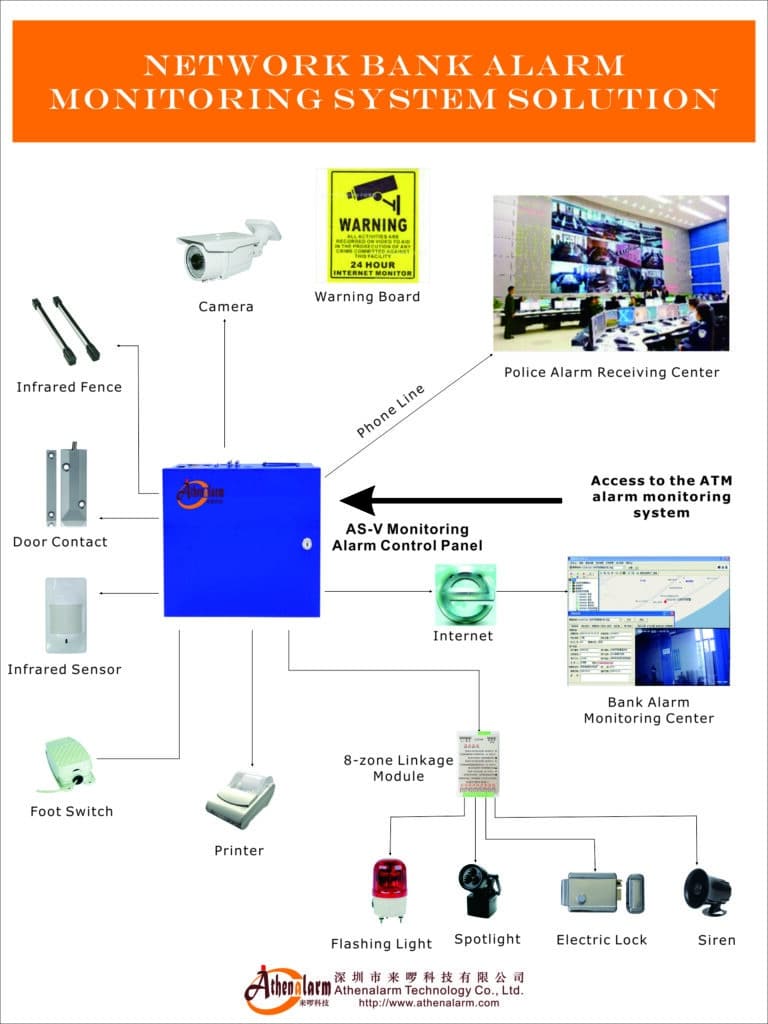
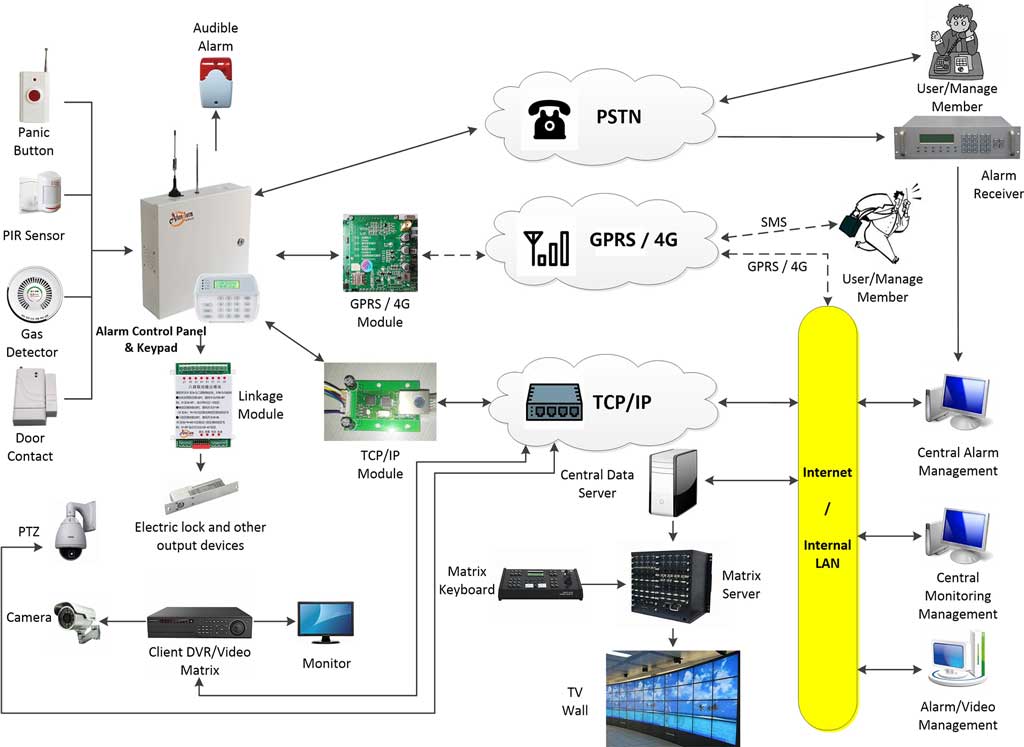
Traditional PSTN-only burglar alarms worked fine in the 1990s, but today’s threats move faster than phone lines. A skilled intruder can cut a landline in seconds. A power outage or cellular jammer renders many systems silent. Network alarm systems solve this with dual- or triple-path communication: primary TCP/IP over broadband, backup 4G LTE, and sometimes PSTN fallback. This multi-path transmission, including traditional telephone networks as a reliable option, ensures high-sensitivity delivery via a cloud platform that unifies what were once separate alarm and CCTV systems. Alarm signals reach your central station in under 2 seconds—faster than any traditional system.
But speed is only the beginning. The real power comes from integration. When an alarm triggers, your monitoring software doesn’t just log an event—it instantly pops up live video from the exact camera covering that zone, displays the floor plan with flashing hotspots, and automatically notifies the right responders with GPS coordinates. This is the difference between a 30-minute police response and a 3-minute on-site intervention, enabling command automation and rapid deployment of public security forces.
For bulk buyers like you, the advantages compound dramatically:
- Centralized management of thousands of users from one server cluster
- Real-time equipment health monitoring across all sites
- Automated reporting for compliance, billing, and maintenance contracts
- Dramatic reduction in truck rolls thanks to remote programming and diagnostics
- Scalability that grows with your business without forklift upgrades
- Comprehensive business management including user queries, statistical reports on maintenance, inspection, and payments
I’ve deployed these systems for everything from small security companies managing 200 residential clients to national banks protecting 500+ ATMs. The results speak for themselves: false alarm rates drop by 70-85%, response times improve by 60%, and clients report 40% lower insurance premiums after certification.
Breaking Down the Core Components of a Professional Network Alarm System
Before you touch a single tool, you must understand the anatomy. A modern network alarm system consists of five interlocking layers:
- Front-End Detection & Control Panels
The heart is an addressable burglar alarm control panel capable of handling 16 wired + 30 wireless zones out of the box, expandable via RS-485 bus to over 1,600 zones. Look for models like the AS-9000 series with 32-bit ARM processors, anti-tamper circuits that detect case opening, power loss, and line cuts, and surge protection up to 4kV. Communication modules must support simultaneous TCP/IP (Ethernet/Wi-Fi) and 4G LTE with automatic failover. Panels that store 1,500+ event logs locally plus cloud backup give you forensic evidence even if the network drops. Ensure at least 24-hour battery standby for uninterrupted protection during outages. - Detection Devices
Mix of hardwired PIRs, dual-tech sensors, magnetic door contacts, glass-break detectors, and panic buttons. Wireless options using 433MHz or 315MHz frequencies reduce cabling costs on large sites. Choose pet-immune models where needed to cut false alarms from the start. - Central Monitoring Software
The command center runs on a dedicated Windows Server environment (Server 2008 R2 or 2012 recommended for stability) with SQL Server database. Client workstations connect from anywhere with internet. Use software such as AS-ALARM for key features you must have: map integration (Baidu or custom bitmap), automatic video pop-up on alarm, multi-level operator permissions, alarm forwarding to police or sub-centers, massive user capacity (5,000+ users easily), remote diagnostics, equipment status monitoring, and built-in reporting tools for user statistics and maintenance contracts. - Video Surveillance Linkage
ONVIF-compatible cameras from Hikvision, Dahua, XM, or equivalent. The software links each alarm zone to specific camera presets so an intrusion at Door 3 instantly displays Camera 3 live feed with recording started automatically. - Backup & Redundancy Layer
UPS power, dual servers in active-active mode, encrypted VPN tunnels for all data, and regular automated backups of user data, alarm logs, and video archives.
Choosing components that were designed to work together (rather than bolting third-party pieces) is the single biggest predictor of long-term success.

Pre-Deployment Planning: The 48-Hour Assessment That Prevents 90% of Failures
Rushing straight to installation is the #1 reason deployments fail. Spend two full days on planning and you’ll save weeks of rework.
Step 1: Risk & Threat Assessment
Walk every site with stakeholders. Map every entry point, high-value asset location, and blind spots. Rate each zone on a 1-5 risk scale. Document existing CCTV coverage gaps.
Step 2: Site Survey Checklist
- Internet speed and uptime (minimum 10 Mbps symmetric with <50ms latency)
- Cellular signal strength (use 4G test tool—aim for -85 dBm or better)
- Power availability and grounding quality
- Existing network infrastructure (can you create a dedicated VLAN for alarms?)
- Camera count and model compatibility
- Local authority requirements for monitored alarms
- Telephone line availability if PSTN fallback is planned
Step 3: Burglar Alarm Zoning Strategy
Define clear zone types upfront for reliable intrusion detection:
- Perimeter zones (doors/windows—immediate or delayed alarm)
- Interior zones (PIRs for motion after entry)
- Entry/Exit zones (allow time to arm/disarm)
- 24-hour zones (panic buttons or vaults—always active)
- Follower zones (trigger only after entry zone)
- Fire/smoke or environmental zones (add-on for complete protection)
Use descriptive names like “Main Entrance Perimeter” in software to avoid operator confusion later.
Step 4: Scalability Blueprint
For multi-site buyers, create a master template: same panel model, same software version, same zone naming convention across all locations. This makes training, spares, and remote management effortless.
Step 5: Budget & ROI Projection
Typical network alarm deployment costs $800–$2,500 per site depending on size. Factor in 40% savings on false alarm fines and insurance discounts within 12 months. I provide clients with a simple Excel model—happy to share the template upon request.
Selecting the Right Hardware and Software: What Actually Matters for Bulk Buyers
Don’t buy on price. Buy on three criteria: reliability, compatibility, and future-proofing.
For panels, prioritize models with built-in 4G + TCP/IP modules, addressable expansion, and native support for industry-standard protocols (Contact ID, SIA DC-09). The ability to arm/disarm via app, SMS, or central software is non-negotiable for commercial clients.
For software, insist on:
- SQL Server backend with >1 million record capacity
- Modular architecture (add video linkage or map functions without reinstall)
- Dual-server failover
- Open interfaces (DDE/Socket) for custom integrations
- Multi-language support, operator-level permissions, and built-in business reporting tools
I always recommend testing a demo kit on one pilot site before full rollout. The time invested pays for itself tenfold.
Step-by-Step Deployment: The Exact Process I Use on Every Professional Job
Here’s the proven 9-phase deployment sequence. Follow it exactly and your network alarm system will work flawlessly from day one.
Phase 1: Central Monitoring Center Setup (1-2 days)
- Provision dedicated server hardware (or cloud VM with equivalent specs).
- Install Windows Server OS + SQL Server.
- Deploy the network alarm center management software server component (such as AS-ALARM).
- Configure database, backup schedule, and dual-server mirroring.
- Install client software on operator workstations and test connectivity.
- Create operator accounts with appropriate permissions.
- Import your master user template (addresses, contacts, zone maps).
Pro Tip: Test remote access from a mobile device early.
Phase 2: On-Site Panel Installation (Per Location – 4-6 hours)
- Mount the control panel in a secure, accessible location with good ventilation.
- Connect backup battery and UPS (verify at least 24-hour standby).
- Wire all zones using color-coded cable (18AWG minimum). Use end-of-line resistors exactly as specified (typically 2.2kΩ—check your panel manual and verify with a multimeter).
- Install tamper switches on panel and all junction boxes.
- Insert 4G SIM card (pre-activated with static IP if possible) and Ethernet cable.
- Power up and verify all LEDs indicate normal status.
Common Pitfall: Skipping EOL resistor testing causes constant zone faults—double-check before leaving the site.
Phase 3: Sensor & Device Placement
Follow the “double coverage” rule: every entry point protected by two independent sensors. Mount PIRs at 2.1m height, 90° from windows. Test every device for walk-test coverage before final fixing: walk the full detection area while monitoring the panel LED or software; adjust sensitivity or angle if dead spots appear.
Phase 4: Network Configuration & Communication Testing
- Configure panel TCP/IP settings (static IP recommended) and place alarm traffic on a dedicated VLAN.
- Enter central station receiver IP address and port (typically 5000 or custom).
- Program 4G APN and test failover by unplugging Ethernet.
- Verify signal strength and send test alarms via both paths.
- Set up encryption and VPN if required by your security policy.
Pro Tip: Always test all three paths (TCP/IP, 4G, PSTN) before moving on.
Phase 5: Software Programming & Zone Mapping
- Add the new site/user in the central software.
- Program panel ID and communication format.
- Link each physical zone to software zone and corresponding camera preset using descriptive names.
- Upload custom floor plan or Baidu map coordinates.
- Configure alarm handling rules (auto pop-up video, SMS to owner, forward to police).
Phase 6: CCTV Integration & Video Linkage
- Add cameras to the software via ONVIF or brand-specific driver (Hikvision, Dahua, or XM).
- Create linkage rules: Zone 01 alarm triggers Camera 03 preset + recording.
- Test live pop-up response time (must be under 3 seconds).
- Set automatic clip retention policy (minimum 30 days).
Phase 7: Arming/Disarming & User Training
Program multiple methods: keypad, keyfob, app, SMS, central software. Include duress codes for silent alarms. Conduct hands-on training for site managers and end users. Create simple laminated quick-reference cards.
Phase 8: Full System Testing & Commissioning
- Walk-test every zone with video verification
- Simulate power failure, network cut, tamper events, and full intrusion scenarios
- Verify alarm forwarding and operator workflow
- Generate test reports and export to Excel
- Obtain signed acceptance from client and schedule first operator drill
Phase 9: Go-Live & 30-Day Monitoring
Monitor first 30 days closely. Remote-tune sensitivities if needed. Provide weekly performance reports.

Integration Mastery: Making Your Burglar Alarm Network Truly Intelligent
The magic happens when your network alarm talks to everything else. Beyond basic CCTV linkage, consider:
- Access control synchronization (door forced open triggers immediate alarm)
- Environmental sensors (smoke, flood) on the same bus
- Smart building systems via open APIs
- Mobile apps for remote arming with push notifications
Cybersecurity Best Practices for Your Network Alarm System
Cybersecurity cannot be an afterthought. Always:
- Place alarm traffic on a dedicated VLAN
- Enforce TLS 1.3 encryption
- Schedule monthly firmware updates and test them on a pilot site first
- Use strong, unique passwords and two-factor authentication for the central software
- Enable audit logs and review them weekly
- Conduct annual penetration testing for enterprise deployments
Pro Tip: Treat your central server like a vault—restrict physical and remote access to authorized personnel only.
Troubleshooting the Most Common Network Alarm Deployment Problems (And How to Fix Them Fast)
Even the best plans hit snags. Here are the top five I see:
- Intermittent Communication – Usually weak 4G signal or firewall blocking port. Solution: External antenna + port forwarding rules. Use the software’s remote diagnostics tool for instant signal checks.
- False Alarms – Pet movement, HVAC drafts, or improper zoning. Solution: Dual-tech sensors + proper walk-test calibration. Enable video verification to confirm before dispatching.
- Video Linkage Delay – Bandwidth bottleneck. Solution: QoS prioritization + dedicated 100Mbps minimum.
- Software Overload – Too many simultaneous clients. Solution: Load-balanced server cluster.
- Remote Programming Failures – Incorrect panel ID. Solution: Double-check before deployment and always test one zone remotely first.
I maintain a private troubleshooting database with 200+ case studies—contact me and I’ll share relevant ones for your setup.
Real-World Applications: How Different Sectors Deploy Network Alarm Systems Successfully
Bank & ATM Networks
One national bank client deployed 312 ATMs using vault + ATM-specific panels. Video linkage reduced robbery response from 12 minutes to 90 seconds. Insurance savings: $187,000 in first year. The system provides prevention, real-time handling, and post-incident retrospective review.
Retail Chain Operations
A 187-store convenience chain standardized on one panel model and central software. Centralized monitoring cut after-hours break-ins by 68% while reducing security guard costs. Operators instantly see live video and record evidence automatically.
Residential Communities & Villas
Gated communities love the map function—operators see exactly which villa is alarming and which camera shows the intruder. Automatic video pop-up gives immediate visual confirmation.
Industrial & Office Parks
Unattended server rooms use the same platform with environmental monitoring added. Factories and hotels protect personnel and property with instant forwarding to the central station.
Every sector benefits from the same core deployment process—just with tailored zone priorities.

Long-Term Maintenance, Optimization & Scaling Your Network Alarm Empire
Treat your network alarm system like a living organism. Quarterly:
- Remote health checks via software dashboard (signal strength, battery voltage, event logs)
- Battery replacement schedule
- Firmware updates
- Sensitivity re-calibration
- Operator refresher training and full-system drills
- Generate and review statistical reports on maintenance, inspections, and user activity
For enterprises managing 500+ sites, migrate to multi-level networking: regional sub-centers forwarding critical events to a national command center.
Future-proof by choosing platforms with open APIs—AI video analytics and 5G modules are already here. Use the built-in remote diagnosis features to fix issues without truck rolls.
Measuring Success: KPIs Every Professional Security Buyer Should Track
Track these monthly:
- False alarm rate (<0.5% ideal)
- Average response time
- System uptime (99.98% target)
- Insurance premium reduction
- Total cost of ownership vs traditional systems
- Number of remote fixes vs on-site visits
Clients who hit these numbers typically see payback in under 9 months.
Your Next Move: From Guide to Ironclad Deployment
You now have the complete blueprint—the same one I’ve used to deploy thousands of network alarm points worldwide. No more guesswork. No more expensive mistakes. Just a repeatable, scalable process that delivers the protection your operations deserve.
If you’re a procurement decision-maker or technical lead ready to roll this out across your portfolio, the next step is simple: reach out for a no-obligation consultation. We’ll review your current setup, run a pilot site assessment, and provide a customized bill of materials with volume pricing that makes sense for bulk buyers.
Don’t let another breach happen because your burglar alarm network is still living in the past. Contact our team today at Athenalarm—we specialize in exactly the enterprise deployments covered in this guide. Let’s build the system that keeps your assets safe, your insurance costs down, and your peace of mind high.
Your sites. Your rules. Your ultimate network alarm system—deployed right, the first time.