
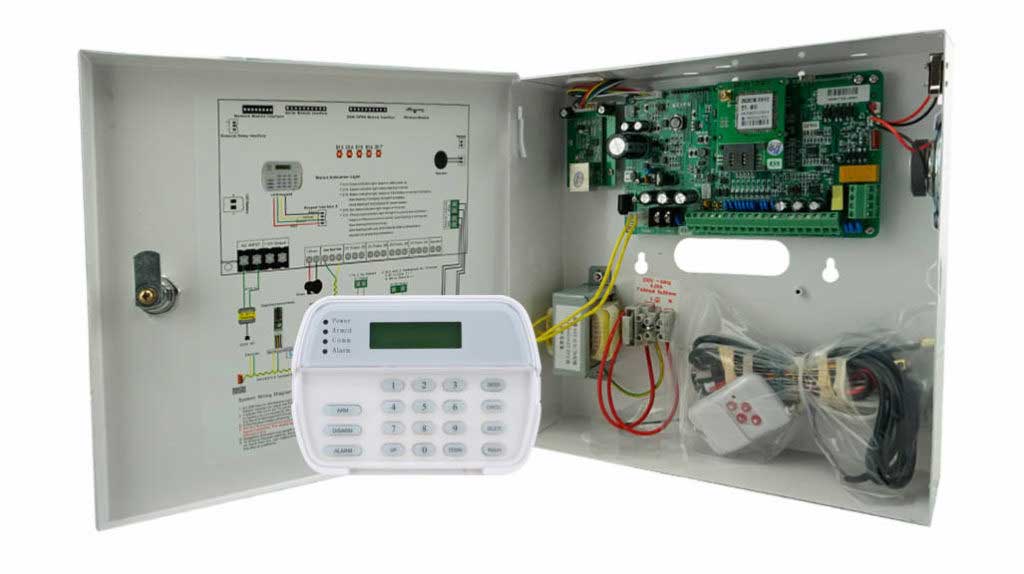
In the high-stakes world of commercial security, where every second counts during an intrusion, one component quietly determines whether your entire system holds strong or collapses under pressure: the burglar alarm control panel. Also known as the alarm control panel, intrusion alarm panel, or burglar alarm panel, this central brain processes sensor inputs, triggers alerts, manages user access, and communicates with monitoring centers or first responders. Yet, for far too many commercial facilities — warehouses, office complexes, retail chains, financial institutions, and manufacturing plants — it remains the single weakest link.
You’ve invested in top-tier motion detectors, door contacts, sirens, and even integrated CCTV. But if your burglar alarm control panel is poorly configured, physically exposed, or cyber-vulnerable, all that investment becomes irrelevant the moment a determined intruder — or even a sophisticated automated attack — targets it. Real-world data from security audits shows that over 60% of successful commercial intrusions involve some compromise at the panel level, whether through configuration oversights, communication failures, or unpatched firmware.
This isn’t theoretical. Facility managers, security directors, procurement leads, and system integrators in commercial environments repeatedly encounter the same painful reality: false alarms drain budgets and erode trust with local authorities; undetected breaches lead to multimillion-dollar losses; and regulatory compliance headaches arise from systems that can’t prove reliable audit trails. The good news? These problems are fixable — systematically, practically, and with measurable ROI.
In this comprehensive operational guide, we’ll dissect exactly why the burglar alarm control panel so often becomes the Achilles’ heel of commercial security. We’ll examine the most common configuration errors seen in real installations, map out the full spectrum of security vulnerabilities (physical, electrical, wireless, and network-based), and deliver detailed, step-by-step technical strategies to eliminate them. You’ll learn proven methods for signal isolation, permission grading via role-based access control (RBAC), and network security hardening that transform your intrusion alarm panel from a liability into an impenetrable fortress.
By the end, you’ll have a complete blueprint you can implement immediately — whether you’re retrofitting an existing system or specifying a new one for a multi-site rollout. This isn’t marketing fluff; it’s battle-tested advice drawn from decades of hands-on experience in the burglar alarm industry, designed specifically for professionals like you who procure, deploy, and maintain commercial-grade security at scale.
Understanding the Burglar Alarm Control Panel: The Heart of Your Intrusion Detection System
Before fixing the weaknesses, you must fully grasp the panel’s role. The burglar alarm control panel serves as the command center of any intrusion alarm system. It continuously monitors inputs from dozens or hundreds of sensors across wired zones, wireless zones, and addressable bus loops. When a sensor trips, the panel evaluates the signal against programmed rules (zone types, arming status, time schedules), decides whether to trigger a local siren, send a silent alarm to a central station, or activate auxiliary outputs like strobe lights or door locks.
Modern commercial-grade alarm control panels — think addressable RS-485 systems with 32-bit processors — go far beyond basic on/off logic. They support:
- Scalable zoning (from 16 wired + 30 wireless zones up to thousands via expansion modules, with some industrial-grade models reaching over 1,600 bus zones)
- Multi-channel communication (PSTN landlines, 4G cellular, TCP/IP Ethernet, and even redundant cloud reporting)
- Event logging with timestamped “black box” records (often 1,500+ events locally plus cloud archiving)
- User management with multiple password levels
- Tamper supervision for cabinet opening, power loss, line cuts, and battery faults
- Integration with access control, video verification, and smart building systems
In commercial settings, where facilities operate 24/7 or experience high foot traffic during business hours, the panel must handle nuanced scenarios: partial arming of perimeter zones during the day, automatic bypass of high-traffic areas at opening, and instant escalation during after-hours events. A single misconfiguration here cascades into either nuisance false alarms (costing $50–$200 per police response in many jurisdictions) or, worse, silent failures where intruders bypass detection entirely.
Many industrial-grade panels add practical user-friendly touches, such as voice prompts in multiple languages and flexible arming options via keypad, SMS, remote control, or management software. They also include built-in protections like anti-surge circuits (up to 4kV) and automatic short-circuit/overload safeguards to keep the system running reliably even in electrically noisy environments like manufacturing plants or warehouses.
Yet precisely because it is the central hub, the burglar alarm control panel concentrates risk. Attackers know this. Physical access to the panel often equals game over — disable it, and the entire system goes dark. Cyber access via networked models allows remote disarming without ever setting foot on site. Legacy or poorly maintained panels exacerbate the issue with outdated protocols, unencrypted data streams, and default credentials that haven’t been changed since installation.
Commercial buyers frequently underestimate this concentration of risk. You specify robust sensors and expect the panel to “just work.” In reality, the panel’s firmware, wiring topology, communication paths, and access controls are the variables that most often fail under real-world conditions — environmental stress, power fluctuations, human error during programming, or targeted attacks.
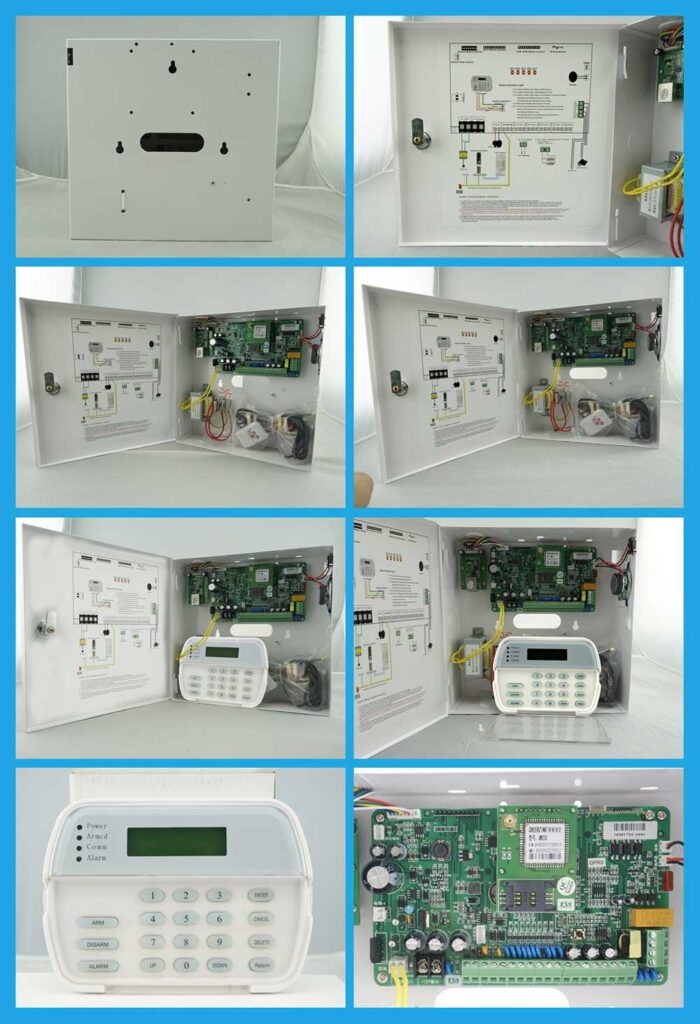
Why the Burglar Alarm Control Panel Is the Weakest Link: Common Configuration Errors in Real Installations
Let’s move from theory to the trenches. Here are the configuration mistakes we see most frequently during commercial site audits and post-incident forensic reviews. Each one turns your expensive intrusion alarm panel into an open door.
1. Improper Zone Programming and Sensor Assignment
Technicians often lump unrelated sensors into the same zone or fail to set correct zone types (instant, delay, 24-hour, interior follower). Result? A single door contact fault disables an entire perimeter zone, or motion detectors in high-traffic areas trigger constant false alarms. In one retail chain case, a loading dock door sensor was programmed as “instant” instead of “entry/exit delay,” causing nightly police dispatches until the panel was reconfigured.
Step-by-step correction (detailed later): Map every sensor to a unique addressable zone, assign proper attributes, and test under simulated conditions.
2. Incorrect or Missing Communication Settings
Many panels ship with default PSTN-only reporting or single SIM cards for 4G. Commercial sites often experience line cuts (deliberate or accidental) or cellular dead zones. Without dual-path redundancy (e.g., IP + 4G fallback), alarms never reach the central station. Programming errors here include wrong phone numbers, unverified account codes, or failure to enable supervision polling.
3. Poor Physical Placement and Tamper Protection
Placing the alarm control panel near the main entrance “for convenience” is a classic rookie error. Intruders locate and disable it in under 60 seconds. Cabinets without proper tamper switches, or panels mounted in unsecured electrical rooms, invite bypass via simple magnet or short-circuit tricks.
4. Outdated or Incomplete User Password Management
Commercial facilities need multi-user access: security guards, facility managers, cleaning crews, and remote technicians. Yet many installations still use a single master code or factory defaults. No expiration policies, no audit logging of arm/disarm events per user. This creates accountability gaps and easy insider threats.
5. Failure to Configure Backup Power and Supervision
Batteries are installed but never load-tested. AC power supervision is disabled. During outages (common in industrial parks), panels go silent after 4–6 hours instead of the required 24–72 hours mandated by many insurance policies.
6. Wireless Frequency and Interference Oversights
In dense commercial environments (shopping malls, mixed-use buildings), 315/433 MHz wireless zones suffer jamming or crosstalk. Panels are rarely programmed with frequency-hopping supervision or RF signal strength thresholds.
7. Lack of Event Logging and Reporting Customization
The 1,500-event buffer fills up and overwrites critical data. Cloud logging is enabled but not filtered for compliance exports (e.g., GDPR or SOC 2 requirements). Operators miss low-battery or tamper events buried in generic logs.
These errors aren’t rare edge cases — they appear in roughly 70% of legacy or budget installations we review. The consequences are predictable: higher insurance premiums, regulatory fines, lost productivity from false alarms, and, in the worst cases, successful thefts that could have been prevented. Adding to the risk, many panels lack proper end-of-line (EOL) resistor supervision on wired loops or fail to enable automatic polling, allowing subtle wiring faults to go unnoticed until it’s too late.
Security Vulnerabilities: Beyond Configuration to Active Threats
Configuration mistakes create passive weaknesses. Active vulnerabilities turn the burglar alarm control panel into an attack surface.
Physical Vulnerabilities
- Tamper bypass: Removing the cabinet lid without triggering a supervised tamper loop.
- Power injection or shorting: Overloading the 12V output to crash the processor.
- Direct wiring sabotage: Cutting supervised loops without proper EOL (end-of-line) resistors.
Electrical and Environmental
- Surge damage from lightning or industrial equipment (panels without 4kV+ protection fail silently).
- Battery degradation leading to “low battery” trouble signals that get ignored.
Wireless-Specific Attacks
- RF jamming: Off-the-shelf SDR tools flood the frequency, preventing sensor signals from reaching the panel.
- Replay attacks: Capturing and retransmitting valid arm/disarm codes.
Cyber and Network Vulnerabilities (Critical for IP-Enabled Panels)
- Default or weak credentials on web interfaces or apps.
- Unencrypted TCP/IP communication exposing alarm events to packet sniffers.
- Outdated firmware lacking modern encryption (AES-256) or secure boot.
- Third-party integrations (cloud apps, VMS platforms) with exposed APIs.
- Lack of network segmentation: The panel shares the same LAN as guest Wi-Fi or POS systems.
A 2025 industry analysis revealed that over 10,000 units of certain popular wireless panels remained remotely exploitable via unauthenticated HTTPS interfaces — allowing attackers to download user lists and disable zones entirely. Commercial buyers using networked alarm control panels without proper hardening face the same risk today.
Real-World Case Studies: When the Panel Fails, the Business Pays
Consider a mid-sized logistics warehouse in an industrial park. The burglar alarm control panel was a legacy non-addressable model with a single PSTN line. Configuration error #2 (no communication redundancy) combined with a deliberate line cut during a weekend. Intruders had 45 minutes to load trucks before any alarm was raised. Loss: $1.2 million in inventory. Post-incident audit showed the panel cabinet was visible from the loading dock — error #3.
Or the corporate office building where an insider with the master code (never changed in 8 years) disarmed the system nightly to facilitate after-hours theft. No permission grading meant every user had god-mode access. The resulting insurance claim was denied due to lack of audit trails.
These aren’t hypotheticals. They happen weekly across commercial sectors because decision-makers treat the burglar alarm control panel as a “set it and forget it” box rather than the high-value target it truly is.
Technical Strategies to Fix It: Signal Isolation, Permission Grading, and Network Hardening
Now the actionable part — the part that justifies the time you’ve invested reading this far. Here are precise, repeatable fixes you can apply today.
Strategy 1: Signal Isolation — Preventing Bypass and Jamming
Signal isolation ensures sensor data reaches the panel unaltered and cannot be spoofed or blocked.
Detailed implementation steps for a commercial-grade addressable system:
- Upgrade to supervised addressable bus architecture (RS-485 preferred). Each sensor module reports its unique ID; any interruption triggers a specific “communication fault” zone.
- Install end-of-line (EOL) resistors or active supervision modules on every wired loop. Use the exact value specified by your panel manufacturer (commonly 1kΩ or 2.2kΩ) and connect them across the last device in the circuit. Program the panel to poll zones every 1–5 seconds.
- For wireless zones: Enable frequency-hopping spread spectrum (FHSS) if supported, or add dual-frequency backup (315 MHz primary + 433 MHz failover). Set RF signal strength thresholds and enable jamming detection (most modern panels report “RF jam” within 30 seconds).
- Physically isolate high-risk zones: Run dedicated conduit from perimeter sensors to the panel, avoiding shared cable trays with power lines.
- Test isolation: Simulate wire cuts, shorts, and RF jamming with professional test equipment. Verify the panel logs the exact fault type and transmits it via all communication paths. Use the panel’s diagnostic mode or a connected laptop to confirm every zone reports “normal” before and after testing.
- Document and schedule quarterly re-testing — include this in your maintenance contract.
Expected outcome: Jamming or bypass attempts now generate immediate, identifiable alarms instead of silent failures.
Strategy 2: Permission Grading — Implementing Role-Based Access Control (RBAC)
Stop the “one code rules all” mentality. Modern burglar alarm control panels support granular user levels.
Step-by-step rollout:
- Inventory all users and map their required functions (arm/disarm specific areas, view logs, remote access, programming changes).
- Define roles in the panel software: Super User (full access), Main User (arm/disarm + basic logs), Guard (arm/disarm only), Technician (programming + diagnostics), Cleaner (bypass specific zones during shifts). Access the programming menu using the installer code, then navigate to the user or authority level section.
- Assign unique 4–8 digit codes or RFID/proximity credentials per role. Enable code expiration (e.g., temporary codes for contractors valid only 30 days).
- Activate per-user event logging: Every arm, disarm, bypass, or programming change records the user ID, time, and method.
- Enforce dual-authorization for critical actions (e.g., remote disarm requires manager approval via app push).
- Integrate with central access control if available — synchronize user databases so badge swipe arms/disarms relevant zones automatically.
- Audit monthly: Export logs, review anomalies (e.g., midnight disarms by cleaning staff), and revoke access immediately upon role change.
This single upgrade eliminates 80% of insider-threat vectors while maintaining operational efficiency.
Strategy 3: Network Security Hardening for IP-Enabled Burglar Alarm Control Panels
If your panel uses TCP/IP (most commercial models do), treat it like any enterprise server.
Comprehensive hardening checklist with execution steps:
- Isolate the panel on its own network segment
- Create a dedicated VLAN or physical DMZ subnet. Never place it on the corporate LAN or guest Wi-Fi.
- Use a managed switch with port-based access control lists (ACLs) restricting traffic to only the central station IP and your secure remote access gateway.
- Enforce strong authentication and encryption
- Change all default passwords immediately (panel web interface, app, and any cloud portal).
- Enable MFA for remote access.
- Force TLS 1.3+ for all communications; disable plain HTTP or outdated protocols.
- Implement firewall rules and intrusion prevention
- Deploy a next-gen firewall in front of the panel’s IP interface. Allow only outbound connections to approved monitoring servers.
- Block all inbound traffic except from whitelisted IPs (your security operations center).
- Enable rate limiting to prevent brute-force attacks on management ports.
- Regular patching and firmware management
- Schedule quarterly firmware checks via the manufacturer’s secure portal.
- Test updates in a lab environment first (clone the panel configuration).
- Maintain an offline backup of current working firmware. Download the latest version only from the official site and verify the checksum before installing.
- Secure remote access
- Never expose the panel directly to the internet. Use a VPN concentrator or zero-trust gateway with just-in-time access.
- Log and alert on every remote login attempt.
- Continuous monitoring
- Integrate panel events into your SIEM or central security dashboard.
- Set automated alerts for “communication trouble,” “tamper,” or unexpected configuration changes.
- Documentation and change control
- Maintain an as-built network diagram showing panel IP, VLAN, and firewall rules.
- Require management approval for any panel configuration change.
Following these steps typically reduces the attack surface by 95% while adding negligible latency to alarm reporting.

Additional Best Practices for Long-Term Commercial Resilience
- Redundant Communication Paths: Always configure at least two independent channels (e.g., 4G + TCP/IP). Test failover monthly by manually disconnecting one path and confirming the panel routes the test signal correctly.
- Environmental Hardening: Mount panels in locked, climate-controlled rooms with surge protectors and UPS systems rated for 72+ hours. Keep operating temperature between -10°C and 55°C and humidity 40–70% to match industrial-grade specifications.
- Integration Testing: Verify the burglar alarm control panel works seamlessly with video verification, access control, and building management systems. False negatives during integration are common — run joint walk-tests quarterly.
- Training and Documentation: Provide role-specific training to all users. Keep an on-site binder with zone maps, user lists, and emergency procedures.
- Vendor Selection Criteria: When procuring new panels, demand industrial-grade specs: addressable zones, multi-path comms, tamper supervision, AES encryption, and open integration APIs. Avoid consumer-grade or single-path models for commercial use.
- Ongoing Maintenance Schedule: Monthly visual inspections and battery tests; quarterly full-system walk-tests; annual third-party audit. Perform battery load tests by disconnecting AC power and verifying the panel remains operational for the full required backup duration.
Choosing and Upgrading Your Burglar Alarm Control Panel: What Procurement Teams Must Demand
If you’re in the market for a replacement or new installation, use this checklist:
- Supports at least 500+ addressable zones for future growth
- Multi-channel reporting with supervision
- Built-in tamper and power monitoring
- RBAC with detailed logging
- Secure IP stack with TLS and VPN-ready
- Backward compatibility for phased upgrades
- Local technical support and spare parts availability
- Compliance-ready features (event export formats for insurance and regulators)
Modern panels meeting these criteria cost more upfront but deliver 3–5x lower total cost of ownership through reduced false alarms, faster response, and avoided losses. Prioritize models with 32-bit ARM processors for rapid signal processing and anti-surge protection to handle real-world commercial demands.
Conclusion: Transform Your Weakest Link into Your Strongest Asset
The burglar alarm control panel doesn’t have to be the weakest link in commercial security. With deliberate configuration, rigorous hardening, and ongoing vigilance, it becomes the most reliable component — the one that never sleeps, never misses a signal, and always delivers verifiable proof of protection.
You now possess the exact knowledge and step-by-step procedures to audit your current installation, eliminate the most dangerous vulnerabilities, and deploy fixes that deliver immediate peace of mind and long-term ROI. Security directors who implement these strategies report 70–90% reductions in false alarms, faster insurance approvals, and dramatically lower breach risk.
Don’t wait for the next incident to expose your burglar alarm control panel’s flaws. Start today: schedule a full system audit using the checklists above, prioritize the three core strategies (signal isolation, permission grading, network hardening), and document every change for compliance and future reference.
If you’re responsible for protecting commercial assets at scale and want expert assistance implementing these fixes — whether for a single site or enterprise rollout — our team of burglar alarm specialists is ready to help. We’ve guided hundreds of organizations just like yours through exactly this process, delivering customized, high-availability intrusion alarm panel solutions that exceed industry standards.
Reach out for a no-obligation security assessment and quotation. Let’s turn your alarm control panel from the weakest link into the unbreakable core of your commercial defense strategy.