

Executive Summary for Security Decision Makers
Selecting an alarm control panel for a single retail shop is straightforward. Selecting a scalable burglar alarm control panel for 12 branches, 3 regional warehouses, and a future expansion roadmap is a fundamentally different engineering and financial decision.
Most multi-site businesses fail not because they chose a low-quality intrusion alarm panel, but because they chose a panel designed for a single building and attempted to stretch it across an enterprise architecture.
This guide introduces a Scalability-First Framework built specifically for:
- Retail chains
- Multi-warehouse logistics operators
- Franchise brands
- Banking branches
- Fuel station networks
- Healthcare groups
- Regional commercial property portfolios
Instead of comparing product brochures, we will build a structured decision matrix called the Scalability Matrix, covering:
- Zone capacity architecture
- User capacity management
- Communication redundancy strategy
- Cloud and centralized management integration
- Firmware and lifecycle upgrade capability
This is not a theoretical discussion. It is a field-tested framework used in real-world commercial deployments, drawing from years of experience in deploying systems for growing enterprises where scalability prevents downtime and costly overhauls.
Why Traditional Alarm Panel Selection Fails in Multi-Site Environments
Most procurement teams ask:
- How many zones does this alarm panel support?
- Does it support IP?
- Is it compatible with our existing sensors?
These questions are incomplete. They overlook the broader operational demands of managing security across dispersed locations, where coordination and future-proofing are essential.
In multi-site environments, the real risks are:
- Expansion beyond panel capacity, leading to fragmented systems
- Fragmented user permission structures that create security gaps
- Communication outages between sites and headquarters, delaying response times
- Inconsistent firmware versions across branches, exposing vulnerabilities
- Replacing entire burglar alarm panel systems during expansion, which can disrupt operations for weeks
The true cost of a poorly selected commercial alarm panel system is not the hardware — it is operational fragmentation and forced system replacement within 3–5 years. For instance, a mid-sized retail chain might spend tens of thousands on initial installation, only to face double that in upgrades if scalability isn’t prioritized from the start.

Understanding Multi-Site Alarm Architecture
Before selecting a burglar alarm panel, you must define your architecture model. This step ensures alignment with your business’s operational flow, growth trajectory, and risk tolerance.
There are three common architectures:
1. Isolated Local Panels (Legacy Model)
Each branch has:
- Its own alarm control panel
- Independent users
- Local monitoring only
Problems:
- No centralized control, making it impossible to oversee all sites from headquarters
- No unified reporting, complicating compliance audits and incident analysis
- High maintenance overhead, as technicians must visit each site individually for updates or troubleshooting
Suitable only for micro-enterprises with fewer than five locations and no plans for growth.
2. Hybrid Model (Decentralized with Remote Access)
Each site has:
- A local intrusion alarm panel
- Remote IP access
- Limited centralized monitoring
Better, but still limited:
- Firmware inconsistencies that can lead to compatibility issues during integrations
- User management duplication, increasing administrative burden and error risks
- Expansion complexity, often requiring custom configurations for new sites
This model works for businesses with moderate growth but can become unwieldy as sites exceed 10–15 locations.
3. Enterprise-Centric Scalable Model (Recommended)
Each site deploys a scalable burglar alarm control panel capable of:
- Centralized cloud management
- Unified user hierarchy
- Multi-site dashboard visibility
- Cross-site reporting
- Firmware synchronization
- Communication redundancy
This is the only model suitable for long-term growth, as it supports seamless scaling without overhauling infrastructure. It also facilitates integration with other enterprise systems, reducing silos in security operations.
To choose the right architecture, start by mapping your current sites, projected additions, and key pain points like response times or regulatory needs.
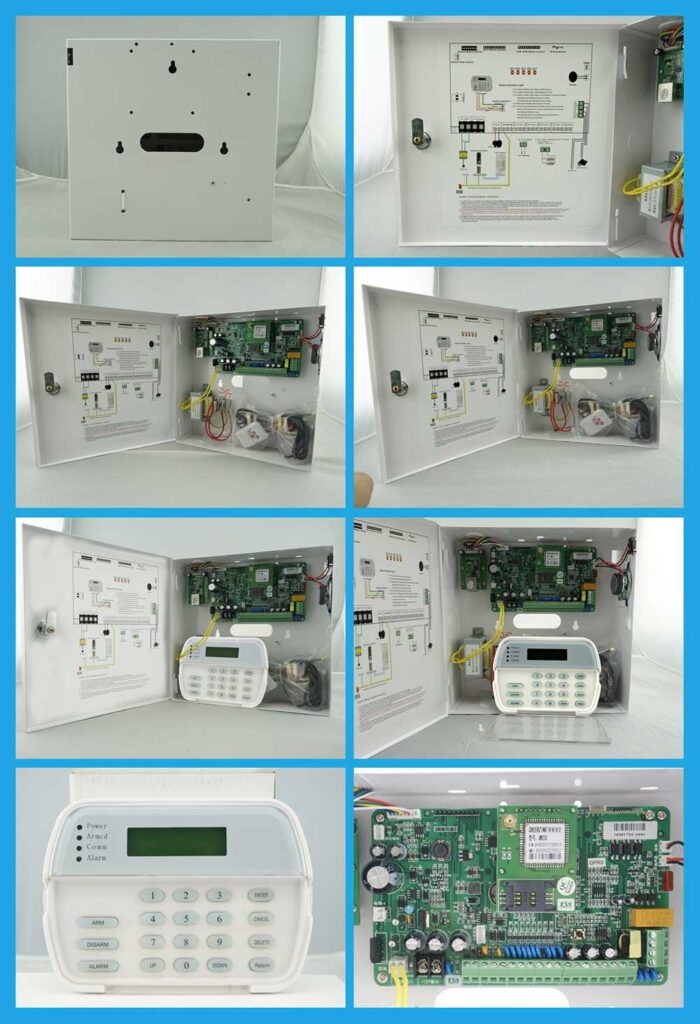
The Scalability Matrix: A Structured Decision Framework
The Scalability Matrix evaluates five critical dimensions. Instead of comparing brand names, score each candidate alarm control panel against these five dimensions on a scale of 1–10, weighting them based on your priorities (e.g., higher weight for communication in remote areas). This matrix helps visualize trade-offs and ensures decisions are data-driven.
Dimension 1: Zone Capacity — Planning for 5-Year Growth
Most buyers evaluate: “How many zones does this panel support today?” The correct question is: “How will this burglar alarm panel scale when my site doubles in size?”
What to Analyze
- Base Zone Count
- On-board zones (built-in connections for sensors)
- Expandable zones via modules
- Maximum system capacity, including any limits on total zones across all expansions
- Expansion Architecture
- Hardwired expansion for reliable, high-security setups
- Bus-based expansion modules for flexible, modular growth
- Wireless expansion compatibility to accommodate hard-to-wire areas
- Addressable vs conventional zone logic (addressable allows individual sensor identification, reducing false alarms)
- Practical Scenario Planning Example: A warehouse today with 24 zones (doors, PIRs, perimeter beams). Planned expansion: 60 zones within 3 years. If your intrusion alarm panel caps at 32 zones, you will replace it, incurring downtime and retraining costs.
Action Step Checklist
- List current zone requirements per site, categorizing by type (e.g., entry points, motion detectors).
- Project 5-year expansion by consulting business forecasts and site plans.
- Confirm maximum scalable zone count from manufacturer specs and independent reviews.
- Verify whether expansion requires:
- Panel replacement (a red flag for scalability)
- Or module addition only, ensuring minimal disruption.
Rule: Never deploy a commercial burglar alarm panel at more than 60% of its maximum zone capacity at installation. This buffer accounts for unforeseen additions like new entry points or integrated fire sensors.
Common Pitfall: Overlooking zone partitioning, which allows dividing zones into independent areas for multi-tenant sites—ensure the panel supports at least 8–16 partitions for flexibility.
Dimension 2: User Capacity — Controlling Human Risk at Scale
In multi-site environments, user management is more complex than sensor deployment, as it directly impacts access control and audit trails.
Why User Capacity Matters
Consider a 15-store retail chain:
- Store managers
- Assistant managers
- Regional supervisors
- Security officers
- IT administrators
- External maintenance providers
If your alarm control panel supports only 32 users, you will encounter access bottlenecks, forcing shared codes that compromise security.
Evaluate These Parameters
- Maximum user capacity (aim for 100+ for enterprises)
- User grouping capability for organizing by role or location
- Multi-site user hierarchy to delegate authority levels
- Role-based permissions (e.g., arm/disarm vs. full admin)
- Time-based access rules to restrict after-hours entry
- Audit logging depth, including timestamps, user IDs, and actions for forensic reviews
Centralized vs Local User Databases
An enterprise-grade intrusion alarm panel must allow:
- Global user creation from a central console
- Site-level restriction to prevent overreach
- Instant revocation across all locations via cloud sync
Without this, terminated employees retain access at remote sites, posing insider threats. To implement: Log into the central dashboard, select the user, and apply revocation—verify it propagates within minutes.
Additional Consideration: Integration with Active Directory or LDAP for syncing with corporate HR systems, streamlining onboarding and offboarding.
Dimension 3: Communication Redundancy — Eliminating Single Points of Failure
Multi-site businesses cannot tolerate communication dependency on a single channel, especially in areas prone to outages like storms or cyberattacks.
A professional burglar alarm control panel must support:
- IP (Ethernet) for high-speed, cost-effective connectivity
- 4G/LTE for backup in urban or mobile scenarios
- PSTN (if required by region) for legacy compliance
- Dual-SIM redundancy to switch carriers automatically
- Automatic failover to maintain uninterrupted monitoring
Redundancy Architecture Model
Primary: IP
Secondary: Cellular
Optional: Encrypted VPN tunnel for added security
If communication fails:
- Panel detects IP failure via heartbeat signals.
- Automatically switches to LTE within seconds.
- Sends event to monitoring center with details.
- Logs redundancy activation for post-incident review.
What to Verify in Technical Documentation
- Is failover automatic, or does it require manual intervention?
- Is redundancy simultaneous (both paths active) or sequential (backup only on failure)?
- Does the panel buffer events during outage to prevent data loss?
- Is there heartbeat supervision to ping the center every 30–60 seconds?
Never deploy a scalable intrusion alarm panel without dual-path communication. Test this by simulating a network cut during pilot phases to ensure seamless operation.
Key Error to Avoid: Assuming all IP modules are equal—check for AES-256 encryption to protect against eavesdropping.
Dimension 4: Cloud Integration and Centralized Management
This is where most traditional burglar alarm panel systems fail, as they lack the connectivity for enterprise oversight.
Required Capabilities
- Multi-site dashboard for at-a-glance status
- Real-time event aggregation across locations
- Centralized arming/disarming control for unified operations
- Remote diagnostics to troubleshoot without site visits
- Over-the-air configuration for quick adjustments
- API integration capability for custom apps or third-party tools
What Advanced Enterprises Need
- Integration with:
- Access control systems for synced entry logs
- Video management systems for correlated alerts
- ERP platforms for inventory-linked security
- SOC dashboards for 24/7 monitoring centers
An enterprise alarm control panel should not operate in isolation; it must form part of a holistic security ecosystem. For cross-regional arming: Use the cloud portal to set schedules, ensuring all sites align with headquarters time zones.
Privacy Note: Ensure cloud providers comply with GDPR or CCPA, with data stored in user-specified regions to avoid compliance pitfalls.
Dimension 5: Firmware Upgrade and Lifecycle Management
This dimension is rarely evaluated but critical for maintaining security against evolving threats.
Questions to Ask
- Does the alarm panel support remote firmware updates?
- Are updates incremental (partial) or full-flash (complete overwrite)?
- Is rollback supported in case of issues?
- How frequently does the manufacturer release patches (monthly for vulnerabilities)?
Without remote firmware upgrade:
- Technicians must visit each site, escalating costs
- Costs multiply across regions, especially in remote areas
- Security vulnerabilities persist, risking breaches
Implementation Steps: Schedule updates during off-hours via the cloud interface, monitor for errors, and have a rollback plan tested in advance.
Long-Term View: Check the manufacturer’s support lifecycle—aim for 7–10 years to avoid premature obsolescence.
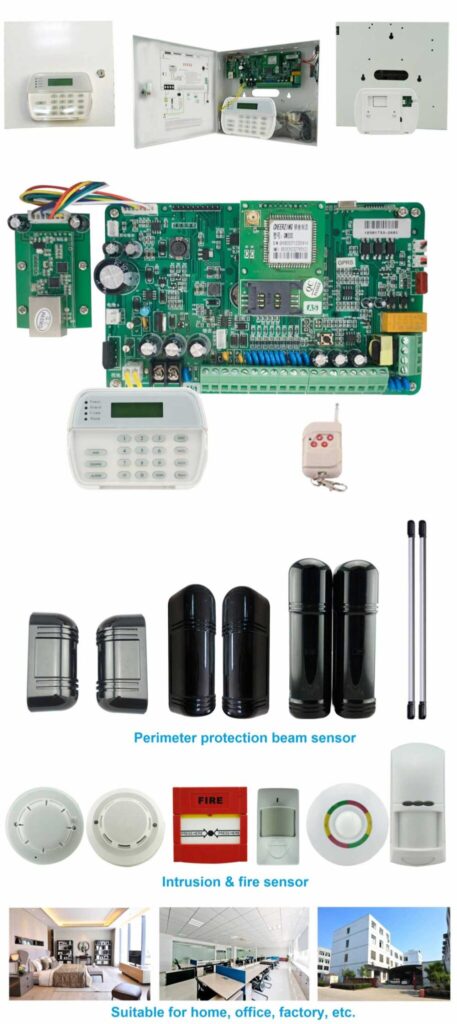
Step-by-Step Implementation Framework for Multi-Site Deployment
Step 1: Site Audit
For each location:
- Count zones and categorize by criticality
- Identify expansion plans, including potential integrations
- Map communication infrastructure (e.g., broadband availability)
- Assess local compliance requirements, like fire code integrations
Deliverable: A standardized site requirement matrix in a spreadsheet format, with columns for site name, current zones, projected growth, and notes.
Step 2: Scalability Matrix Scoring
Score candidate burglar alarm control panels across:
- Zone scalability
- User scalability
- Communication redundancy
- Cloud management
- Firmware lifecycle
Assign weighted scores based on business priority (e.g., 30% for zone capacity in warehouses). Use a table like this for clarity:
| Dimension | Weight | Candidate A Score | Candidate B Score |
|---|---|---|---|
| Zone Capacity | 25% | 8 | 7 |
| User Capacity | 20% | 9 | 6 |
| Communication Redundancy | 20% | 7 | 9 |
| Cloud Integration | 20% | 8 | 8 |
| Firmware Upgrade | 15% | 9 | 7 |
| Total Weighted Score | 8.2 | 7.4 |
Step 3: Architecture Simulation
Before procurement:
- Simulate 5-year growth by adding virtual zones and users
- Simulate communication failure by disconnecting paths
- Simulate user revocation across sites and check propagation
- Simulate firmware update across all panels and verify consistency
If the system fails simulation, reject it. Use manufacturer demos or third-party tools for realistic testing.
Step 4: Pilot Deployment
Deploy in:
- 1 flagship site for high-visibility testing
- 1 high-risk site (e.g., urban with frequent outages)
- 1 remote site to assess connectivity
Monitor for 60–90 days, tracking metrics like false alarms, response times, and user feedback.
Step 5: Phased Rollout
- Regional clustering to minimize travel
- Centralized configuration templates for consistency
- Unified firmware baseline before launch
- Standardized zone naming convention (e.g., “Site1-Door1”) for easy identification
Post-rollout, conduct quarterly reviews to adjust for new needs.
Remote vs Local Control: The Balanced Architecture
Remote-only systems are risky due to potential cloud downtime. Local-only systems are outdated, lacking oversight.
Best practice:
- Local control priority for immediate on-site actions
- Remote supervisory override for headquarters intervention
- Cloud-based monitoring layer for analytics
- Encrypted communication to secure data flows
This hybrid architecture ensures resilience. To set it up: Configure local keypads for daily use, link to cloud for alerts, and enable overrides only for authorized roles. Test failover by disabling cloud access and confirming local functionality.

Avoiding the Most Expensive Mistakes
Mistake 1: Selecting a Residential Alarm Panel for Commercial Use
Residential-grade alarm panels often lack:
- Sufficient user capacity for teams
- Advanced reporting for audits
- Redundancy channels for reliability
- Enterprise firmware management for updates
Switching later means ripping out wiring—avoid by checking commercial certifications upfront.
Mistake 2: Ignoring Expansion Bus Limitations
Always confirm:
- Maximum number of expansion modules (e.g., 8–16)
- Cable distance limitations (typically 1,000–4,000 feet)
- Power supply constraints to avoid voltage drops
Test in a mock setup to identify bottlenecks early.
Mistake 3: No Standardization Across Sites
Different burglar alarm panel models across sites create operational chaos.
Standardization reduces:
- Training cost by using uniform interfaces
- Spare parts inventory through bulk purchasing
- Configuration errors from mismatched settings
Enforce this via procurement policies.
Additional Mistake: Overlooking Power Backup—Ensure panels include UPS integration for outages, with at least 24-hour runtime.
Cost Modeling: CAPEX vs Lifecycle Cost
Lowest initial cost does not equal lowest lifecycle cost. Calculate over 5–7 years:
- Installation cost (hardware + labor)
- Expansion cost (modules vs. replacements)
- Maintenance visits (fewer with remote capabilities)
- Firmware update labor (zero with OTA)
- Communication subscription redundancy (e.g., $50/month per site for cellular)
Example Table for a 10-Site Chain:
| Cost Category | Non-Scalable Panel | Scalable Panel |
|---|---|---|
| Initial CAPEX | $20,000 | $30,000 |
| 3-Year Expansion | $15,000 (replacements) | $5,000 (modules) |
| Annual Maintenance | $10,000 | $4,000 |
| Total 5-Year Cost | $85,000 | $55,000 |
A scalable intrusion alarm panel reduces long-term expenditure by preventing system replacement and minimizing downtime.
Security Compliance and Industry Standards
Depending on your region, consider compliance with:
- EN Grade standards (e.g., Grade 3 for high-risk sites)
- UL certifications for insurance discounts
- Insurance requirements for minimum features
- Data encryption mandates like AES standards
Your commercial alarm panel system must support compliant deployment, including tamper detection and event logging. Verify by requesting compliance reports and consulting local regulators.
Enterprise Case Scenario
A 22-branch retail brand deployed a non-scalable burglar alarm control panel across all sites.
Within 3 years:
- 9 sites exceeded zone capacity, requiring add-ons
- No centralized user management, leading to access errors
- Firmware versions inconsistent, causing integration failures
- Communication outages undetected, missing alerts
Result: Full system replacement, costing over $100,000 in hardware and lost productivity.
After implementing a scalability-first intrusion alarm panel model:
- Unified management dashboard for real-time oversight
- Centralized user revocation to enhance security
- Dual-path communication for zero missed events
- Remote firmware updates, saving site visits
Operational efficiency improved dramatically, with response times cut by 40% and false alarms reduced through better zoning.

Final Decision Checklist for Procurement Teams
Before selecting an alarm control panel, confirm:
- Does it support at least 2x projected zone capacity?
- Does it support centralized multi-site user control?
- Does it provide dual communication paths?
- Does it support remote firmware upgrades?
- Is it designed for commercial scalability — not residential retrofits?
If any answer is “no,” continue your evaluation. Also check: Vendor support response times (under 24 hours) and warranty length (at least 3 years).
Conclusion: Scalability Is Not an Option — It Is the Core Requirement
For multi-site businesses, an alarm control panel is not just a device — it is a long-term infrastructure commitment.
Selecting the wrong burglar alarm panel locks your organization into:
- Costly replacements
- Fragmented operations
- Increased security exposure
Selecting a scalable intrusion alarm panel enables:
- Controlled expansion
- Centralized authority
- Operational efficiency
- Reduced lifecycle cost
- Enterprise-grade resilience
Multi-site security success does not begin with brand comparison. It begins with architecture clarity and scalability discipline.
If You Are Evaluating Enterprise Alarm Control Panels
Start with your expansion roadmap — not the product brochure.
Build your Scalability Matrix.
Simulate growth.
Stress-test communication.
Standardize across sites.
Security infrastructure should never limit business expansion. It should enable it.
For procurement teams and security integrators seeking scalable commercial burglar alarm panel solutions, a structured architecture discussion is the first step toward eliminating hidden operational risks.
A properly selected alarm control panel becomes the backbone of multi-site enterprise protection — today and for the next decade.