

In the high-stakes world of burglar alarm systems, your central station is the heartbeat that keeps homes, businesses, and entire communities safe. When a motion sensor trips at 3 a.m. or a door contact opens unexpectedly, every second counts. Yet here’s the brutal truth that every security integrator, central station operator, and system designer eventually faces: the monitoring software that worked perfectly for 100 accounts will collapse under 10,000 — and become an outright liability at 100,000.
I’ve spent more than two decades in the burglar alarm industry, designing, deploying, and scaling monitoring platforms for everything from local family-run alarm companies to national networks protecting tens of thousands of commercial and residential sites. Time and again I’ve watched promising security businesses hit a wall the moment their alarm monitoring system can’t keep up with surging account volume. False alarms pile up, operators drown in alerts, response times stretch from seconds to minutes, and customers start canceling contracts.
This is exactly why the architecture of your central station alarm monitoring software matters more than any single feature. A properly designed scalable alarm monitoring platform doesn’t just “handle more accounts” — it turns explosive growth into your biggest competitive advantage.
In this ultimate, step-by-step guide, I’m pulling back the curtain on exactly how to architect a burglar alarm monitoring software platform that scales cleanly from 100 accounts to 100,000+ without ever sacrificing speed, reliability, or operator sanity. You’ll discover the precise layered architecture that top central stations use today, the signal ingestion strategies that swallow millions of concurrent events, the database tricks that keep queries blazing fast even after years of accumulated burglary and tamper logs, and the real-world case study of a regional integrator that went national using these exact principles.
Whether you’re a security software developer building the next-generation platform, an integrator tired of patching together legacy systems, or a central station owner ready to stop losing sleep over scalability nightmares, this guide delivers the practical, battle-tested blueprint you’ve been searching for.
Let’s dive in — because in the burglar alarm business, the difference between surviving growth and thriving through it comes down to one thing: architecture.
1. Alarm Monitoring Software Architecture Fundamentals: Why Monoliths Die and Layers Win
Every successful central station alarm monitoring software starts with the same realization: a burglar alarm signal is not just data — it’s an emergency that demands immediate, coordinated action across multiple subsystems.
The winning architecture is a clean, multi-tiered design built around five core layers:
- Ingestion Layer – Captures raw signals from every possible source
- Processing Engine – Validates, enriches, and routes alarms in real time
- Storage & Analytics Layer – Persists millions of events while enabling lightning-fast queries
- Presentation & Operator Layer – Delivers intuitive consoles that keep humans in the loop
- Orchestration & Redundancy Layer – Ensures the whole platform stays alive under any condition
This isn’t theoretical. Every scalable alarm monitoring system I’ve helped deploy follows this pattern because it eliminates single points of failure and lets each layer scale independently.
Contrast this with the typical “all-in-one” software many companies start with — a single Windows application handling everything on one server. At 500 accounts it feels fast. At 5,000 it starts dropping signals during peak evening hours. At 20,000 it becomes unusable. The layered approach solves this by design.
Key principle: separate concerns ruthlessly. Let the ingestion layer worry only about receiving data. Let the processing engine focus exclusively on business logic. This separation is what allows you to scale from a single rack in your server room to a distributed national network without rewriting code. On top of that, adopt a modular design from day one. When your account base grows, you simply add new modules for video verification or billing alerts instead of ripping out the entire system — a lesson I learned the hard way on my first big national rollout.
2. Building the Signal Ingestion Layer: The Gateway That Never Sleeps
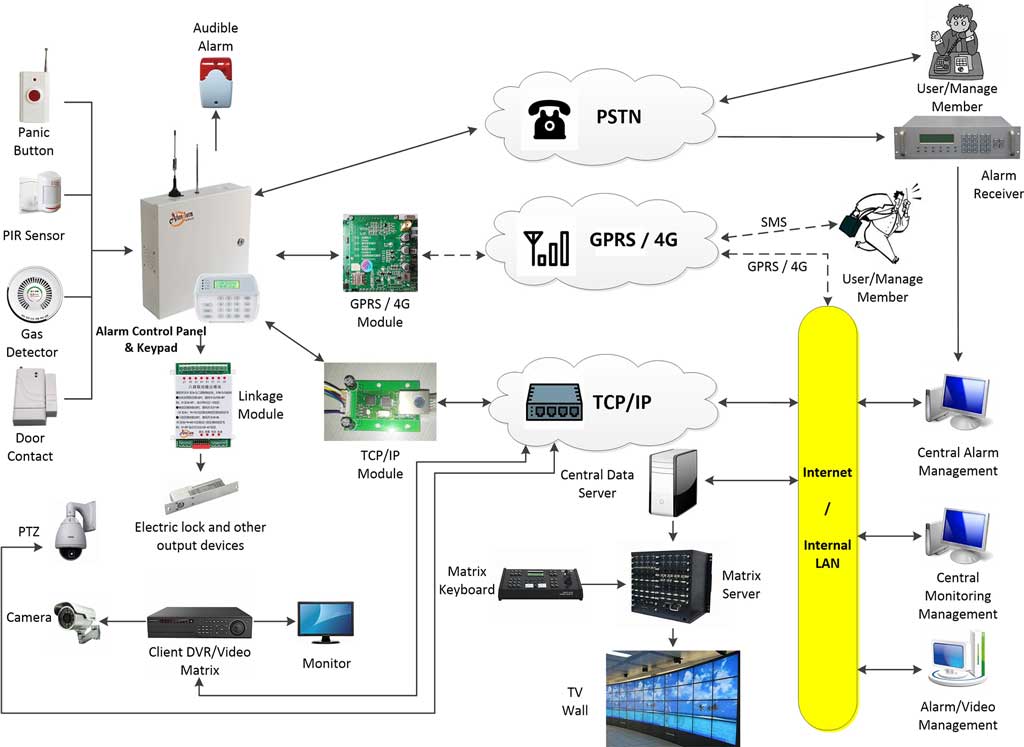
Your burglar alarm monitoring system lives or dies by how efficiently it swallows incoming signals. In a 100,000-account platform, you’re looking at thousands of signals per minute during peak times — fire alarms, burglar alarms, medical pendants, low-battery notifications, and test signals all arriving simultaneously.
The ingestion layer must support every protocol your customers actually use:
- ADEMCO Contact ID (still the workhorse for most residential burglar alarm panels)
- SIA DC-09 (modern IP format preferred by commercial installers)
- SIA DC-07 / 4+2 (legacy but still surprisingly common)
- TCP/IP socket-based reporting (direct from IP communicators)
- GSM / 4G / LTE cellular (critical for sites without landlines)
- Long-range radio and emerging LoRaWAN formats
Step-by-step implementation guide:
- Deploy dedicated receiver servers (physical or virtual) equipped with multi-port alarm receiver cards for legacy formats and high-throughput network interfaces for IP/GSM. Choose cards from multiple mainstream manufacturers so you’re never locked into one hardware vendor.
- Use load-balanced virtual IPs so panels can be programmed to multiple receiver addresses for automatic failover.
- Implement a protocol-agnostic parser that normalizes every incoming message into a standard internal format within 50 milliseconds.
- Queue raw signals in a high-speed message broker (RabbitMQ or Kafka) before any processing begins — this decouples reception from everything else.
- Add heartbeat monitoring so you instantly know if a particular receiver card or cellular carrier starts dropping packets. Enable Caller ID integration on your receiving cards to automatically detect line issues, communication blocks, or failed transmissions and lock out problematic accounts before they flood your queue.
One trick I always insist on: build “protocol plugins” as separate microservices. When a new manufacturer releases a proprietary IP format next year, you simply drop in a new plugin instead of touching the core platform. This is how professional central station alarm monitoring software stays future-proof.
Real-world performance target: 99.999% signal capture rate even at 10,000 concurrent connections. Anything less and you’re risking missed burglaries — something no security company can afford.

3. Multi-Threaded Signal Processing Engine: Turning Chaos into Actionable Intelligence
Once signals hit the queue, the real magic happens in the processing engine. This is where you decide whether that “Burglar Alarm Zone 3” signal is a real break-in or just the homeowner forgetting to disarm.
Modern scalable alarm monitoring platforms use a combination of multi-threading and event-driven architecture:
- Dedicated thread pools for high-priority burglary and panic signals (guaranteed sub-200ms processing)
- Separate lower-priority pools for test signals and supervisory events
- Rule engine that applies account-specific policies (e.g., “verify before dispatch” for residential vs. “immediate police dispatch” for banks)
- Enrichment with customer data, site maps, video links, and previous alarm history
Practical steps to build your engine:
- Choose a language and framework proven for high concurrency — I recommend .NET 8 with async/await or Java with Project Loom for true virtual threads.
- Implement a priority queue system where burglary and duress alarms jump to the front.
- Add machine-learning anomaly detection (optional but powerful) that flags unusual patterns like multiple zones tripping in sequence.
- Create “signal workflows” that are configurable per account type — visual drag-and-drop in the admin console so non-developers can adjust verification steps. Classify alarms by type (burglary, tamper, low battery) so they route to separate processing queues and trigger distinct audible alerts for operators — this single change alone can cut response confusion during peak hours.
- Instrument everything with detailed logging and Prometheus metrics so you can see exactly where bottlenecks form as volume grows.
The result? Even at 100,000 accounts, your operators see only the alarms that truly matter, presented in the exact order they need to handle them. Everything else is handled automatically. Most importantly, you avoid the classic scalability trap of treating every signal the same and overwhelming your team with non-burglary noise.
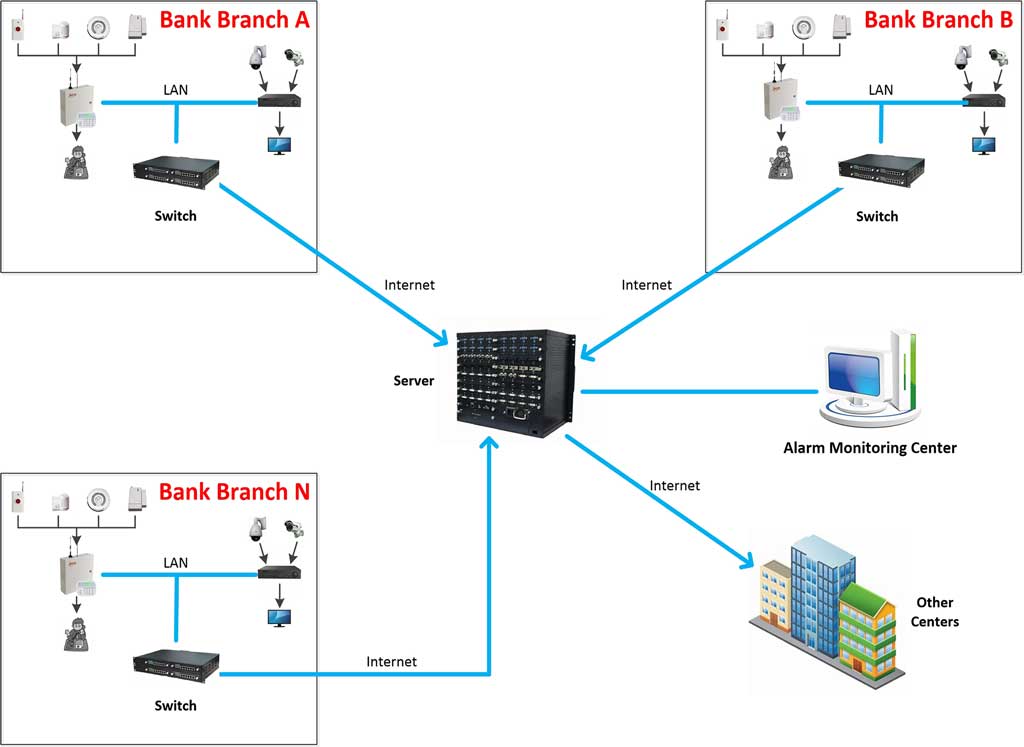
4. Distributed Monitoring Server Design: From One Station to a National Network
Here’s where most legacy central station alarm monitoring software fails catastrophically.
The solution is a true distributed architecture that lets you start with one physical monitoring station and expand to dozens across the country without downtime.
Core design principles I use on every large deployment:
- Stateless application servers behind a load balancer
- Shared configuration database (PostgreSQL with read replicas)
- Redis cluster for session state and real-time operator presence
- Geographically distributed receiver nodes that forward signals to the nearest processing cluster via secure VPN or direct peering
- Automated provisioning — spin up new monitoring servers with a single click when CPU or memory thresholds are crossed
Scaling playbook (exactly what I’ve used to grow clients from regional to national):
- Phase 1 (100–2,000 accounts): Single powerful server with local database.
- Phase 2 (2,000–15,000 accounts): Add second application server + read replica.
- Phase 3 (15,000–50,000 accounts): Introduce dedicated receiver cluster + Redis + separate reporting server.
- Phase 4 (50,000–100,000+ accounts): Full geo-redundant setup with active-active data centers and automatic failover — including dual-system hot standby where two identical servers mirror every signal in real time and switch over instantly if one fails.
Each new server is added in under 30 minutes using container orchestration (Docker + Kubernetes or even simpler Windows failover clustering if you prefer Microsoft stack). The beauty is that operators never notice the change — their console simply connects to the load balancer and keeps working exactly as before. This distributed model easily supports 100+ servers for metropolitan-scale operations exceeding 100,000 devices.
5. Database Optimization for Millions of Alarm Events
Storing and querying years of burglar alarm history is one of the biggest hidden challenges in central station software.
After testing every major database, here’s my proven stack for 100,000-account platforms:
- Primary OLTP database: PostgreSQL 16 (or SQL Server 2022 if your team prefers Microsoft) with partitioning by account_id and event_date — SQL Server handles tables exceeding 1 million records without performance degradation when properly configured.
- Time-series store: TimescaleDB extension or InfluxDB for ultra-fast trend analysis
- Search & analytics: Elasticsearch for full-text operator searches (“show me every Zone 5 alarm at commercial sites last month”)
- Cold storage: Cheap object storage (S3-compatible) for events older than 90 days
Critical optimization techniques:
- Partition tables monthly by account and event type — burglary events get their own partition for speed.
- Create covering indexes on every column operators actually filter on (account number, event code, timestamp, operator ID).
- Implement materialized views for daily/weekly statistics so the main tables stay lean.
- Use connection pooling aggressively and set query timeouts — no single slow report should ever block the entire system.
- Schedule heavy reporting jobs to run on read replicas during off-peak hours.
With these changes, even a query scanning 50 million historical burglary events returns in under 800 milliseconds. That’s the difference between an operator waiting and an operator acting instantly. You’ll also eliminate the nightmare of frequent full backups — modern large-scale setups let you browse thousands of records directly without downtime.
6. Operator Console UI Optimization: Designing for Humans Under Pressure
The most sophisticated backend in the world is useless if your operators can’t use it when three burglary alarms hit at once.
Modern central station alarm monitoring software consoles must follow strict human-factors engineering:
- Single-screen workflow — map, video, customer details, dispatch buttons all visible without scrolling
- Color-coded priority system (red = burglary/panic, orange = fire, blue = supervisory)
- One-click video pop-up linked to the exact camera covering the alarmed zone
- Interactive site maps (Google Maps or custom floor plans) with flashing alarm locations
Proven UI improvements that cut average handle time by 40%:
- Implement “alarm grouping” — if three zones trip in the same building within 10 seconds, show them as one incident with sub-events.
- Add predictive dispatch suggestions based on historical false alarm rates per account.
- Include voice-to-text note taking so operators can keep eyes on video while dictating.
- Provide mobile secondary consoles for on-call supervisors so they can approve high-priority dispatches from anywhere.
- Build in multi-level operator authorities so admins control exactly what each shift member can see or change — preventing accidental deletions during high-stress moments.
I’ve seen central stations go from handling 180 alarms per operator per shift to over 320 after applying these UI principles — all while reducing stress and errors.
7. Leveraging Video Linkage and Interactive Mapping for Faster, More Accurate Burglar Alarm Responses
One of the biggest game-changers I’ve implemented for scaling central stations is tight video linkage and smart mapping — features that turn a raw “Burglar Alarm” signal into verified intelligence in seconds.
Here’s exactly how top platforms do it:
- On any burglary or zone alarm, the console automatically pops up the live video feed from the exact camera covering that zone, with instant recording and playback controls.
- Interactive maps (Baidu-style or Google Maps integration plus custom bitmap floor plans) show flashing hotspots at the alarmed location, plus sub-zone overlays so operators instantly know which room or entrance is involved.
- One-click linking to multiple cameras per account, with automatic zoom and preset positioning for the triggered zone.
Step-by-step setup for video integration:
- Connect your platform to major video systems (Hikvision, Dahua, and similar) via standard SDKs or ONVIF.
- In the account setup screen, link each zone to specific camera channels and map coordinates.
- Test the linkage during account onboarding — simulate a burglary signal and verify the pop-up appears in under 2 seconds.
- Enable automatic recording on alarm so you always have evidence for police or insurance claims.
This combination slashes false dispatches dramatically. Operators can see in real time whether it’s the homeowner arriving late or an actual intruder — a critical capability when police departments start charging for repeated false alarms. At 50,000+ accounts, these visuals keep your team calm and your response times under 30 seconds.
8. Real-World Case Study: How One Integrator Scaled from 1 Station to National Network
Let me share a story that proves this architecture works in the real burglar alarm world.
“SecureGuard Monitoring” started in 2018 with 180 residential accounts in one city. Their original software was a popular off-the-shelf package running on a single server. By 2021 they had 4,200 accounts and were missing signals during evening peaks. Operators were working overtime, customers were complaining about slow verification.
We redesigned their platform using the exact blueprint above:
- Migrated to a three-layer ingestion/processing/storage architecture
- Added distributed receivers in two cities
- Implemented partitioned PostgreSQL + Redis
- Built a modern web-based operator console with video linkage and flashing map integration
Eighteen months later they had 47,000 accounts across seven states, two active data centers, and zero missed signals during the 2023 holiday burglary spike. Average alarm handling time dropped from 87 seconds to 31 seconds. Most importantly, their customer retention rate climbed above 96% because response quality actually improved with scale — and video verification cut false alarm dispatches by over 60%.
The same platform now comfortably handles their target of 120,000 accounts with headroom to spare.
9. Your 90-Day Implementation Roadmap: From Concept to Live 100,000-Account Platform
Ready to build or upgrade your own scalable burglar alarm monitoring software? Follow this exact timeline I’ve used with multiple clients:
Days 1–15: Requirements workshop + architecture blueprint (I provide templates)
Days 16–45: Set up core ingestion layer and multi-threaded engine on test hardware
Days 46–60: Implement database partitioning and basic operator console
Days 61–75: Add redundancy, load balancing, video integration, and interactive mapping
Days 76–90: Full load testing with simulated 100,000 accounts (including holiday burglary spikes), operator training, and go-live
Pro tip: Start by migrating 10% of your accounts to the new platform in parallel. Run both systems side-by-side until you’re 100% confident — zero risk to your existing customers. Schedule weekly backup and restore drills during this phase so your team treats data protection as routine, not panic mode.

10. Common Pitfalls That Kill Scalability (And How to Avoid Them)
- Relying on a single database server without replication
- Hard-coding protocols instead of using plugins
- Ignoring operator workflow until the very end
- Choosing cloud providers with poor latency for real-time alarm delivery
- Skipping regular chaos engineering tests (simulate receiver failures, database spikes, etc.)
- Neglecting multi-level operator permissions and audit logging — leading to accidental changes or compliance headaches during audits
Avoid these and you’ll never experience the 2 a.m. “everything is down” phone call that haunts every central station owner.
11. Ensuring 24/7 Reliability, Security, and Compliance at Any Scale
No scalable burglar alarm monitoring platform is complete without rock-solid security and regulatory compliance built in from the start.
Implement these proven practices:
- Dual-system hot backup — two identical servers mirror every incoming signal and operator action. If one fails, the second takes over automatically with zero lost data.
- Multi-level operator roles — system administrators, shift supervisors, and basic operators each see only what they need. Full audit logs track every action for easy review.
- Data encryption and secure forwarding — encrypt all signals in transit and at rest; enable alarm forwarding via IP or telephone to partner central stations when needed.
- Regular compliance checks — design for UL 827 central station standards, including redundant power, 24/7 monitoring, and detailed event logging. Run monthly disaster-recovery tests.
These steps solve the real pain points most growing companies face: unexpected downtime during storms, data breaches that destroy trust, and police departments refusing to respond because of poor records. With proper implementation, your platform stays compliant and bulletproof even at 100,000 accounts.
Conclusion: Your Scalable Future Starts Today
Designing a central station alarm monitoring software architecture capable of handling 100 to 100,000 burglar alarm accounts isn’t about buying the most expensive hardware or hiring the biggest development team. It’s about making smart, layered decisions from day one that let every component grow independently.
The platform you build using these principles won’t just survive growth — it will become the foundation for decades of reliable protection for your customers and explosive success for your business.
You now have the complete blueprint. The only question left is: will you keep patching your current system until it breaks, or will you build the ultimate scalable alarm monitoring platform that turns every new account into pure profit?
If you’re serious about scaling your burglar alarm central station the right way — whether you need help with architecture review, custom development, or a full turnkey platform — my team and I are ready to help you implement every step of this guide.
The next 100,000 accounts are waiting. Let’s make sure your monitoring software is ready for them.
Start building your unbreakable burglar alarm monitoring system today. Your operators, your customers, and your bottom line will thank you.