
Introduction: Why Network Alarm System Architecture Matters in Modern Intrusion Protection
For decades, intrusion alarm systems were built around isolated control panels and analog communication lines. While these systems served their purpose in the past, the modern security environment has fundamentally changed. Businesses today operate across distributed locations, rely on digital infrastructure, and require real-time security visibility.
As a result, traditional alarm architectures can no longer meet operational demands. Delayed alerts, single-point failures, and limited integration capabilities can turn a security system into a liability rather than a protection mechanism.
This is where a network alarm system becomes essential.
A network alarm system architecture connects alarm panels, detectors, communication modules, cloud platforms, and monitoring centers through IP networks. Instead of operating as isolated hardware devices, every component becomes part of a connected security ecosystem capable of:
- Real-time alarm transmission
- Remote system management
- Scalable multi-site deployment
- Integration with other security technologies
- Intelligent event analysis
For security system distributors, integrators, and enterprise buyers, understanding the architecture behind a network alarm system is critical. Poor architecture design can result in unstable systems, high maintenance costs, and dissatisfied clients.
In this comprehensive guide, I will break down how professional network alarm architectures are designed, how they function, and how you can deploy them successfully in real-world projects. You will also learn exactly how to integrate video verification, implement multi-path redundancy, and avoid the most common pitfalls that leave burglary protection gaps.
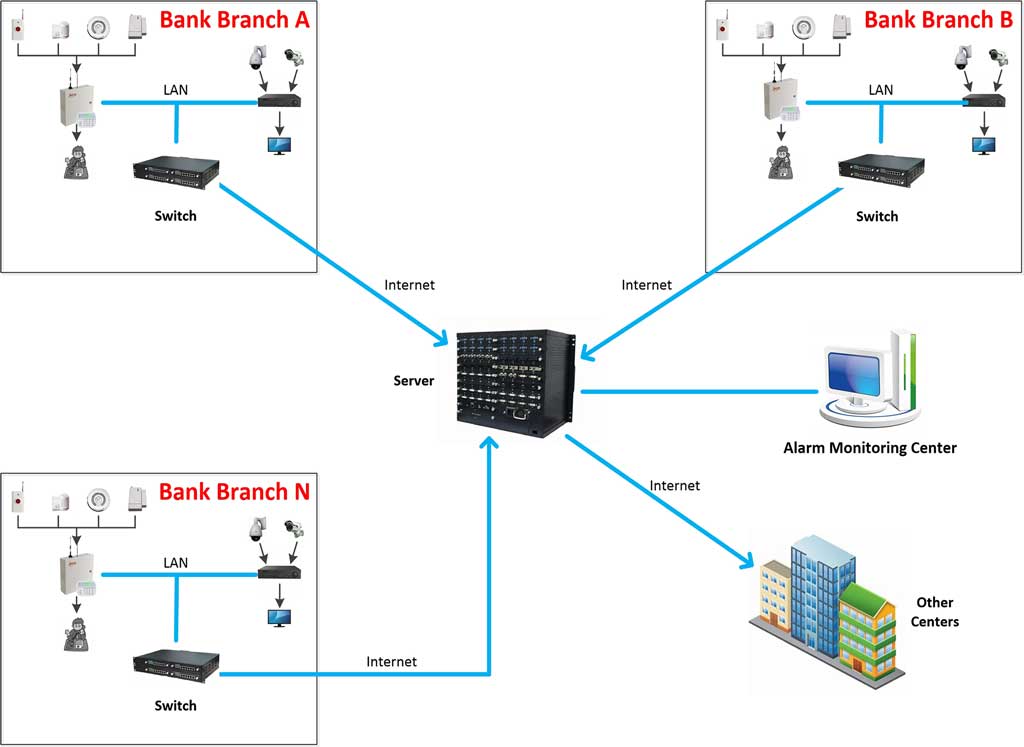
1. What Is a Network Alarm System?
A network alarm system is an intrusion detection system that uses IP networks to connect security devices, control panels, communication modules, and monitoring platforms.
Unlike traditional alarm systems that rely on telephone lines or standalone operation, a network alarm transmits signals through LAN, WAN, or cloud infrastructure.
In practical terms, a network alarm system transforms an alarm installation from a single building device into a distributed security network capable of protecting multiple locations simultaneously.
Core Characteristics of a Network Alarm System
A modern network alarm platform typically includes the following capabilities.
- IP-Based Communication
Alarm events are transmitted through Ethernet or wireless IP networks rather than analog phone lines.
This allows:
- instant alarm transmission
- remote monitoring
- secure encrypted communication
- Distributed Architecture
Multiple alarm devices operate across different locations but connect to a central platform.
This enables organizations to manage hundreds or thousands of alarm systems from a single dashboard.
- Remote Configuration and Maintenance
Technicians can configure devices remotely without visiting the site. Common remote operations include:
- zone programming
- firmware upgrades
- system diagnostics
- communication troubleshooting
This greatly reduces maintenance cost and response time.
- Multi-Channel Communication Redundancy
Professional systems support multiple communication paths such as:
- Ethernet
- WiFi
- 4G / LTE
- backup cellular modules
- traditional telephone lines (still used as fallback in many hybrid setups)
If the primary network fails, the backup channel automatically takes over.
- Integration Capability
A network alarm system can integrate with other security technologies including:
- video surveillance systems
- access control systems
- smart IoT sensors
- cloud monitoring platforms
- voice deterrence devices
This architecture transforms the alarm system from a simple detection device into a comprehensive security infrastructure. When an intrusion alarm triggers, the system can instantly pop up live video from the exact zone, record the event, and forward the alert to multiple monitoring centers—giving you visual confirmation in seconds instead of relying on blind audio signals.

2. Core Components of a Network Alarm System Architecture
Understanding architecture begins with understanding its building blocks.
A professional network alarm system consists of five main layers. Each layer performs a specific role in the security ecosystem.
2.1 Detection Layer
This layer includes all sensors that detect intrusion events.
Common devices include:
- PIR motion detectors
- door / window magnetic contacts
- glass break detectors
- vibration sensors
- active infrared beam detectors
- smoke detectors
- environmental sensors (temperature, water leakage, gas detection)
When a threat is detected, these sensors trigger the alarm panel.
Best Practices for Sensor Deployment
For optimal reliability:
- Install motion detectors 2.2–2.4 meters above ground
- Avoid pointing PIR detectors directly toward windows or HVAC vents
- Install magnetic contacts on all primary entry points
- Use dual-technology detectors in high-risk areas to reduce false alarms
- Deploy beam detectors for perimeter protection in large facilities
The reliability of the entire network alarm system begins at this layer. False alarms waste your team’s time and erode trust—proper placement and dual-tech sensors cut nuisance alerts by up to 70% in real burglary scenarios.
2.2 Control Layer (Alarm Panel)
The alarm panel acts as the brain of the system.
Its main functions include:
- processing sensor signals
- determining alarm events
- managing zones
- triggering sirens or voice warnings
- sending alarm messages to the network
Professional alarm panels in a network alarm system typically support:
- dozens to hundreds of zones
- programmable automation rules
- multi-area partitioning
- encrypted network communication
- event log storage
- integration APIs
Key Panel Features to Evaluate
When selecting a professional alarm panel, integrators should verify:
- maximum zone capacity
- support for wired and wireless devices
- communication redundancy support
- remote firmware update capability
- cloud platform compatibility
For distributors and integrators, choosing the right control panel platform determines the scalability of the entire system.
2.3 Communication Layer
The communication layer ensures alarm signals reach monitoring systems without delay or interruption.
In a network alarm system, the following communication channels are commonly used.
Ethernet Communication
The most stable and widely used connection for fixed installations.
Advantages include:
- high transmission speed
- reliable connectivity
- low operating cost
- stable long-term performance
WiFi Communication
WiFi is commonly used in environments where cable installation is difficult.
Typical applications include:
- residential security systems
- small retail stores
- temporary installations
However, WiFi networks must be secured using:
- WPA2/WPA3 encryption
- strong passwords
- router firewall protection
Cellular Communication (4G / LTE)
Cellular communication acts as a backup transmission path.
If the wired network fails, alarm messages can still be delivered through cellular networks.
Professional network alarm systems often support dual communication paths such as:
Ethernet + Cellular Backup
This ensures that alarm events are still transmitted during network outages.
Communication Protocols Used in Network Alarm Systems
Professional systems may support:
- TCP/IP alarm transmission
- MQTT IoT messaging protocols
- encrypted HTTPS communication
- proprietary alarm transmission protocols
These protocols ensure reliable and secure communication. Many systems also retain legacy telephone-line support for maximum redundancy in areas with unstable broadband.
2.4 Platform Layer
This layer includes software platforms used to manage alarm systems.
Typical platforms include:
- cloud alarm management platforms
- remote configuration tools
- mobile monitoring applications
- central monitoring station software (server installed on Windows Server environments, client on any connected PC)
Key platform capabilities include:
- real-time alarm display
- device management
- user management
- system diagnostics
- event history logs
- remote firmware upgrades
- visual site maps
- automatic video pop-up and recording on alarm
For large deployments, the platform layer becomes the operational center of the network alarm system. Security companies managing hundreds of client sites rely on this central software to query equipment status, perform remote diagnosis, and generate maintenance reports in one click.
2.5 Response Layer
The response layer determines how the system reacts after an alarm event occurs.
Possible responses include:
- triggering sirens
- activating voice deterrence devices
- sending push notifications
- notifying monitoring centers
- activating cameras
- unlocking emergency exits
- activating lighting systems
- automatic live video pop-up with recording at the monitoring center
A well-designed network alarm system architecture ensures that responses are fast, reliable, and appropriate for the situation. In a burglary attempt, the system can simultaneously sound a siren, send your phone a video clip, and forward the alert to both your central station and local authorities.
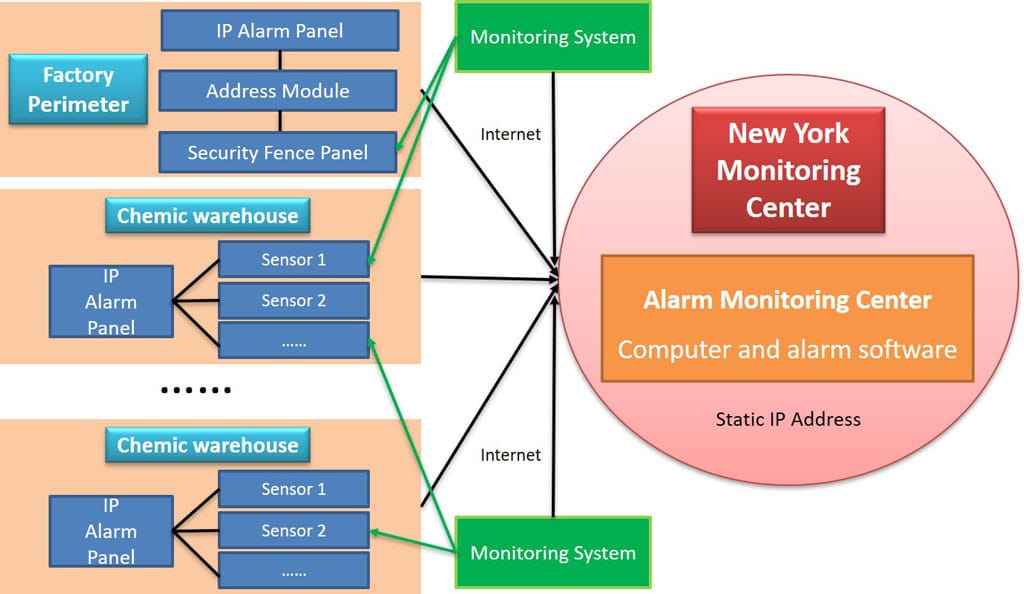
3. Network Alarm System Topology Models
Different projects require different architecture designs.
The most common network alarm system topologies include the following.
3.1 Single-Site Architecture
Used in small facilities such as:
- retail stores
- offices
- warehouses
- clinics
All devices connect to one alarm panel, which communicates with the monitoring platform.
Advantages:
- simple deployment
- low cost
- easy maintenance
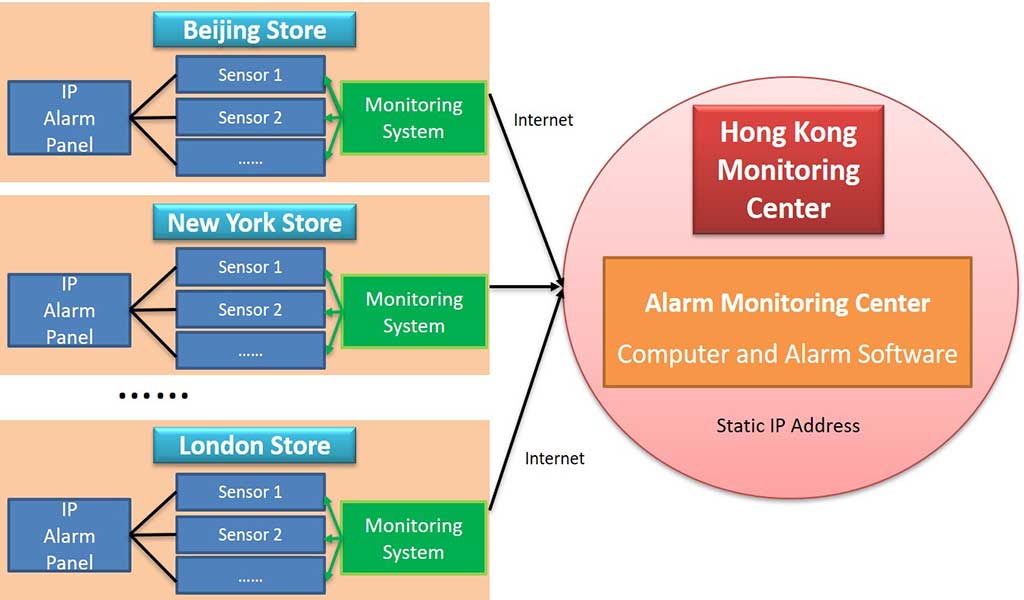
3.2 Multi-Site Distributed Architecture
Large enterprises often operate multiple facilities.
In this architecture:
- each site has its own alarm panel
- all panels connect to a central platform
Benefits include:
- centralized management
- scalable deployment
- unified alarm monitoring
- standardized security policy
This architecture is widely used in:
- retail chains
- logistics networks
- banking systems
- commercial campuses
- residential communities
3.3 Cloud-Based Alarm Architecture
In modern security systems, cloud platforms act as the management center.
In this model:
- alarm panels connect to cloud servers
- users access the system via web or mobile apps
Advantages include:
- remote management
- automatic updates
- reduced infrastructure cost
- simplified system expansion
For distributors, cloud architecture allows the creation of security service platforms.
3.4 Hybrid Architecture (Enterprise Model)
Many professional projects adopt a hybrid architecture combining local and cloud management.
In this model:
- local servers provide redundancy
- cloud platforms provide remote access
- monitoring centers receive alarm events simultaneously
Benefits include:
- higher reliability
- compliance with local data policies
- improved disaster recovery capability
This architecture is common in banks, government facilities, and large enterprises.
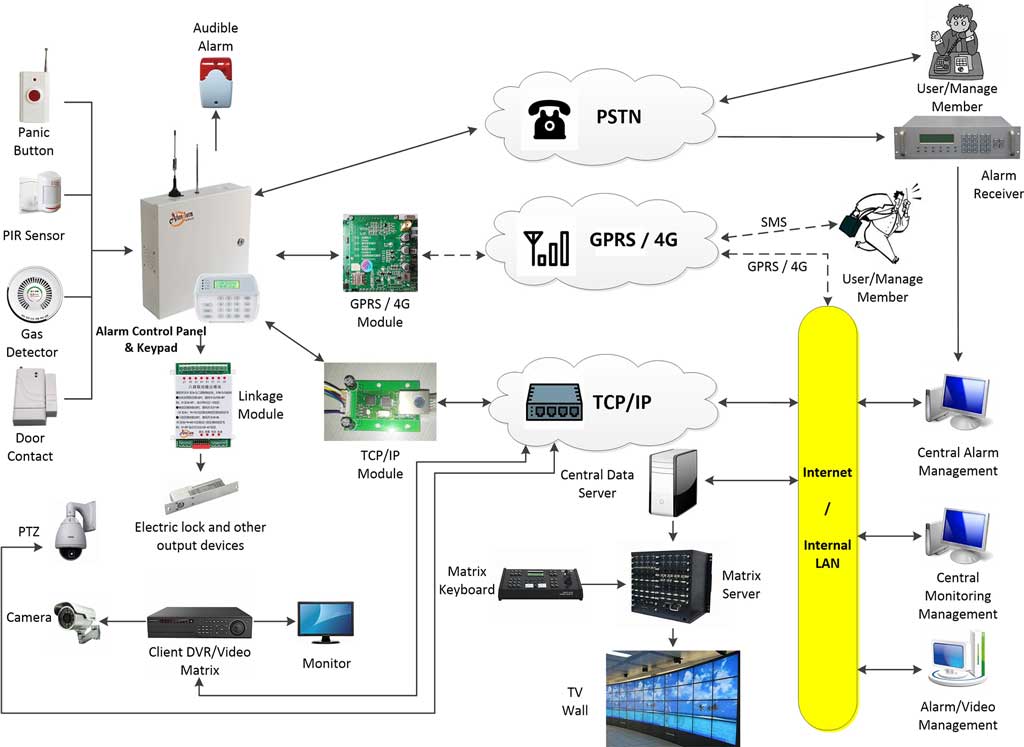
4. How a Network Alarm System Works: Event Flow Explained
Understanding the event flow helps professionals design better systems.
A typical alarm process follows this sequence.
Step 1 — Detection
A motion detector senses movement inside a protected zone.
Step 2 — Signal Transmission
The detector sends the signal to the alarm control panel.
Step 3 — Alarm Verification
The panel verifies the event based on programmed rules such as:
- zone status
- arming mode
- user schedules
Step 4 — Alarm Activation
If the event meets alarm conditions, the panel triggers alarms.
Actions may include:
- sirens
- voice warnings
- notification messages
Step 5 — Network Communication
The alarm panel transmits the event to the monitoring platform through IP communication (Ethernet, 4G, or telephone backup).
Step 6 — Video Verification (Critical Step)
The platform automatically links the alarm zone to the pre-assigned cameras. Within seconds, the real-time video stream of the exact alarm location pops up on the operator’s screen and begins recording. This visual confirmation is the heart of modern network alarm systems.
Step 7 — Monitoring Response
Operators receive the alert and verify the event using:
- alarm logs
- automatic real-time video pop-up from the alarm zone
- user contact
Step 8 — Security Response
Security personnel or authorities respond accordingly.
In a properly designed network alarm system, this entire process can occur within seconds. The video linkage step is what separates professional installations from basic ones—giving you immediate visual confirmation instead of guessing whether it’s a real burglary or a false alarm.
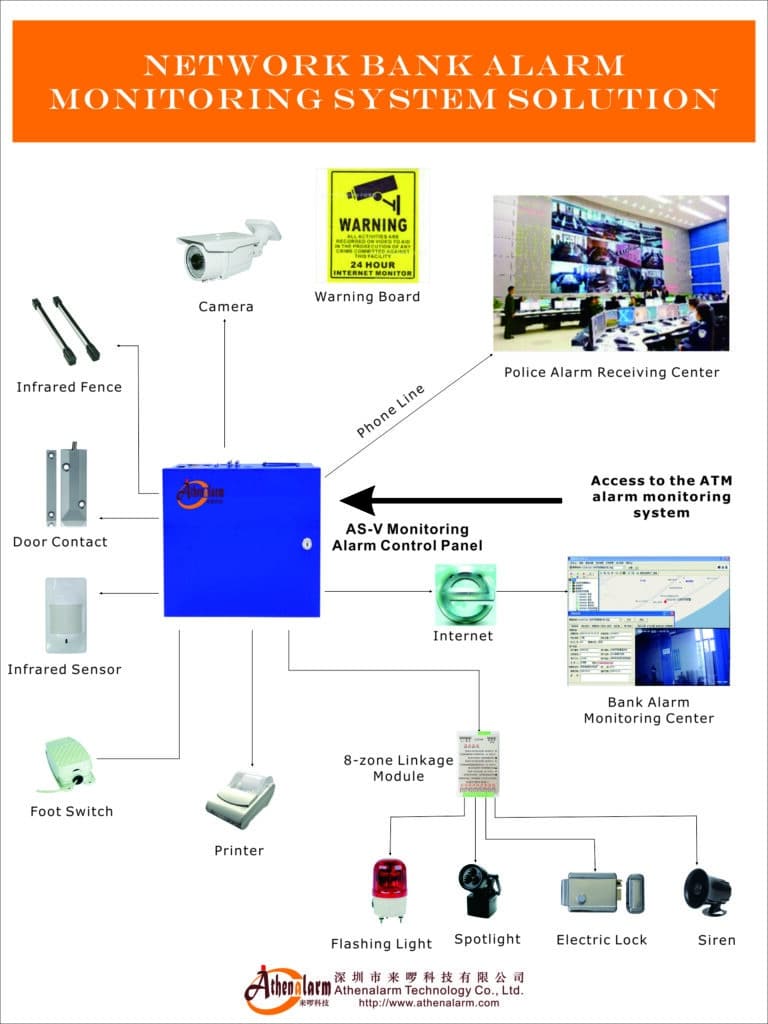
5. How to Design a Professional Network Alarm System Architecture
Designing a reliable system requires careful planning.
Below is a proven architecture design process used by professional security integrators.
Step 1 — Risk Assessment
Start by identifying security risks.
Questions to consider:
- What assets must be protected?
- Where are the vulnerable entry points?
- What types of intrusion risks exist?
- Are there insider threats or external threats?
This determines sensor placement and system scale.
Step 2 — Determine System Scale
Define system requirements such as:
- number of zones
- number of buildings
- monitoring requirements
- remote access needs
- integration with other systems
This determines the appropriate network alarm system platform.
Step 3 — Choose Communication Methods
Select communication channels based on reliability.
Best practice for professional systems:
Primary channel: Ethernet
Backup channel: Cellular network (plus telephone where available)
This ensures communication redundancy.
Step 4 — Design Device Layout
Plan the placement of:
- detectors
- alarm panels
- communication modules
- sirens
- cameras for video linkage
Ensure that all critical areas are protected.
Create a zone map to document sensor locations and zone numbering.
Step 5 — Build the Network Architecture
Determine how devices connect.
Possible structures include:
- star topology
- hierarchical architecture
- cloud-connected network
The architecture must support future expansion and additional devices.
Step 6 — Implement Security Protocols
Network security is critical.
Professional network alarm systems should support:
- encrypted communication
- authentication protocols
- firewall protection
- secure device authentication
- VPN remote access
This prevents cyber attacks against alarm infrastructure. Always change default passwords, segment security devices on a dedicated VLAN, and enable two-factor authentication for the monitoring platform.
6. Step-by-Step Deployment Guide for a Network Alarm System
A structured deployment process ensures successful installation.
Step 1 — Prepare the Network Infrastructure
Verify:
- stable LAN connectivity
- router configuration
- internet bandwidth
- firewall rules
Install VLAN segmentation if required to isolate security devices.
Step 2 — Install Alarm Panels
Mount the control panel in a secure location.
Connect:
- power supply
- backup battery
- communication module
- detector wiring
Ensure proper grounding to prevent electrical interference.
Step 3 — Install Sensors
Place sensors according to the protection plan.
Key principles include:
- covering entry points
- avoiding blind spots
- preventing false alarms
Test signal strength for wireless sensors.
Step 4 — Configure the System
Program:
- alarm zones
- communication settings
- user permissions
- notification rules
- automation logic
- video linkage rules (which cameras pop up on specific zones)
Create different user roles for administrators, operators, and technicians.
Step 5 — Connect to the Platform
Register the alarm panel on the management platform (install server software on Windows Server or cloud equivalent, then connect client PCs).
Verify:
- device registration
- network communication
- encryption authentication
Step 6 — Conduct System Testing
Test all alarm zones.
Verify:
- alarm triggering
- network communication
- siren activation
- monitoring center alerts (including video pop-up)
- mobile notifications
- alarm forwarding to secondary centers
Document test results for maintenance records.
Step 7 — Train Operators
Provide training for:
- system operation
- alarm verification using live video
- emergency response procedures
- maintenance procedures
Operator training significantly improves system effectiveness and reduces response time during real burglary events.

7. Best Practices for Optimizing Network Alarm System Performance
A well-designed system still requires optimization.
Key best practices include:
Use Communication Redundancy
Always deploy at least two communication paths.
Monitor Network Health
Continuous monitoring prevents downtime.
Implement Event Filtering
Filtering reduces false alarms and improves response efficiency.
Regular Firmware Updates
Keep devices updated to maintain cybersecurity.
Scheduled System Audits
Periodic inspections ensure long-term reliability.
Maintain Backup Power
Install backup batteries capable of supporting at least 24 hours of standby operation.
Enable Automatic Video Pop-up and Recording
This gives operators instant visual confirmation—critical for distinguishing real intrusions from false alarms.
Forward Alarms to Multiple Centers
Redundancy ensures no single point of failure in high-security environments like banks or chain stores.
8. Common Mistakes in Network Alarm Architecture Design
Many projects fail due to poor planning.
Common mistakes include:
Single Communication Channel
Network outages can disable alarm transmission.
Improper Sensor Placement
Incorrect positioning leads to false alarms or missed events.
Lack of Cybersecurity Protection
Unsecured devices may be vulnerable to hacking.
Poor Scalability Planning
Systems may become difficult to expand later.
Insufficient Documentation
Without proper documentation, maintenance becomes difficult.
Lack of Video Integration
Without automatic video linkage, operators lose valuable verification time during burglary alarms.
Avoiding these mistakes dramatically improves system performance.

9. Maintenance and Lifecycle Management of a Network Alarm System
A network alarm system must be maintained regularly to ensure long-term reliability.
Recommended maintenance procedures include:
Monthly Checks
- verify communication status
- test random alarm zones
- check battery voltage
- review equipment online status in the central software
Quarterly Checks
- inspect detector alignment
- review alarm event logs
- verify cellular backup operation
- perform remote diagnosis
Annual System Audit
- full alarm system test
- firmware updates
- cybersecurity vulnerability review
- detector cleaning and recalibration
Preventive maintenance significantly reduces system failure risk. Remote maintenance tools let you fix 80% of issues without ever visiting the site—saving time and money while keeping your burglary protection always active.
10. Future Trends in Network Alarm Systems
The evolution of the network alarm system continues.
Key future developments include:
AI-Assisted Alarm Verification
Artificial intelligence can analyze alarm events and reduce false alerts by cross-checking video.
Edge Computing Alarm Devices
Devices will process data locally for faster response.
Unified Security Platforms
Alarm systems will integrate deeply with:
- video surveillance
- access control
- building management systems
IoT Sensor Integration
More smart sensors will become part of the network alarm ecosystem.
Predictive Security Analytics
Future systems will predict risks based on historical alarm data.
These technologies will make security systems more intelligent and proactive—turning your network alarm into a true predictive burglary prevention tool.

11. Deep Dive: Video Verification Technology in Network Alarm Systems
Video verification is the single most powerful upgrade you can add to any network alarm system. It turns a simple “beep” into undeniable visual proof, slashing false alarms and speeding up response times dramatically.
How Video Verification Actually Works
When a sensor triggers:
- The alarm panel instantly sends the zone information through TCP/IP or 4G to the central monitoring platform.
- The platform automatically identifies the cameras linked to that exact zone.
- Within 1–3 seconds, the live video feed pops up on the operator’s screen (and simultaneously starts recording).
- The operator sees exactly what is happening—person, animal, or nothing—and decides whether to dispatch police, call the owner, or ignore the event.
- The full video clip is saved with the alarm record for later review or evidence.
This entire linkage happens automatically through the same IP network that carries the alarm signal—no extra wiring or manual steps required.
Technical Requirements for Reliable Video Verification
- Compatible IP cameras (HIKVISION, DAHUA, or any ONVIF standard camera works fine).
- Sufficient upload bandwidth (at least 2–4 Mbps per camera during alarm events).
- Proper zone-to-camera mapping in the monitoring software.
- Low-latency protocols (H.264 or H.265 streaming).
- Dedicated VLAN or QoS settings to prioritize video traffic.
Step-by-Step Setup Guide for Video Linkage
- Install and register your IP cameras on the same network as the alarm panels.
- In the central monitoring software (such as AS-ALARM or equivalent), add each camera and give it a clear name.
- Go to the zone configuration page and assign one or more cameras to every alarm zone.
- Set the pop-up rule: “On alarm → show live view + start recording + save to event folder.”
- Test by triggering a test alarm—watch the video appear instantly on both the main monitoring station and mobile app if configured.
- Adjust camera angles so the field of view covers the exact area protected by the sensor.
Real-World Benefits You Will Feel Immediately
- False alarm rate drops dramatically—operators verify in seconds instead of guessing.
- Police response improves because they receive video evidence with the dispatch.
- Insurance companies love it—many offer premium discounts for verified systems.
- Remote clients can watch the live pop-up on their phones and confirm threats themselves.
- Post-incident investigation becomes effortless with timestamped video tied to every alarm event.
Common Pitfalls to Avoid
- Forgetting to map cameras to zones (no video pops up).
- Using cameras with poor night vision or low resolution.
- Insufficient bandwidth—video stutters or fails to load.
- Not testing pop-up speed regularly.
Get these basics right, and video verification becomes the difference between “we had an alarm” and “we caught the intruder on video.”
Conclusion: Building a Reliable Network Alarm System Architecture
A modern network alarm system is far more than a simple intrusion alarm. It is a connected security infrastructure designed to detect threats, transmit alerts instantly, coordinate effective responses, and deliver live video verification—all in one seamless platform.
The success of such systems depends heavily on architecture design.
By understanding the key components, communication methods, topology models, and deployment processes outlined in this guide, security professionals can design reliable, scalable, and future-ready network alarm systems.
For distributors, integrators, and enterprise buyers, mastering network alarm architecture is not just a technical requirement—it is a strategic advantage.
Organizations that deploy well-designed network alarm systems gain:
- faster threat detection
- centralized security management
- scalable protection across multiple sites
- improved operational efficiency
- dramatically reduced false alarms through video linkage
In a world where security threats continue to evolve, a properly designed network alarm system architecture ensures that protection remains strong, responsive, and ready for the future. Start with a solid risk assessment, insist on multi-path communication and video integration, and maintain the system proactively—you’ll sleep better knowing your burglary protection is truly bulletproof.