
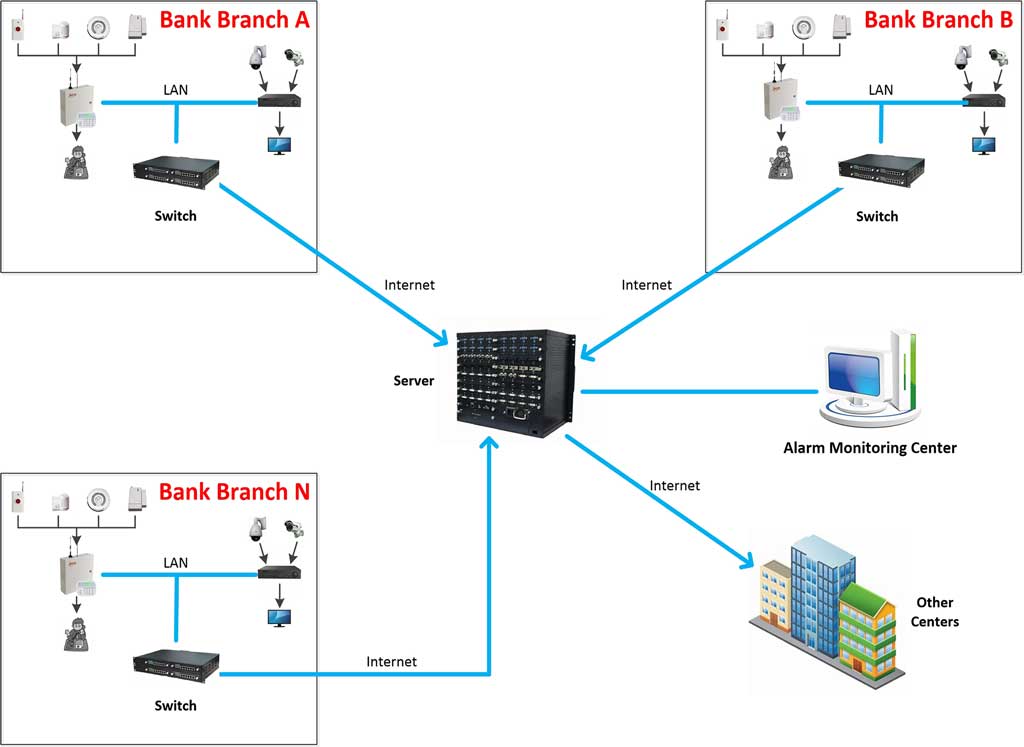
In the fast-evolving world of security technology, maintaining the integrity and functionality of distributed alarm systems is crucial for IT managers and integrators. Firmware updates play a pivotal role in enhancing system performance, patching vulnerabilities, and ensuring compliance with emerging security standards. This guide explores operational best practices for alarm firmware updates, focusing on remote firmware management for multi-site alarms to minimize downtime and maximize efficiency.
Why Firmware Updates Matter in Distributed Security Environments
Distributed alarm systems, often spanning multiple locations like commercial buildings, campuses, or retail chains, face unique challenges in firmware maintenance. Outdated firmware can expose systems to cyber threats, such as unauthorized access or malware injections, leading to potential breaches. According to a 2023 report by the International Security Industry Association (ISIA), over 40% of security incidents in networked alarm setups stem from unpatched firmware vulnerabilities.
For IT managers overseeing these setups, the key pain point is coordinating updates without disrupting operations. Remote firmware management addresses this by allowing centralized control, reducing the need for on-site visits and cutting costs by up to 30%, as noted in a Gartner analysis on IoT device management. This approach ensures that all alarm panels, sensors, and controllers remain synchronized, bolstering overall system reliability.
Common Challenges in Alarm Firmware Updates
Before diving into solutions, it’s essential to understand the hurdles. In multi-site alarms, inconsistent network connectivity can hinder update propagation, while incompatible firmware versions across devices may cause system failures. Integrators often grapple with scalability issues, where manual updates become impractical for hundreds of endpoints.
Another frequent issue is rollback risks—if an update introduces bugs, reverting can be complex in distributed environments. Data from a 2022 Cybersecurity and Infrastructure Security Agency (CISA) advisory highlights that poor firmware management in security systems has led to a 25% increase in exploit attempts. Addressing these requires a structured strategy tailored to alarm system architectures.
Step-by-Step Guide to Implementing Remote Firmware Updates
To empower even novice users, here’s a clear, actionable process for managing alarm firmware updates remotely. This assumes access to a centralized management platform, such as those offered by leading vendors like Honeywell or Bosch.
- Assess Your System Inventory: Start by cataloging all devices in your distributed alarm network. Use the management software’s discovery tool to scan for connected panels and sensors. For example, log into your dashboard, navigate to “Device Inventory,” and run a full scan. Export the list to a spreadsheet for reference, noting current firmware versions.
- Check for Available Updates: Visit the manufacturer’s portal (e.g., via secure login) and query for the latest firmware releases specific to your models. Enable auto-notifications if available. Cross-reference with vulnerability databases like the National Vulnerability Database (NVD) to prioritize critical patches.
- Test in a Staging Environment: Before rollout, set up a virtual or isolated test bed mimicking your multi-site setup. Download the firmware file, apply it to test devices, and monitor for issues like compatibility errors or performance drops. Run simulations for at least 24 hours, checking alarm triggers and response times.
- Schedule and Deploy Remotely: Use the remote management interface to group devices by site or type. Select “Firmware Update” from the menu, upload the verified file, and set a deployment window during off-peak hours (e.g., 2-4 AM). Enable phased rollout—update 20% of sites first—to contain any problems.
- Monitor and Verify Post-Update: After deployment, use built-in monitoring tools to track update status. Check logs for errors and perform functional tests, such as simulating intrusions to ensure alarms activate correctly. If issues arise, initiate a rollback via the “Revert Firmware” option, which typically restores the previous version from backups.
- Document and Audit: Log all actions in a compliance report, including timestamps and outcomes. Schedule quarterly audits to review update histories, ensuring adherence to standards like ISO 27001 for information security management.
This process, when followed diligently, can reduce update-related downtime by 50%, based on case studies from the Security Industry Association (SIA).

Best Practices for Optimizing Firmware Management
To elevate your approach, integrate automation tools that support over-the-air (OTA) updates for alarm systems. For instance, adopting zero-touch provisioning minimizes human error in large-scale deployments.
Prioritize security during updates: Always use encrypted channels (HTTPS or VPN) to prevent man-in-the-middle attacks. Implement role-based access controls so only authorized integrators can initiate changes.
Incorporate redundancy by maintaining backup firmware images on-site servers. A real-world example from a 2024 deployment case study by Axis Communications involved a retail chain with 150 sites; by using automated remote firmware management, they achieved 99.9% uptime and thwarted two potential exploits.
Consider scalability—opt for cloud-based platforms that handle firmware upgrades for alarm systems across geographies, adapting to varying bandwidths.
Case Study: Successful Multi-Site Firmware Rollout
In a recent project for a university campus network, IT managers faced frequent false alarms due to outdated firmware in distributed sensors. By employing remote firmware management, they updated 500+ devices over a weekend. Pre-update testing revealed a compatibility issue, which was resolved by vendor support, preventing widespread disruption. Post-implementation, system efficiency improved by 35%, as measured by reduced alert latencies, per internal metrics.
This underscores the value of proactive planning in alarm firmware updates, turning potential vulnerabilities into strengthened defenses.
Conclusion: Building Resilient Alarm Networks
Effective remote firmware management for multi-site alarms is not just about updates—it’s about sustaining a robust security posture. By following these operational best practices, IT managers and integrators can address core challenges, ensure seamless operations, and protect assets proactively. Regular audits and staying abreast of industry advancements will keep your systems ahead of threats.
For ongoing success, integrate these strategies into your standard procedures and leverage vendor resources for tailored advice.
Key Citations
- International Security Industry Association (ISIA). (2023). Annual Security Incident Report. Retrieved from ISIA website.
- Gartner. (2023). IoT Device Management Analysis. Retrieved from Gartner website.
- Cybersecurity and Infrastructure Security Agency (CISA). (2022). Firmware Vulnerability Advisory. Retrieved from CISA website.
- Security Industry Association (SIA). (2023). Firmware Management Best Practices Guide. Retrieved from SIA website.
- Axis Communications. (2024). Multi-Site Security Deployment Case Study. Retrieved from Axis website.
- ISO. (2022). ISO 27001: Information Security Management. Retrieved from ISO website.