

Introduction
For many security integrators and alarm service teams, few situations are more frustrating than dispatching an engineer to a remote site only to discover that the intruder alarm fault—whether a tamper alert, low-battery notification, or communication failure—could have been identified and resolved remotely. As organizations scale across multiple locations, unnecessary site visits translate directly into higher operational costs, delayed response times, and avoidable system downtime.
Modern intruder alarm systems now incorporate advanced remote diagnostic tools, cloud-based software platforms, and secure reset utilities that allow technicians to perform checks, apply configuration changes, and clear system faults without physically accessing the premises. These solutions transform how intrusion detection systems are serviced, making remote diagnostics a critical capability for product managers and procurement teams evaluating alarm technologies.
This technical guide provides a comprehensive overview of the most widely used remote diagnostic options available today. It explains how they work, their practical advantages, and how teams can adopt them to improve service efficiency. By the end, you’ll understand which diagnostic tools, cloud interfaces, and remote software for intruder alarm system resets can best support your operational and procurement strategy.
Section 1: Understanding Remote Diagnostics in Intruder Alarm Systems
What Are Remote Diagnostic Tools and Software?
Remote diagnostic tools are specialized software platforms—either cloud-based or locally installed—that enable technicians to access, monitor, and manage an intruder alarm control panel without a site visit. These tools provide capabilities such as:
- Status monitoring
- Parameter inspection
- Firmware updates
- Event log review
- Remote resets and troubleshooting
Two major categories exist:
- Integrated Cloud Platforms
These are embedded into modern alarm panels via IP, Wi-Fi, or cellular modules. Examples include cloud-based intruder alarm diagnostic tools offering full system visibility and remote command execution. - Standalone Diagnostic Applications
These run on PCs or servers and connect to panels through secured IP connections or VPN tunnels. They provide deeper programming access for burglar alarm systems and wireless intrusion detectors.
To establish remote connectivity, systems typically use IP protocols, cellular data links (4G/LTE), virtual private networks, or encrypted vendor-specific communication paths. This ensures secure access to alarm settings, logs, and diagnostic functions.
Key Benefits for Security Professionals
Remote diagnostics deliver significant operational and commercial benefits:
- Reduced downtime by identifying communication errors, sensor failures, or low-battery alerts before they escalate.
- Lower service costs due to fewer physical site visits and more efficient resource allocation.
- Improved response times, especially for large retail chains and multi-site enterprises.
- Enhanced scalability for procurement teams deploying hundreds or thousands of intrusion detection devices across regions.
- Higher customer satisfaction through rapid issue resolution and proactive maintenance.
For procurement decision-makers, selecting alarm systems with strong remote diagnostic capabilities directly impacts long-term cost of ownership and service-level performance.
Section 2: Popular Remote Diagnostic Tools and Software Options
Cloud-Based Platforms for Comprehensive Monitoring
Alarm.com Commercial Platform
Alarm.com offers one of the most widely adopted cloud-based diagnostic tools for burglar alarm systems. It enables remote arm/disarm, system health checks, communication verification, battery status monitoring, and log retrieval through secure apps and web consoles. Technicians can perform complete system resets without having to dispatch an engineer.
Texecom Cloud (Premier Elite)
Texecom Cloud provides advanced engineering functions such as remote programming, diagnostics, and the well-known Anti-Code Reset feature. This allows authorized engineers to clear lockouts and restore system functionality quickly, making it ideal for enterprise-scale Texecom deployments.
Securitas Technology Remote Services
Securitas Technology offers remote monitoring and diagnostic services that integrate intrusion detection, video verification, and alarm analytics. These platforms provide 24/7 fault identification and remote troubleshooting capabilities for commercial sites.
Specialized Software for Alarm System Diagnostics
Alarm Commander by ASC Global
A monitoring-station-grade diagnostic tool that allows operators to view alarm statuses, communication logs, and device health in real-time. Alarm Commander is widely used in central monitoring stations for deeper visibility into both fire and intrusion alarm systems.
Honeywell Total Connect
Honeywell’s remote management suite supports diagnostics, event log retrieval, system resets, and remote programming for Vista and ProSeries intrusion systems. It ensures secure, encrypted access over IP or LTE.
Bosch Remote Programming Software (RPS)
Bosch RPS enables firmware updates, configuration adjustments, and full-panel diagnostics for Bosch intrusion control panels. It integrates with secured network tunnels to guarantee safe, authenticated access.
Field Service Platforms (e.g., Praxedo)
While not alarm-specific, service platforms such as Praxedo support scheduling and performing remote checks, dispatching commands, or generating automated diagnostic reports for large alarm fleets.
Tools for Remote Resets and Troubleshooting
Many vendors provide secure reset portals designed specifically for off-site intervention. Common steps in using these tools include:
- Logging into the vendor’s secure web portal.
- Validating technician credentials and MFA.
- Accessing the target intruder alarm panel by serial or site ID.
- Running diagnostic tests or communication checks.
- Executing remote reset commands or clearing latched faults.
- Reviewing updated event logs to confirm resolution.
Best-practice platforms support encrypted communication paths, providing safe execution of actions such as remote burglar alarm resets, zone fault acknowledgement, and wireless device health verification.
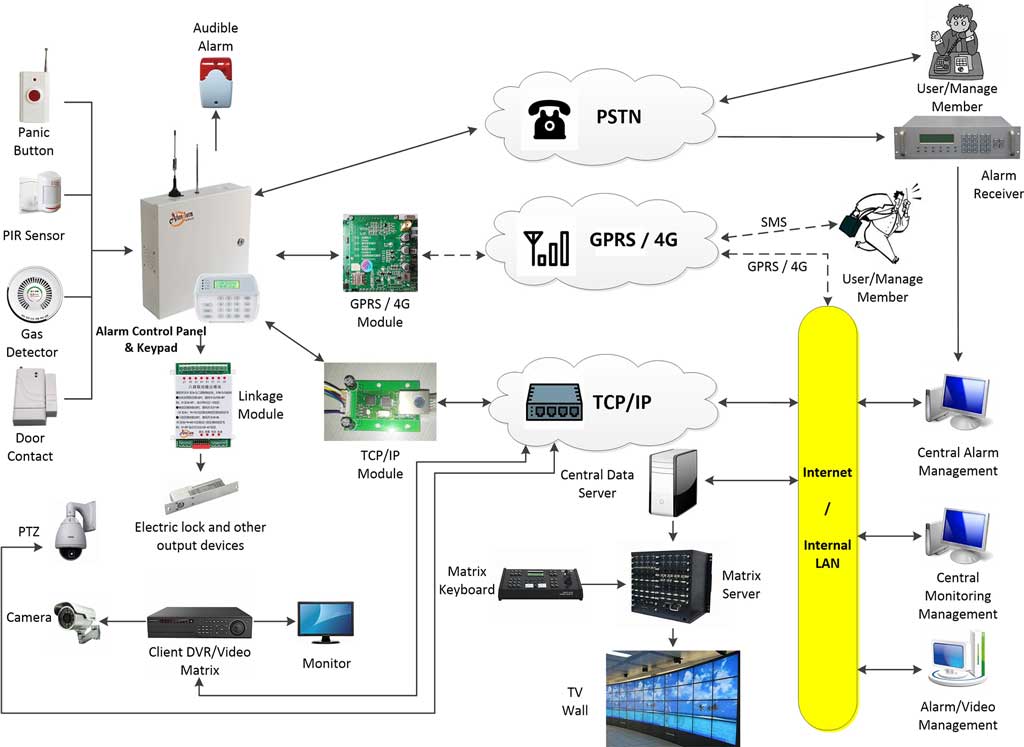
Section 3: Implementation Best Practices and Considerations
How to Choose the Right Tool for Your Needs
When evaluating diagnostic tools or software for intruder alarm systems, decision-makers should consider:
- Compatibility with existing alarm panels, sensors, and communication modules.
- Integration with existing central monitoring station infrastructure.
- Scalability for multi-site or enterprise deployments.
- Cybersecurity features, including encryption and role-based access.
- Vendor support, availability of updates, and technical documentation.
- Total cost of ownership, including subscription fees and licensing.
For procurement teams purchasing in bulk, negotiating cloud licenses or extended support packages often yields significant long-term ROI.
Step-by-Step Guide to Performing Remote Checks and Resets
A typical remote diagnostic workflow includes:
- Authenticate into the cloud platform or diagnostic software using MFA.
- Run system scans to analyze panel status, communication paths, and sensor conditions.
- Access event logs to identify root causes of faults or recurring issues.
- Apply resets (e.g., communication reset, tamper reset, wireless device re-sync).
- Adjust parameters such as entry/exit times, sensitivity levels, or reporting paths.
- Verify system functionality after corrective action.
- Document the intervention for compliance and service reporting.
Troubleshooting common issues often involves reviewing encrypted communication settings, verifying IP reachability, or updating firmware when compatibility issues arise.
Security and Compliance in Remote Diagnostics
Because remote access introduces cybersecurity considerations, organizations must ensure that remote diagnostic tools comply with relevant standards. Key requirements include:
- End-to-end encryption to prevent interception of alarm data.
- Multi-factor authentication (MFA) to protect access credentials.
- Adherence to EN 50131 for intruder and hold-up alarm systems in Europe.
- Regular firmware updates to mitigate vulnerabilities.
- Audit trails for all remote interactions with alarm hardware.
Adopting these practices strengthens system integrity and satisfies corporate and regulatory governance requirements.
Conclusion
Remote diagnostic tools and software have become essential components of modern intruder alarm systems. From cloud-based monitoring platforms to advanced engineering applications, these technologies dramatically simplify system maintenance, reduce service costs, and enhance operational efficiency.
Security teams, product managers, and procurement professionals evaluating new alarm solutions should prioritize systems with robust remote diagnostic capabilities. Leveraging these tools ensures faster fault resolution, better uptime, and long-term cost savings—especially in multi-site commercial environments. As the alarm industry evolves, emerging innovations such as AI-powered analytics and predictive diagnostics will further enhance remote service capabilities and system resilience.