
I. Introduction
In modern security environments, a reliable network alarm system is not just an option—it’s the backbone of proactive protection. Studies show that over 60% of security breaches in commercial facilities occur during periods of system downtime or malfunction. When your alarm system fails to communicate alerts on time, the consequences can be both operationally and financially devastating.
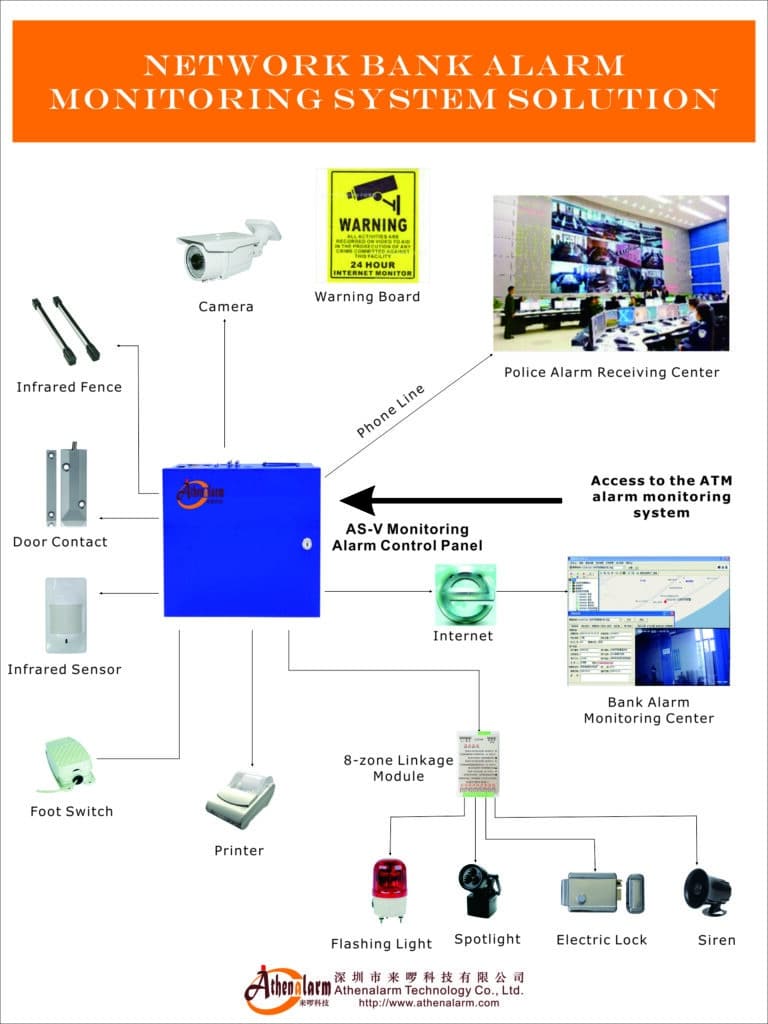
A network alarm system integrates sensors, control panels, IP-based communication modules, and monitoring software to detect unauthorized activities in real time. These systems rely heavily on stable network connections, power continuity, and software reliability.
This article provides an expert guide to Network Alarm Troubleshooting—covering common network alarm issues, diagnostic frameworks, and effective alarm system fault resolution techniques. Whether you’re a security technician or a facility manager, these insights will help maintain your system’s integrity and reduce downtime.
II. Understanding Network Alarm Systems
System Architecture Overview
Modern network alarm systems combine hardware and software components over wired or wireless networks. Key elements include:
- Sensors and detectors (motion, door contact, glass break)
- Control panels that manage input signals and trigger responses
- IP communication modules that transmit data to monitoring centers
- Cloud or IoT integrations, enabling remote control and analytics
These components work together through Ethernet, Wi-Fi, or cellular networks—making system stability highly dependent on network performance.
Why Faults Occur
Common causes of faults include:
- Network instability (packet loss, latency, IP conflicts)
- Hardware wear and tear (aging sensors or routers)
- Software and firmware bugs
- Environmental stress (temperature, humidity, electromagnetic interference)
Benefits of Proactive Troubleshooting
Regular troubleshooting prevents false alarms, communication losses, and system downtime—all of which can undermine trust in your security infrastructure. Proactive maintenance also enhances compliance with industry standards and improves the overall resilience of your alarm network.
III. Common Faults in Network Alarm Systems
1. Connectivity Issues
Symptoms: Delayed alerts, “network error” messages, or loss of connection to the monitoring center.
Causes: Weak Wi-Fi signals, router failure, DHCP or IP address conflicts.
2. False Alarms Triggered by Network Interference
Symptoms: Random alarms or notifications without any actual event.
Causes: Electromagnetic interference, software glitches, or misconfigured sensors.
3. Power Supply and Backup Failures
Symptoms: System going offline during outages, flashing warning LEDs, or unstable performance.
Causes: Dead batteries, power surges, or insufficient UPS capacity.
4. Software and Firmware Glitches
Symptoms: Frozen interface, login errors, or failed updates.
Causes: Outdated firmware, malware infections, or corrupted configuration files.
5. Hardware Component Failures
Symptoms: Inactive zones, non-responsive sensors, or persistent error lights.
Causes: Damaged wiring, environmental exposure (moisture, dust), or improper installation.
IV. Step-by-Step Troubleshooting and Solutions
General Troubleshooting Framework
- Check power sources – confirm both main and backup supply are stable.
- Verify physical connections – inspect cables, routers, and switches.
- Run diagnostics – use system logs, ping tests, and monitoring tools.
- Restart and isolate – reboot devices one by one to identify the fault zone.
- Update and document – apply patches, and log any recurring issues for trend analysis.
Solution for Connectivity Issues
Diagnostics:
- Ping test between the alarm panel and monitoring server.
- Inspect cable connections and verify router settings.
- Measure Wi-Fi signal strength and identify IP conflicts.
Fixes:
- Reset or replace routers and network switches.
- Update router firmware to the latest version.
- Use wired connections where possible to ensure stability.
- Employ network analyzers or SNMP tools for continuous monitoring.
Solution for False Alarms
Diagnostics:
- Review the event log to identify specific sensors triggering alarms.
- Perform zone isolation tests to eliminate faulty devices.
Fixes:
- Re-calibrate or reposition sensors to reduce environmental interference.
- Adjust motion detector sensitivity levels.
- Apply firmware updates addressing false alarm reduction.
- Consider AI-based filtering software that distinguishes between real intrusions and environmental noise.
Solution for Power Supply Failures
Diagnostics:
- Test power output and backup battery voltage with a multimeter.
- Check for loose wiring or corrosion.
Fixes:
- Replace batteries every 12–18 months.
- Add surge protection and voltage stabilizers.
- Integrate a redundant UPS to sustain power during outages.
Solution for Software Glitches
Diagnostics:
- Review system logs for software errors.
- Run antivirus and integrity scans.
Fixes:
- Reboot in safe mode and reinstall firmware or software.
- Perform version-controlled updates and back up configurations.
- Schedule regular patch management to prevent vulnerabilities.
Solution for Hardware Failures
Diagnostics:
- Conduct zone testing to isolate faulty devices.
- Inspect connectors, terminals, and housing for physical damage.
Fixes:
- Replace damaged sensors or modules under warranty.
- Follow manufacturer guidelines for installation spacing and mounting.
- Keep spare parts available for critical systems.
V. Preventive Maintenance Tips
Routine Checks
- Schedule monthly inspections for all sensors and controllers.
- Apply firmware updates quarterly.
- Conduct network security audits to detect latency or signal drops.
Best Practices
- Use encrypted communication protocols (TLS, HTTPS) to prevent tampering.
- Maintain redundancy using dual network links or 4G failover modules.
- Train personnel to recognize early warning signs and respond promptly.
Advanced Strategies
- Implement SNMP-based monitoring for real-time device health tracking.
- Integrate the alarm system with smart home or building management platforms for unified control.
Cost-Saving Advice
Preventive maintenance reduces long-term expenses by minimizing emergency repairs and extending equipment lifespan—improving total cost of ownership (TCO) for your security infrastructure.
VI. Conclusion
A well-maintained network alarm system ensures consistent protection, reliable alerts, and minimized downtime. By understanding common faults, applying structured troubleshooting techniques, and adopting preventive maintenance practices, organizations can safeguard both assets and operational continuity.
If you’re experiencing persistent network alarm problems, consult certified technicians for an in-depth system audit.