

Introduction
Imagine this: you’ve just invested in a new alarm system, only to find that your smart door lock refuses to connect—or worse, your mobile app keeps showing “device not supported.” You’re not alone. Many homeowners and security managers face confusion when selecting or integrating alarm products, often due to unclear feature descriptions and compatibility issues.
This Alarm Products Features FAQ is designed to clear up that confusion. Drawing from years of hands-on experience in security system design and installation, this guide explains the core features, compatibility challenges, and best practices that every user should understand before choosing or upgrading an alarm system.
As a certified security expert specializing in intrusion alarm systems and enterprise-level monitoring integration, I’ve helped hundreds of users design systems that work seamlessly—without the headaches of mismatched devices or unreliable setups. In this article, you’ll learn practical answers to real-world problems backed by professional insights.
So, let’s dive in and explore what makes modern alarm systems smarter, more compatible, and truly reliable.
Section 1: Understanding Core Features of Alarm Products
What Are the Essential Features of Modern Alarm Products?
Modern alarm systems go far beyond simple sirens and door contacts. They combine advanced sensors, intelligent control hubs, and smart integrations that adapt to different environments—whether it’s a small apartment or a large industrial facility.
Here are the most important features every user should understand:
- Sensors: Motion, door/window, vibration, and glass-break sensors detect unauthorized entry.
- Control Panels: The central hub that connects all devices—often touchscreen-based and cloud-connected.
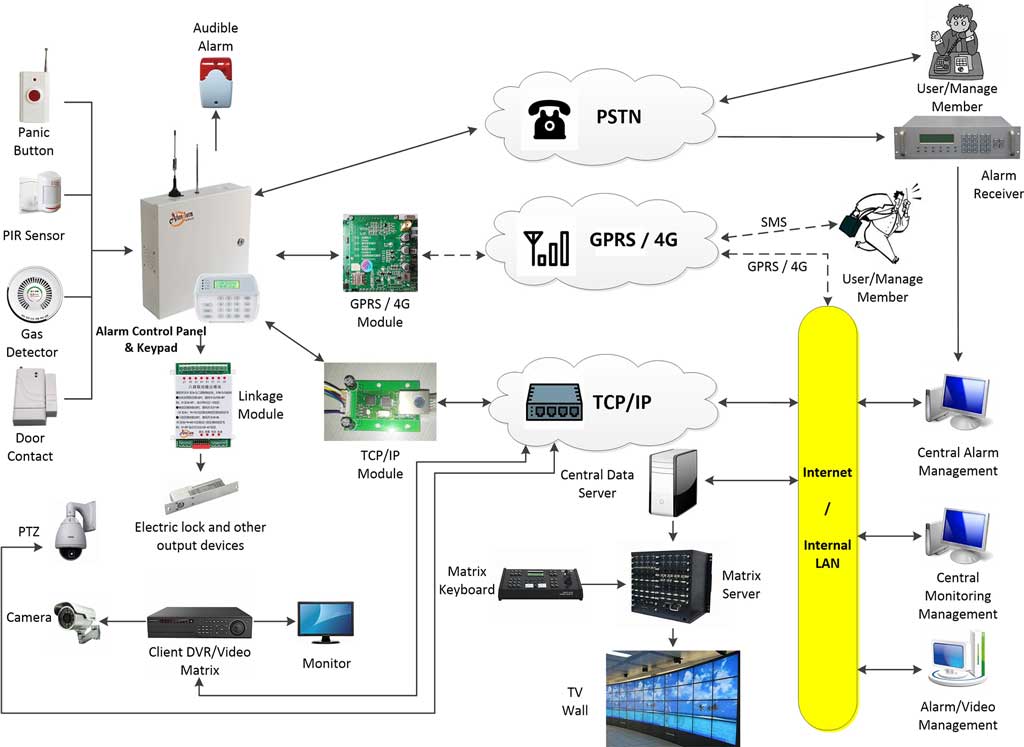
- Communication Modules: Support Wi-Fi, cellular, or Ethernet to ensure alarm signals reach monitoring centers.
- Smart Integrations: Mobile apps, AI detection algorithms, and compatibility with assistants like Alexa or Google Home.
- Power Management: Battery backup and tamper protection ensure the system operates even during outages.
FAQ Highlights
Q1: What types of sensors should I prioritize for my alarm system?
Choose based on your layout and threat points. Motion sensors for open areas, magnetic contacts for entry points, and glass-break sensors for windows are essential. In industrial settings, vibration sensors protect valuable equipment.
Q2: How do wireless vs. wired alarm products differ in functionality?
Wired systems offer stability and are ideal for permanent installations, while wireless systems provide flexibility and faster setup. Modern encrypted wireless systems now offer near-wired reliability.
Q3: What role do smart features like AI detection play in preventing false alarms?
AI-enabled sensors distinguish between human movement and environmental noise (like pets or wind), significantly reducing false triggers and unnecessary alerts.
Section 2: Common Compatibility Issues and Solutions
Navigating Compatibility Challenges in Alarm Systems
Compatibility remains one of the most common concerns among users. Many alarm products claim “universal support,” but in practice, differences in communication protocols and manufacturer ecosystems often cause integration issues.
Common Compatibility Scenarios
- Cross-brand integration: Mixing brands like Honeywell, DSC, and Ring can be difficult without compatible hubs or adapters.
- Protocol conflicts: Z-Wave, Zigbee, and proprietary RF systems don’t always communicate directly.
- Smart home integration: Some products require specific hubs (e.g., Samsung SmartThings) to link with IoT platforms.
FAQ Highlights
Q1: Can I integrate my existing alarm product with new smart home devices?
Yes—if both use compatible communication standards (Z-Wave, Zigbee, or Wi-Fi). Use a bridge hub or universal gateway if needed, and always verify firmware version compatibility.
Q2: What should I check for compatibility when mixing brands like ADT and Ring?
Check the protocol layer (Z-Wave or Wi-Fi), frequency range, and API openness. Most proprietary systems, like ADT, are locked ecosystems. If flexibility is a priority, consider third-party hubs or open-platform systems.
Q3: How do I resolve issues with alarm products not connecting to my Wi-Fi network?
Ensure the device supports your Wi-Fi band (2.4GHz vs. 5GHz), update firmware, and check router firewall settings. Rebooting both devices and performing a fresh pairing often resolves link errors.
Section 3: Advanced Features and Integration Tips
Exploring Advanced Alarm Product Features for Enhanced Security
As smart home ecosystems evolve, alarm products now include automation, cloud connectivity, and AI analytics. These not only improve convenience but also increase situational awareness.
Key Advanced Features
- Geofencing: Automatically arms/disarms your system based on smartphone location.
- Cloud Storage: Stores alarm events and video verification data securely.
- Video Verification: Combines camera feeds with alarm signals for faster emergency response.
- Automation Rules: Customize scenarios—like turning on lights when motion is detected.
FAQ Highlights
Q1: How does geofencing work in alarm products, and is it compatible with all smartphones?
Geofencing uses GPS data from your smartphone to automate arming/disarming. Most systems work with iOS and Android, but ensure app permissions for location access are always enabled.
Q2: What are the benefits and compatibility requirements for video verification features?
Video verification reduces false dispatches and speeds up emergency response. Ensure your alarm control panel supports IP camera integration and cloud storage for compatible operation.
Q3: Can alarm products be integrated with professional monitoring services?
Yes, but confirm the monitoring provider supports your specific brand and communication module (IP, GSM, or PSTN). Some DIY alarm systems may lack UL-certified transmission standards required for professional monitoring.
Section 4: Best Practices for Selection and Maintenance
Expert Tips for Choosing and Maintaining Compatible Alarm Products
Choosing compatible alarm systems isn’t just about features—it’s about long-term reliability. Poor compatibility or neglected maintenance can lead to costly replacements or downtime.
Selection & Maintenance Tips
- Check Certification: Look for UL or CE markings for safety and interoperability standards.
- Read Product Spec Sheets: Verify supported frequencies, protocols, and firmware update policies.
- Perform Regular Maintenance: Test sensors monthly and replace backup batteries yearly.
- Plan for Scalability: Choose systems that allow expansion without replacing the main control unit.
FAQ Highlights
Q1: How do I ensure long-term compatibility when buying alarm products?
Select brands that regularly update firmware and support open communication standards. Avoid products with closed ecosystems that restrict integration.
Q2: What maintenance routines prevent feature malfunctions or compatibility drifts?
Regularly test connectivity between sensors and control panels, and keep firmware updated. Dust and humidity can also affect sensor accuracy—inspect hardware quarterly.
Q3: Are there universal standards that guarantee compatibility across alarm brands?
While no single global standard exists, Z-Wave Alliance and ONVIF (for cameras) are the closest. Choosing ONVIF- or Z-Wave-certified devices ensures higher interoperability.
Conclusion
Understanding your alarm products’ features and compatibility is the foundation of a secure, efficient protection system. By taking the time to review specifications, verify interoperability, and perform regular maintenance, you’ll not only enhance safety but also extend the lifespan of your investment.