
In the high-stakes world of burglar alarm systems, one truth stands out: the best hardware fails if the interface confuses the very people it’s meant to protect. As a senior technical expert with over two decades designing, installing, and optimizing burglar alarm solutions for banks, hospitals, nursing homes, and family residences worldwide, I’ve seen it time and again. Traditional keypads and apps that work perfectly for tech-savvy installers become sources of panic, false alarms, and outright abandonment for elderly homeowners or caregivers.
This article delivers a complete, actionable blueprint for burglar alarm UX design that puts real users first—especially elderly users and those with disabilities. Whether you’re a product manager refining the next-generation control panel, a UI/UX designer tasked with accessibility compliance, or a system integrator specifying solutions for senior living communities, you’ll walk away with practical frameworks, step-by-step processes, and proven tactics that make every burglar alarm interface intuitive, forgiving, and genuinely empowering—even for users with age-related vision loss, reduced dexterity, mild cognitive changes, or hearing impairment.
We’ll explore simplified emergency response flows, crystal-clear feedback prompts, ironclad misoperation prevention, and a logical design framework you can implement immediately. The result? Fewer false dispatches (often slashed by 40-60% in real deployments), higher user confidence, stronger customer loyalty, and systems that actually get used daily instead of gathering dust. Let’s transform your burglar alarm UX from a potential liability into your strongest competitive advantage.

Why Burglar Alarm UX Has Become the Make-or-Break Factor in Modern Security
The global population aged 65+ is projected to double by 2050. Millions of these individuals live independently or in assisted facilities where a reliable burglar alarm is non-negotiable for peace of mind. Yet legacy systems—small buttons, cryptic codes, tiny screens, and shrill beeps—create exactly the opposite effect. Studies and field data consistently show that poor interface design contributes to:
- 25-50% of false alarms stemming from user error (arming/disarming mistakes or accidental triggers).
- Elderly users disabling systems entirely because they “don’t want the hassle.”
- Delayed emergency response when panic sets in and the interface feels overwhelming.
As system integrators and bulk procurers know, every false alarm costs monitoring centers time, erodes trust with law enforcement, and damages your brand reputation. Superior burglar alarm UX directly impacts your bottom line: lower service calls, higher retention rates, and easier upsell to wireless network solutions that integrate seamlessly with existing infrastructure.
At companies like Athenalarm, we’ve spent nearly 20 years perfecting industrial-grade burglar alarm panels precisely because we treat the human interface as seriously as the sensors and communication protocols. The payoff is measurable: installations in nursing homes and residential communities report dramatically higher satisfaction when interfaces respect real human limitations rather than assuming perfect dexterity and 20/20 vision. Features like customizable MP3 voice reminders and hybrid physical-digital panels have proven especially effective in these environments, turning complex burglar alarm operations into simple, reassuring experiences.
The Real-World Challenges Elderly and Disabled Users Face with Burglar Alarms
Before designing solutions, we must map the problems with ruthless honesty. Age-related changes are predictable yet frequently ignored:
- Vision decline: Smaller text, low contrast, and glare-prone screens become invisible under typical home lighting. An elderly user trying to read a 4-digit code on a dimly lit keypad at 2 a.m. often gives up in frustration.
- Dexterity and motor issues: Arthritis or tremors make tiny buttons or swipe gestures frustrating or impossible. Pressing a small “Arm” key while standing at the door can feel like a daily battle.
- Hearing changes: High-pitched beeps (above 2000 Hz) are inaudible; overlapping alarms create confusion during a real intrusion.
- Cognitive load: Multi-step processes or abstract icons increase anxiety during high-stress moments like a perceived intrusion.
- Tech familiarity: Many seniors prefer physical buttons over apps; voice commands or large tactile feedback feel more natural.
Disabled users—wheelchair users needing reachable controls, those with color blindness, or individuals with early dementia—face the same barriers. Inclusive burglar alarm UX isn’t a “nice-to-have”; it’s the difference between a system that protects lives and one that sits unused. In practice, this means designing every interaction around the reality of a 78-year-old living alone who needs to arm the house before bedtime without second-guessing.
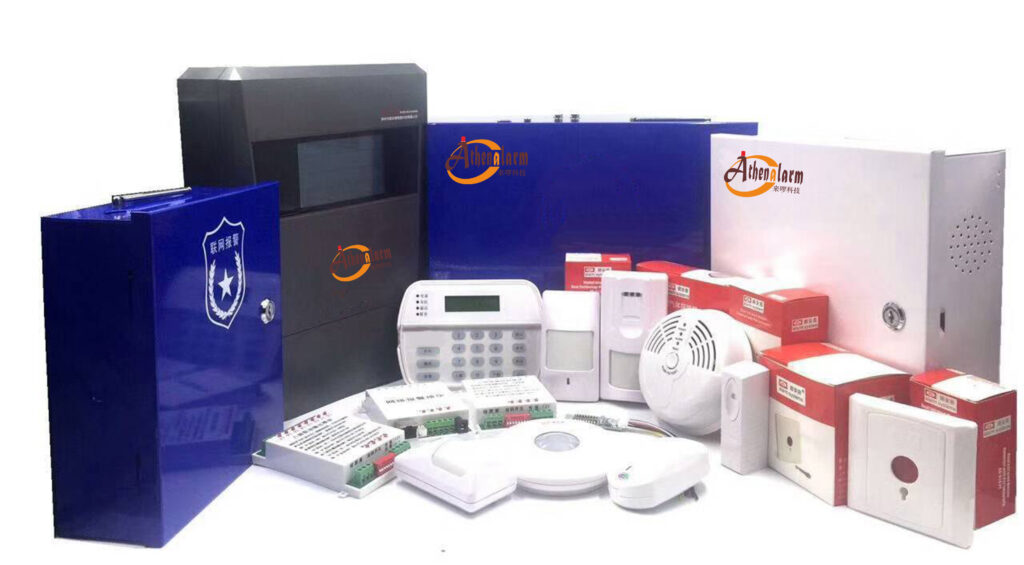
10 Core Design Principles for Accessible Burglar Alarm Interfaces
These principles form the foundation of every successful burglar alarm UX project I’ve led. Apply them rigorously and you’ll create systems that feel invisible—in the best possible way.
- Simplicity First – Reduce Cognitive Load
Limit visible options on the home screen to 4-6 maximum. Use plain language: “Arm Home” instead of “Stay Mode.” Every screen should answer three questions instantly: Is the system armed? Are any zones open? What should I do next? In a burglar alarm context, this prevents the common mistake of leaving the house unprotected because the user couldn’t figure out the mode. - High-Contrast, Oversized Visuals
Minimum 16pt sans-serif fonts (ideally 24pt+ for critical labels). Contrast ratio of at least 7:1 (WCAG AAA compliant). Large, high-contrast icons with text labels underneath. Buttons at least 48×48 pixels (preferably 60×60) with generous spacing to prevent accidental presses. For elderly users, this means status text like “All Secure” is readable from across the room even in low light. - Multimodal Feedback – Never Rely on One Sense
Combine visual (large flashing icons or color-coded status), auditory (deep 500-2000 Hz tones, adjustable volume, clear voice prompts), and haptic (distinct vibration patterns) cues. For example, a successful arming sequence triggers a green “All Secure” screen, a calm spoken confirmation (“System armed. All doors secure”), and a short vibration. Athenalarm’s MP3 voice modules excel here by allowing custom low-pitched recordings that elderly users can actually hear and understand. - Error Prevention Over Error Correction
Design so mistakes are nearly impossible. Highlight open zones in red with large “Fix This Zone” buttons. Require explicit confirmation for critical actions like disarming or bypassing. Include a one-touch “Cancel” that’s always visible and oversized. This directly tackles the leading cause of false burglar alarms: accidental triggers during routine movement. - Progressive Disclosure
Show only what’s needed right now. Advanced settings tucked behind a clearly labeled “More Options” area protected by optional simple PIN or biometric. Caregivers can access full logs without overwhelming the primary user. - Consistency Across Devices
The physical keypad, touchscreen panel, mobile app, and voice interface must speak the same visual and verbal language. A user who arms via panel should recognize identical status icons in the companion app. This continuity is crucial for family caregivers who monitor remotely. - Adjustability and Personalization
Allow users (or caregivers) to set text size, volume, contrast themes (high-contrast black-on-white or white-on-black), and preferred feedback modes during initial setup or via a simple menu. A one-time 5-minute setup walk-through makes all the difference for long-term adoption. - Voice and Tactile-First Options
Integrate reliable voice commands (“Hey Alarm, arm the house”) and large physical buttons for users who prefer them. Voice reminders—pre-recorded or customizable MP3 messages—can announce “Front door is open” in a calm, low-pitched voice when a PIR sensor triggers. These features, refined in systems like Athenalarm’s, give elderly users independence without forcing them to learn new tech. - Forgiving Recovery Paths
If a user makes a mistake, the system gently guides them back without alarm escalation. Example: “You pressed disarm but the system is not armed. Would you like to arm it instead?” This prevents panic spirals that lead to unnecessary 911 calls. - Inclusive Testing Standard
Every design iteration must be validated with actual elderly and disabled users, not just internal teams. Simulate real home environments, including poor lighting and hurried nighttime use.
Step-by-Step: Designing the Perfect Burglar Alarm Control Panel
Here’s the exact process I use when specifying or redesigning control panels for large-scale deployments.
Phase 1: User Research (2-4 weeks)
Interview 15-20 target users (seniors in independent living, caregivers, facility managers). Observe them attempting common tasks: arming at night, responding to a door chime, canceling a false alarm. Document pain points with video (with consent). Ask specifically about past experiences with burglar alarms that frustrated them.
Phase 2: Information Architecture
Create a simple hierarchical map:
- Home/Dashboard (status + one-tap actions)
- Arm/Disarm flow
- Zone status & bypass
- Emergency/Panic
- Settings (caregiver-only)
Phase 3: Wireframing and Prototyping
Use large printouts or clickable Figma prototypes sized to actual panel dimensions. Test button sizes by having users tap with simulated tremors (thick gloves work well). Ensure every element feels solid and reachable.
Phase 4: Visual and Interaction Design
- Background: Matte, non-reflective finish to reduce glare.
- Status LED ring around the entire panel for at-a-glance visibility from across the room.
- Touchscreen fallback: physical buttons below screen for hybrid operation, exactly as implemented in many Athenalarm hybrid panels.
Phase 5: Implementation
For wireless systems like those from Athenalarm, ensure the panel firmware supports customizable voice libraries and app synchronization without lag. Test end-to-end with real sensors to confirm no delays in feedback during an actual zone trigger.

Crafting Seamless Emergency Response Workflows
Emergency response is where poor UX can cost lives. Here’s the exact simplified flow I recommend, with clear operation steps for users:
- Dedicated Panic Button – Large, red, illuminated button on the panel and optional wearable pendant. One long press (1.5 seconds) triggers silent or audible alarm with automatic voice confirmation: “Emergency help requested. Stay on the line.”
User step: Locate the big red button (always at standard height for wheelchair access) and hold for 1.5 seconds—no code required. - Two-Step Verification for Non-Emergency Alarms
When an intrusion is detected:
- Immediate loud but distinct chime + voice: “Possible intrusion at front door.”
- Large on-screen countdown (30 seconds) with “False Alarm – Cancel Now” button (counts down visibly).
- If not canceled, escalate to full siren and central station notification with video verification if integrated.
User step: Press the oversized “Cancel Now” button within the countdown window. The system will speak: “Alarm canceled. Thank you.”
- Disarm Under Stress
Single large “Disarm” button always visible. Enter a simple 4-digit code or use fingerprint/biometric. Immediate visual + voice feedback: “System disarmed. Welcome home.”
User step: Tap the big “Disarm” button, then follow the on-screen prompts—no hunting for small keys.
Detailed operation steps for integrators:
- Step 1: During commissioning, walk the end-user through the flow three times, using their actual daily routine.
- Step 2: Program a “Practice Mode” that simulates alarms without notifying the central station.
- Step 3: Provide laminated quick-reference cards with large icons matching the panel exactly.
- Step 4: Set up caregiver remote access so family can arm/disarm via app while seeing the same status.
Feedback Mechanisms That Build User Confidence
Feedback turns an abstract “black box” into a trusted partner. Best practices:
- Status at a Glance: Persistent top bar showing “Armed – All Secure” in green, 48pt font, with icon of a locked house.
- Zone-Specific Alerts: When a door opens, the panel highlights the exact zone on a simple floorplan diagram (optional but highly effective for larger homes).
- Auditory Hierarchy: Low-priority chimes (soft doorbell tone), medium (voice + tone), high (distinct siren pattern). Never overlap sounds.
- Haptic Patterns: Short buzz for button press confirmation, longer pulse for open zone warning.
Voice reminders (a feature perfected in systems like Athenalarm’s MP3 modules) are gold: “Good morning. Remember to arm the system before leaving” or “Window in bedroom is open.” Add low-battery alerts like “Battery low—please check the panel” in the same calm voice so users never miss maintenance.
Ironclad Techniques to Prevent Misoperations
False alarms destroy credibility. Design these safeguards:
- Zone Highlighting: Before arming, the panel displays a full-screen list of open zones with photos or icons. User must tap “Bypass” or “Close” for each.
- Confirmation Gates: “You are about to arm the system. All zones secure? Yes / Review Zones.”
- Time-Locked Bypass: Temporary bypasses auto-expire after 12 hours unless re-confirmed.
- Activity Logging: Caregivers receive gentle daily summaries (“System armed 7 times this week, 1 false alarm prevented by cancel button”).
Real-world result from similar deployments: false alarm rates drop below 5% when these are implemented. A common pitfall—forgetting to arm at night—is solved with optional voice prompts at bedtime: “It’s 10 PM. Would you like to arm the house now?”

A Proven Logical Framework for Burglar Alarm UX Development
Use this 6-stage framework on every project:
- Define User Personas – “Margaret, 78, mild arthritis, lives alone.”
- Map Journeys – Arming at bedtime, responding to 3 a.m. chime, monthly testing.
- Prototype & Test – Minimum 3 rounds with 8+ senior participants.
- Technical Integration – Ensure UX choices don’t compromise encrypted communication or battery life in wireless burglar alarm systems.
- Deployment & Training – Include video tutorials shot in real homes.
- Monitor & Iterate – Use anonymized usage data and quarterly check-ins to refine.
Real-World Case Studies That Prove the Approach Works
In one 500-home residential community deployment using Athenalarm’s wireless GSM/4G WiFi alarm systems, adding large-button hybrid panels and voice prompts reduced false dispatches by 52% within six months. Residents reported feeling “finally in control” of their security, with app notifications arriving instantly for remote family oversight.
A nursing home chain upgraded aging systems to modern touchscreen panels with multimodal feedback and MP3 voice modules. Staff response time to genuine events improved by 35%, and resident complaints about “that noisy alarm” dropped to zero. These outcomes mirror what leading integrators achieve when they prioritize UX alongside sensor reliability and 4G/WiFi redundancy.
Measuring Success: KPIs Every Integrator Should Track
- False alarm rate per 100 activations (target <5%).
- User satisfaction score via simple 1-5 smiley-face survey after 30 days.
- Percentage of users who customize settings (high customization = high engagement).
- Service call reduction for “can’t figure out the panel” issues.
Emerging Technologies Poised to Transform Burglar Alarm UX
Voice-first interfaces with natural language understanding, AI that learns user patterns to suggest “It’s bedtime—would you like to arm the house?”, and wearable panic pendants with fall detection are already available in premium systems like Athenalarm’s networked solutions. The key is ensuring these enhancements remain optional and never replace simple physical controls—elderly users must always have the big red button as their safety net.
Your Next Step: Implement Burglar Alarm UX That Actually Works
You now have the complete playbook. Stop accepting interfaces that frustrate your most vulnerable customers. Start designing burglar alarm systems where elderly users confidently arm the house every night, caregivers rest easy, and your monitoring center handles real threats instead of user errors.
If you’re procuring systems for senior communities, commercial projects, or residential developments, demand interfaces built on these principles. Companies specializing in industrial-grade wireless solutions—like those with proven voice reminder technology, hybrid control panels, and seamless CCTV integration—already deliver this level of UX excellence today.
Ready to upgrade your next burglar alarm deployment? Reach out to our team for a consultation on custom UX-optimized panels, full system design support, or OEM solutions tailored to your exact accessibility requirements. Your clients—and your false alarm statistics—will thank you.