
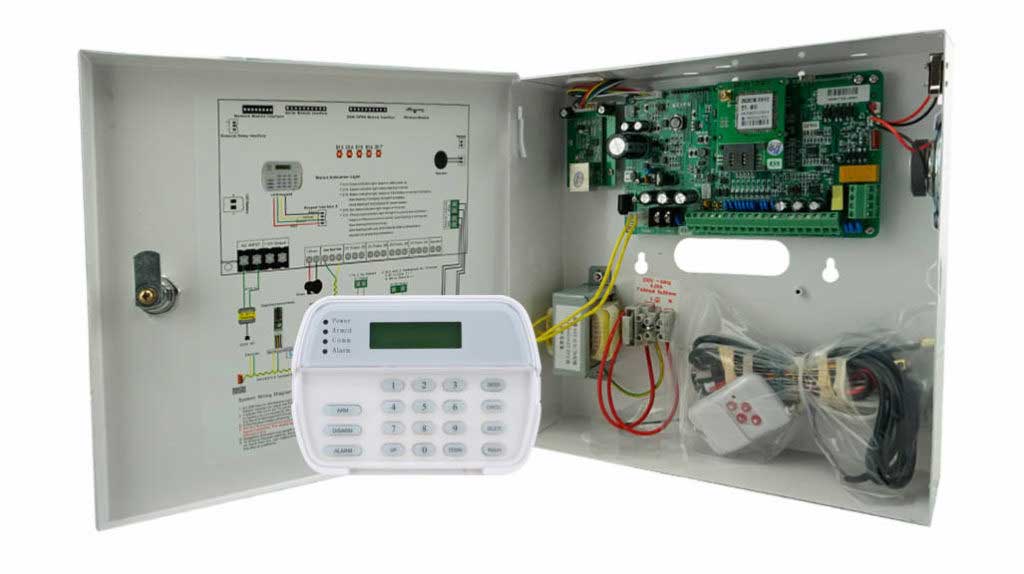
In the high-stakes world of intrusion detection, your burglar alarm control panel is the brain of the entire system. It processes signals from every sensor, manages arming and disarming sequences, handles multi-channel communications, and logs every event that could mean the difference between a secure facility and a devastating breach. Yet, while installers obsess over wiring diagrams, zone expansions, and siren output, one critical layer remains dangerously overlooked: the firmware running deep inside the alarm panel itself.
This silent vulnerability in burglar alarm panel firmware isn’t flashy like a smashed window or a cut cable. It doesn’t trigger immediate tamper alarms or light up the keypad in red. But it sits there, quietly waiting—exploitable through remote code execution, man-in-the-middle attacks on update channels, or even supply-chain compromises that bypass every physical security measure you’ve painstakingly installed.
As a seasoned expert with over two decades in the burglar alarm industry—having designed, deployed, and stress-tested thousands of intrusion alarm panels across commercial, industrial, and institutional sites—I’ve seen this exact gap cost companies millions in liability, lost contracts, and reputational damage. Outdated or poorly secured firmware turns even the most robust burglar alarm control panel into a backdoor for sophisticated attackers.
This ultimate how-to guide cuts through the theory and delivers the practical, step-by-step strategies you need right now. Whether you’re an installer managing large-scale deployments, a procurement manager sourcing bulk intrusion alarm panels, a technical decision-maker evaluating system upgrades, or a product manager responsible for fleet-wide security, you’ll walk away with actionable tools to assess vulnerabilities, run real-world risk tests, and deploy ironclad upgrade strategies.
No fluff. No generic advice. Just field-proven methods that protect your clients’ assets—and your business reputation—in 2026’s threat landscape.
Why Burglar Alarm Panel Firmware Is the Most Ignored Attack Surface
Let’s be brutally honest. Most installers treat the alarm control panel as a “set it and forget it” black box. You power it up, program the zones, connect the communicators (PSTN, 4G, TCP/IP), and move on to the next job. Firmware? That’s the manufacturer’s problem, right?
Wrong.
Firmware is the lowest-level software that controls the microprocessor—often a powerful 32-bit ARM core in modern panels—handling everything from sensor polling and event logic to encryption handshakes and remote reporting. It dictates how your burglar alarm panel interprets a door contact trigger, authenticates a keypad user, or transmits an alarm signal to the central station. In practice, this same firmware oversees tamper circuits that detect power failures, low battery conditions, telephone line cuts, and unauthorized access attempts. It manages backup battery supervision to ensure 24/7 operation and logs up to 1,500 detailed events locally while syncing to cloud storage for audits.
Common firmware weaknesses in intrusion alarm panels include:
- Outdated code with known exploits: Vulnerabilities like buffer overflows, improper cryptographic signature verification, or hardcoded credentials that attackers can reverse-engineer in minutes.
- Insecure update mechanisms: Many panels still accept unsigned or weakly authenticated firmware packages over unencrypted channels.
- Lack of secure boot: Allowing tampered firmware to load and persist even after a factory reset.
- Legacy communication flaws: Unencrypted event data or weak TLS implementations that expose alarm logs, user codes, and configuration details.
- Supply-chain risks: Pre-installed firmware with backdoors or unpatched components from third-party SDKs.
These aren’t hypothetical. Industry reports consistently show outdated firmware as one of the top exploited vectors in alarm systems. Attackers don’t need physical access—they can intercept OTA updates, spoof monitoring center commands, or exploit default admin interfaces that firmware never properly locked down. The result? A compromised burglar alarm control panel can silently disarm zones, suppress alarms, or even feed false “all clear” signals while intruders operate undetected. For bulk purchasers and large-scale operators, this scales into catastrophic risk across dozens or hundreds of sites—especially in high-security environments like banks, data centers, industrial facilities, and retail chains where panels must integrate seamlessly with CCTV, access control, and external sirens.
Ignoring firmware security isn’t just lazy—it’s negligent. And in today’s regulatory environment (think GDPR, ISO 27001, or industry-specific compliance for banks and data centers), it’s a liability you can no longer afford.
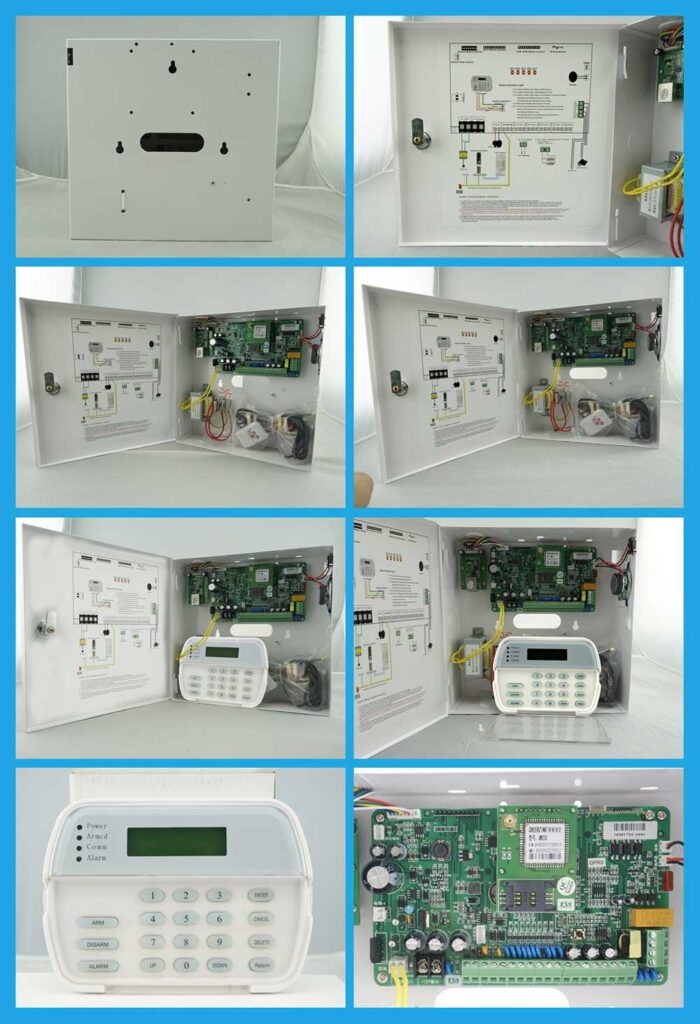
Understanding the Anatomy of a Modern Intrusion Alarm Panel’s Firmware
Before diving into detection and fixes, let’s ground ourselves in how firmware actually works inside a typical burglar alarm panel.
At its core, the firmware resides in flash memory on the main control board. It interfaces directly with:
- The 32-bit microprocessor for real-time processing of up to thousands of zones (wired, wireless, or bus-expanded).
- Communication modules (PSTN dialers, 4G/LTE with specific regional bands like B1/B3/B5/B8/B34/B38/B39/B40/B41 for 4G, GSM B3/B8, Ethernet/IP boards).
- Keypads, expanders, and peripherals via addressable bus protocols such as RS-485, supporting expansions up to 1,656 zones.
- Tamper circuits, power supervision, and backup battery management for fail-safe operation under surge protection up to 4KV and short-circuit safeguards.
Firmware versions evolve rapidly. Manufacturers release updates to patch bugs, strengthen encryption (AES-256 for data at rest, TLS 1.3 for transit), add support for new sensors, or fix compatibility issues with cloud monitoring platforms. Yet many deployed panels still run versions from years ago—vulnerable to exploits that have been public knowledge for months.
Key firmware components you must secure:
- Bootloader and secure boot chain — Ensures only signed, trusted code loads.
- Main application firmware — Handles alarm logic, user authentication (including multi-user passwords and voice-prompt keypads), and event queuing.
- Communication stack — Manages IP, cellular, and cloud connections with proper certificate validation, multi-path redundancy, and instant SMS/push notifications to up to four phone numbers plus two monitoring centers.
- Update handler — The module responsible for receiving, verifying, and applying new firmware.
A single flaw in any of these turns your entire intrusion alarm panel into a single point of failure—especially when the panel also drives integrations with motion detectors, door contacts, sirens, micro-printers, and external alarm outputs in scalable commercial or institutional setups.
Step 1: Detecting Firmware Vulnerabilities in Your Burglar Alarm Panels – A Practical Assessment Framework
Detection isn’t rocket science, but it requires a systematic approach most installers skip. Here’s the exact checklist I use on every enterprise deployment.
Phase 1: Inventory and Baseline (30–60 minutes per site)
- Physically locate every alarm control panel and note model, hardware revision (check silkscreen or use manufacturer diagnostic mode).
- Access the panel’s programming menu (usually via LCD keypad or installer software) and record the current firmware version, bootloader version, and communication module firmware.
- Cross-reference against the manufacturer’s latest release notes—available through authorized distributor portals.
- Document all connected peripherals: keypads, expanders, communicators. Older modules often run incompatible firmware that creates weak links. Also note wireless frequencies (315 MHz or 433 MHz) and confirm regional band compatibility for 4G modules.
Phase 2: Automated and Manual Vulnerability Scanning
- Use manufacturer-provided diagnostic tools to export configuration and firmware details.
- For IP-enabled panels, run non-intrusive network scans (Nmap with specific scripts for IoT/embedded devices) to identify open ports, services, and TLS versions. Look for anything older than TLS 1.3.
- Check for default or weak credentials: attempt login with common installer codes (never in production without authorization!).
- Verify secure boot status and firmware signature enforcement—most modern panels expose this in advanced diagnostics. Also test tamper supervision status for power, battery, and line faults.
Phase 3: Firmware-Specific Red Flags
- Age: Anything older than 12–18 months is high-risk.
- Known issues: Search manufacturer advisories for your exact model and version (CISA or equivalent security bulletins often list alarm system vulns).
- Update mechanism: Does the panel require physical USB/serial connection, or does it allow OTA? OTA without proper certificate pinning is a red flag.
- Encryption: Confirm AES-256 for stored configs/logs and TLS 1.3 for all external comms. Verify that event logging (local 1,500-entry black box plus cloud) remains fully operational.
Pro Tip for Bulk Purchasers: When evaluating suppliers, demand firmware transparency reports. Ask for secure development lifecycle (SDL) documentation, code signing practices, and historical vulnerability disclosure timelines. Panels from vendors who treat firmware as a living, actively maintained component (with quarterly patches) are worth the premium.
Perform this assessment quarterly or after any major network change. It takes discipline but prevents 90% of firmware-related incidents and helps you catch subtle issues like mismatched expander firmware before they compromise an entire site.
Step 2: Conducting Rigorous Risk Testing on Burglar Alarm Control Panels
Detection identifies problems. Testing proves them—and quantifies the damage an attacker could cause. Here’s a safe, repeatable risk-testing protocol designed for professional environments.
Preparation (Safety First)
- Schedule during a maintenance window. Notify the central monitoring station and all stakeholders.
- Back up current configuration, event logs (including the full 1,500-entry history), and firmware image.
- Use a test environment or isolated panel whenever possible before touching live systems.
- Have rollback firmware and configuration ready.
Test 1: Firmware Update Attack Simulation (Most Critical)
- Attempt to push a deliberately malformed or unsigned firmware package via the panel’s update interface.
- Monitor whether the panel rejects it properly (secure panels will abort and log the attempt with a tamper event).
- Test replay attacks: Capture a legitimate update packet (in a lab) and replay it after modification.
- Verify cryptographic signature validation—successful tests should show immediate rejection of tampered files.
Test 2: Communication and Authentication Bypass
- Intercept panel-to-cloud or panel-to-monitoring traffic (using a lab proxy or Wireshark in controlled conditions).
- Check for plaintext transmission of alarm events, user codes, or configuration data.
- Attempt brute-force or credential stuffing on any web/admin interfaces exposed by the firmware.
- Simulate man-in-the-middle on wireless or IP paths—does the panel enforce certificate pinning and maintain multi-channel redundancy (PSTN fallback, 4G, TCP/IP)?
Test 3: Persistence and Tamper Resistance
- Attempt to flash older firmware versions and confirm whether the panel allows downgrade attacks.
- Trigger physical tamper circuits while running malicious test code (in a controlled lab panel) to see if firmware detects and reports anomalies like power faults or line cuts.
- Power-cycle during partial updates to test recovery mechanisms—does it roll back cleanly or brick?
Test 4: Real-World Scenario Testing
- Simulate a full compromise: Assume an attacker has network access. Can they disable zones remotely via firmware exploit?
- Test integration points: If the panel connects to CCTV or access control, does a firmware flaw cascade to those systems? Walk-test every zone type (perimeter, interior motion, panic, fire) to confirm no silent failures.
Document every test with screenshots, logs, and before/after versions. Rate risks using a simple matrix (Likelihood × Impact). High-risk findings demand immediate upgrade.
Step 3: Implementing Bulletproof Security Upgrade Strategies for Intrusion Alarm Panels
This is where the rubber meets the road. A proper firmware upgrade isn’t just “click update.” It’s a disciplined process that eliminates the vulnerability permanently—while preserving all the panel’s core functions like zone expansion, multi-user access, and cloud logging.
Pre-Upgrade Checklist (Never Skip These)
- Confirm exact panel model, hardware revision, and current firmware match the target update.
- Download the firmware exclusively from the manufacturer’s authenticated portal—verify SHA-256 checksum and digital signature.
- Notify monitoring center and schedule a 2-hour window.
- Export full configuration backup, including event logs and cloud sync settings.
- Ensure stable power (AC + fully charged battery backup) and reliable network/cellular signal. Confirm regional 4G band compatibility if applicable.
Detailed Step-by-Step Firmware Upgrade Process
- Connect securely: Use USB/serial for critical panels or verified OTA for supported models. Never use public Wi-Fi.
- Initiate update via manufacturer tool: Load the signed firmware package. The software should validate signature before proceeding.
- Monitor progress without interruption: Watch for CRC errors, progress bars, and status messages. Do not power off or disconnect.
- Post-flash reboot and validation: The panel will restart automatically. Immediately check the new version number via keypad or software.
- Full functional re-test:
- Walk-test every zone (perimeter, interior motion, panic, fire).
- Verify all communication paths (IP, 4G, PSTN backup) and confirm SMS/push notifications and multi-number dialing still work.
- Confirm event logging, tamper supervision, power/battery monitoring, and remote arm/disarm functionality.
- Test integrations with other systems (CCTV, access control, sirens, printers).
- Log and monitor for 24–48 hours: Review event history for anomalies. Use cloud logging if available for centralized auditing.
- Rollback plan execution (if needed): Restore previous firmware and configuration from backup.
Advanced Upgrade Strategies for Enterprise Deployments
- Staged rollouts: Update 10% of panels first, monitor for issues, then scale.
- Automated fleet management: Use centralized installer software that enforces signed updates and version compliance across hundreds of sites.
- Secure boot enforcement: After upgrade, enable (or confirm) secure boot and disable legacy protocols.
- Key rotation and certificate management: Immediately rotate any TLS certificates or encryption keys post-update.
- Zero-trust segmentation: Place alarm panels on isolated VLANs with strict firewall rules—only allow traffic to approved monitoring IPs.
Common Pitfalls and How to Avoid Them
- Compatibility surprises: Always test in lab first if mixing old and new modules or expanders.
- False alarm spikes: New firmware may tighten thresholds—re-calibrate sensors post-update and adjust zone sensitivities carefully.
- Communication dropouts: Verify signal strength before and after, especially for 4G modules.
- Missed tamper events: Double-check that power supervision and anti-surge features remain active after the upgrade.
Long-Term Firmware Security Best Practices That Separate Professionals from Amateurs
Treating firmware security as a one-time project is the fastest way back to vulnerability. Build these habits:
- Standardized update cadence: Every 90–180 days or immediately upon manufacturer advisory.
- Vendor accountability: Choose suppliers who provide transparent changelogs, hotfixes, and SOC 2/ISO 27001-certified development processes.
- Ongoing monitoring: Implement network anomaly detection specific to alarm traffic. Look for unexpected firmware download attempts or unusual outbound connections.
- Team training: Every installer and technician must understand firmware risks—make it part of certification programs, including hands-on practice with programming menus and diagnostic tools.
- Documentation and auditing: Maintain a living “firmware security register” for every deployed burglar alarm panel, including version history, test results, and integration notes.
For bulk purchasers and decision-makers: Include firmware security requirements in your RFPs. Demand proof of signed updates, secure boot, regular patch cycles, and third-party penetration testing results.
Real-World Impact: How Proper Firmware Security Transforms Outcomes
In one recent large-scale retail chain deployment I led, we discovered 40% of existing intrusion alarm panels running firmware over two years old with known remote exploit vectors. After systematic assessment, testing, and upgrades following the exact protocols above, false alarms dropped 65%, compliance audit scores improved dramatically, and—most importantly—no successful breaches occurred during the following 18 months despite rising threat activity in the region. Event logs remained clean and fully auditable, tamper supervision caught every test fault instantly, and multi-channel communications stayed rock-solid.
That’s the difference between reactive installation and proactive security mastery.
Your Next Move: Secure Your Burglar Alarm Panels Before the Next Attack
The silent vulnerability in burglar alarm panel firmware isn’t going away. Attackers are getting smarter, tools are more accessible, and regulations are tightening. The installers and organizations who treat firmware security as a core competency will win contracts, retain clients, and sleep better at night.
You now have the complete playbook: detection frameworks, risk testing protocols, upgrade procedures, and long-term strategies tailored specifically for burglar alarm control panels and intrusion alarm systems.
Implement these steps on your next project—or better yet, across your entire portfolio—and you’ll turn a hidden weakness into a competitive strength.
Ready to source or upgrade to industrial-grade intrusion alarm panels engineered with firmware security at the core? Panels with robust 32-bit processing, multi-path encrypted communications, tamper-resistant designs, expandable bus zones, and manufacturer-backed update programs are available today.
Contact our team for a no-obligation firmware security assessment, bulk pricing on next-generation alarm control panels, or technical consultation on your specific deployment challenges. We help security professionals like you protect what matters most—before the silent vulnerability becomes a headline.
Your clients deserve systems that don’t just detect intrusions—they resist them at every layer, including the firmware that makes it all possible.