

In the world of intrusion detection and perimeter security, reliable alerting remains the cornerstone of any effective intrusion alarm system. While modern cloud-based and IP-connected solutions dominate headlines, they often struggle in environments where stable internet access is limited or nonexistent.
For farms, remote warehouses, oil fields, construction sites, agricultural facilities, and other off-grid or rural locations, a GSM alarm system without internet delivers exceptional dependability by communicating directly through the cellular network using SMS alerts and automatic voice dialing.
Unlike internet-dependent systems that rely on routers, servers, and cloud infrastructure, a GSM-based security network communicates directly through the mobile network. This dramatically reduces the number of potential failure points while maintaining instant alarm notification.
This comprehensive guide explains how to design and deploy a reliable gsm alarm system for remote intrusion detection. It covers system architecture, component selection, installation procedures, configuration techniques, and long-term reliability strategies based on real-world security engineering practices.
By the end of this guide, you will understand how to implement a gsm alarm system capable of delivering immediate alerts to owners, security teams, or response personnel—even when internet connectivity is unavailable.
Why Choose a GSM Alarm System Without Internet in 2026?
Today’s security market is heavily focused on smart home apps, cloud dashboards, and IP video integration. These technologies offer convenience, but they introduce a critical vulnerability: dependence on internet connectivity.
In many real-world environments, internet availability is unreliable due to:
- Remote geographic locations
- Infrastructure limitations
- Weather damage to cables
- Power outages affecting routers and modems
- Network congestion or ISP downtime
When the internet fails, many IP-based alarm systems lose their ability to transmit alerts.
A gsm alarm system, however, operates independently from internet infrastructure. It communicates directly with the mobile network using SMS or voice calls, allowing alarms to reach users even when broadband is unavailable.
Key Advantages of GSM Alarm Systems
Independence from Internet Infrastructure
No Wi-Fi routers, broadband lines, or cloud servers are required. As long as the cellular network is available, the system can send alerts.
High Network Availability
Mobile networks typically cover rural and industrial areas better than fixed broadband. Even basic 2G or 3G networks can transmit SMS alerts reliably.
Immediate Human Notification
A voice call is difficult to ignore. When an alarm system automatically dials a phone number and plays a recorded alert message, the recipient immediately understands the urgency.
Lower Operating Costs
Many GSM systems operate with prepaid SIM cards, avoiding monthly monitoring subscriptions or cloud service fees.
Multi-Number Notification
Most professional GSM alarm panels allow alarms to be sent to multiple phone numbers using sequential dialing and retry mechanisms.
How GSM Alarm Systems Work
Understanding the communication process helps ensure the system is configured correctly.
A typical gsm alarm system works as follows:
- A sensor detects intrusion or abnormal activity.
- The sensor sends a signal to the alarm control panel.
- The control panel verifies the alarm condition.
- The panel activates the local siren.
- The GSM module sends SMS alerts.
- The panel automatically dials programmed phone numbers.
- Recipients receive the alarm message and respond.
Because the communication happens directly between the alarm panel and the cellular network, the system remains functional even when local internet infrastructure fails.

Core Components of a Reliable GSM Alarm System
A stable and dependable alarm network requires several critical components.
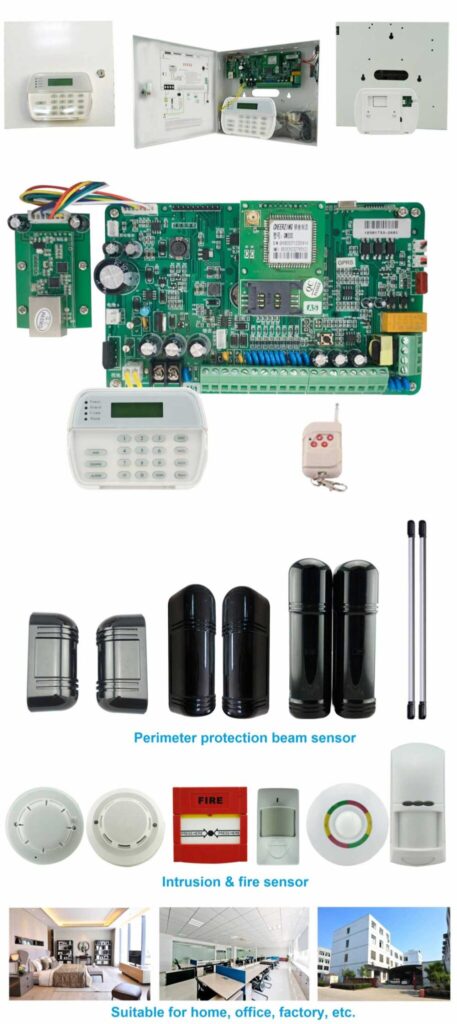
1. GSM Alarm Control Panel
The alarm control panel is the central processing unit of the entire system. It receives signals from sensors, analyzes events, and transmits alarm notifications.
Important features to consider include:
- Built-in GSM communication module
- SIM card slot
- Support for multiple alarm zones
- Wired and wireless sensor compatibility
- Voice message recording
- Multi-number dialing capability
- Tamper protection
- Backup battery support
High-quality panels typically support 6 voice call numbers and 3 SMS numbers, allowing multiple people to receive alerts.
2. SIM Card for GSM Communication
The SIM card enables the alarm panel to access the mobile network.
Best practices when choosing a SIM card:
- Ensure SMS and voice services are enabled
- Avoid data-only plans
- Choose carriers with strong local coverage
- Consider industrial IoT SIM cards for higher reliability
3. Intrusion Detection Sensors
Sensors detect unauthorized activity and trigger alarms.
Common sensor types include:
Door and Window Magnetic Contacts
These sensors detect when doors or windows are opened.
PIR Motion Detectors
Passive infrared sensors detect body heat movement inside protected areas.
Vibration or Shock Sensors
Useful for detecting attempts to break safes, ATM machines, doors, or walls.
Glass Break Sensors
Detect the acoustic signature of breaking glass.
Outdoor Perimeter Sensors
Used for large properties such as farms or industrial yards.
4. Siren and Strobe Alarm
A local audible alarm serves two important functions:
- Deterring intruders
- Alerting nearby personnel
Outdoor sirens usually operate at 100–120 dB and may include flashing strobe lights.
5. Power Supply and Backup Battery
Reliable power is critical for alarm systems.
Typical configuration includes:
- AC power adapter
- Rechargeable backup battery
- Battery runtime of 8–24 hours
Remote sites may also use solar charging systems.
6. Optional Security Accessories
Additional devices may include:
- Remote control key fobs
- RFID access readers
- Keypads
- Remote relay outputs
- GSM remote control switches

Step-by-Step Guide to Installing a GSM Alarm System
Proper installation ensures the system functions reliably in real-world conditions.
Step 1: Conduct a Site Security Assessment
Before installing equipment, analyze the site.
Evaluate Cellular Signal Strength
Use a smartphone to measure signal quality.
Recommended signal strength:
- Better than -85 dBm for stable communication.
If signal levels are weak:
- Install an external antenna
- Move the panel to a higher location
- Avoid metal enclosures
Identify Security Zones
Divide the property into zones such as:
- Entry zones (doors)
- Perimeter zones (windows, gates)
- Interior zones (motion sensors)
- 24-hour emergency zones
Proper zoning allows different alarm responses.
Step 2: Prepare the SIM Card
Before installing the SIM card in the panel:
- Insert the SIM card into a mobile phone.
- Disable the SIM PIN code.
- Ensure SMS and voice calling functions work.
- Add sufficient credit to the account.
- Test sending and receiving SMS messages.
After verification, remove the SIM card and install it into the alarm panel.
Step 3: Install the Alarm Control Panel
Follow these steps carefully.
- Choose a secure indoor location.
- Mount the control panel on a wall.
- Insert the SIM card while power is off.
- Connect the GSM antenna.
- Connect the power adapter.
- Install the backup battery.
- Turn on the system.
After startup, the GSM indicator light should blink while searching for the network and stabilize once connected.
Step 4: Record the Alarm Voice Message
Most GSM panels allow a custom voice message to be played during alarm calls.
Example message:
“Security alert. Intrusion detected at warehouse entrance. Please check immediately.”
Recording procedure typically involves:
- Entering record mode.
- Speaking clearly into the microphone.
- Saving the message.
Keep the message short and clear.
Step 5: Program Alarm Phone Numbers
Programming phone numbers ensures alerts reach the correct recipients.
Typical configuration includes:
- Primary owner
- Security staff
- Maintenance manager
- Local guard
Example dialing sequence:
- Call number 1
- If unanswered, call number 2
- Continue until someone answers
Most systems allow 3–5 retries per number.
Step 6: Add and Configure Sensors
Sensors must be correctly paired with the panel.
For Wired Sensors
- Connect wires to zone terminals.
- Configure zone type.
- Test the connection.
For Wireless Sensors
- Enter learning mode.
- Activate the sensor.
- Confirm the panel recognizes the device.
Assign each sensor to a specific zone.
Step 7: Configure Alarm Modes
Most GSM alarm systems support several modes.
Arm Mode
All sensors are active.
Stay Mode
Interior sensors are disabled while perimeter sensors remain active.
Disarm Mode
All alarms are disabled.
Users can arm or disarm the system using:
- Remote control
- Keypad
- SMS commands
- Phone calls
Step 8: Perform Full System Testing
Testing is essential before relying on the system.
Testing procedure:
- Arm the system.
- Trigger a sensor.
- Confirm the siren activates.
- Verify SMS notifications arrive.
- Confirm voice call alerts are received.
- Test power failure scenarios.
Repeat testing for every sensor.
Preventing Alarm Message Loss
Alarm messages must reach recipients reliably.
Several strategies improve communication reliability.
Use Multiple Phone Numbers
Programming multiple recipients ensures that someone receives the alert even if one phone is unreachable.
Enable Automatic Redial
Professional panels automatically redial unanswered numbers.
Recommended retry count:
3 to 5 attempts.
Improve GSM Signal Quality
Install:
- External GSM antennas
- Signal amplifiers
- High-gain antennas for remote areas
Monitor SIM Card Balance
If the SIM card runs out of credit, SMS messages will fail.
Regularly check the account balance.
Reducing False Alarms
False alarms reduce system credibility and cause unnecessary responses.
Common causes include:
- Incorrect PIR sensor placement
- Pets triggering motion sensors
- Loose door sensors
- Environmental interference
Solutions include:
- Using pet-immune PIR sensors
- Adjusting motion sensitivity
- Installing sensors away from HVAC vents
- Properly securing magnetic contacts
Maintenance Checklist for Long-Term Reliability
A GSM alarm system should be maintained regularly.
Monthly tasks:
- Test alarm triggers
- Verify SMS notifications
- Check siren operation
Quarterly tasks:
- Inspect wiring
- Clean motion sensors
- Test backup battery
Annual tasks:
- Replace aging batteries
- Update phone number lists
- Verify cellular signal quality

Typical Use Cases for GSM Alarm Systems
GSM-based intrusion alarms are particularly useful in locations where internet infrastructure is limited.
Remote Farms
Protect barns, livestock areas, and equipment storage buildings.
Agricultural Warehouses
Monitor grain storage, fertilizer facilities, and machinery storage areas.
Construction Sites
Temporary sites often lack stable internet connections.
Oil and Gas Facilities
Remote energy infrastructure requires reliable alarm notification.
Utility Stations
Power substations and water facilities often rely on GSM monitoring.
GSM Alarm vs Internet Alarm Systems
| Feature | GSM Alarm System | Internet Alarm System |
|---|---|---|
| Internet required | No | Yes |
| Works in remote areas | Yes | Limited |
| Alert type | SMS and voice calls | App notifications |
| Infrastructure dependency | Low | High |
| Installation complexity | Low | Medium |
For remote environments, GSM systems provide greater operational reliability.
Final Thoughts
Despite the rise of cloud-based security solutions, the gsm alarm system without internet remains one of the most practical and dependable intrusion alert technologies for remote environments.
By relying on direct cellular communication through SMS and voice dialing, these systems eliminate many of the vulnerabilities associated with internet-dependent security infrastructure.
With proper planning, installation, and maintenance, a well-designed gsm alarm system can provide years of dependable protection for farms, warehouses, industrial facilities, and other off-grid locations.
For security integrators and facility managers responsible for protecting remote assets, GSM-based intrusion alarms remain one of the most effective and resilient solutions available today.