
Executive Summary & Core Value Proposition
A Distributed Campus Alarm System is an enterprise-grade security architecture designed to protect geographically dispersed facilities—such as university campuses, corporate parks, or hospital networks—by deploying intelligent, interconnected alarm nodes at each site. Unlike legacy centralized systems that funnel all data to a single monitoring point, this model leverages edge computing for local decision-making and cloud platforms for centralized oversight, creating a resilient, scalable, and responsive security fabric. The primary engineering challenge isn’t just detection, but managing event synchronization, network reliability, and operational consistency across multiple independent nodes. This guide provides the architectural logic, protocol-level decisions, and deployment trade-offs necessary for designing a system that balances immediate local response with holistic organizational visibility.
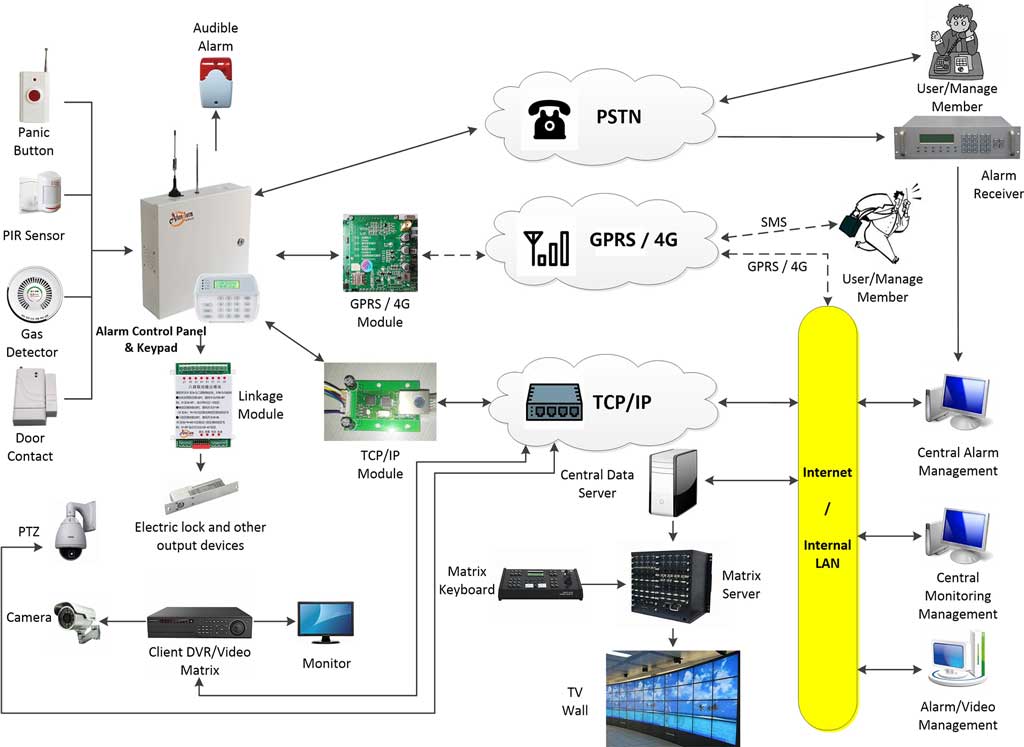
1. System Architecture Overview: The Three-Layer Hybrid Model
Modern distributed alarm systems move beyond simple sensor-to-panel wiring. They are software-defined networks where the intelligence is distributed, but command is unified. The prevailing best-practice architecture is a three-layer hybrid model.
1.1 Physical Layer (Edge Nodes)
This is the “boots on the ground” layer at each campus building or zone.
- Components: Intrusion sensors (PIR, glass break), door/window contacts, sirens/strobes, and crucially, the Edge Alarm Controller or Gateway. This gateway is a hardened computing device (often a Linux appliance) that performs local alarm validation, reducing false alerts before they consume network bandwidth.
- Core Function: Localized Event Processing. An edge gateway can run rules (e.g., “door contact followed by motion within 10 seconds = valid alarm”) and trigger immediate local responses (sirens, door locks) without waiting for cloud confirmation. This solves the critical latency problem for life-safety events.
1.2 Communication Layer (The Nervous System)
This layer connects edge nodes to each other and to the cloud. Protocol choice here dictates system resilience and performance.
- Primary Transport: TCP/IP. Provides reliable, ordered packet delivery over the campus WAN/LAN. It’s the backbone for device management, firmware updates, and heartbeat signals. However, its persistent connections can be a liability during network instability.
- Primary Messaging: MQTT (Message Queuing Telemetry Transport). This publish-subscribe protocol is ideal for alarm events. Edge gateways publish alarm messages to a broker (which can be hosted on-premise or in the cloud). Monitoring clients subscribe to these message streams. The key advantages are:
- Decoupling: Producers and consumers don’t need to know each other.
- QoS Levels: MQTT offers three Quality of Service levels—from “fire-and-forget” (QoS 0) to guaranteed delivery (QoS 2)—allowing engineers to prioritize traffic (e.g., panic alarms use QoS 2, periodic status updates use QoS 0).
- Persistent Sessions: If a monitoring station disconnects, the broker can hold messages until it reconnects.
1.3 Platform Layer (Centralized Intelligence)
This is the cloud-based or on-premise server infrastructure that provides the “single pane of glass.”
- Components: Cloud Alarm Monitoring Platform, Centralized Dashboard, AI/ML Correlation Engine, API Gateway for integrations (PSIM, Access Control, BMS).
- Core Function: Aggregation, Analytics, and Orchestration. It correlates events from multiple campuses to identify coordinated threats, manages user roles and permissions globally, stores forensic data, and provides system-wide health monitoring. It does not typically function as the real-time critical path for alarm validation—that responsibility remains at the edge.
Architecture Definition
- Hybrid Cloud-Edge Alarm Architecture: A security system model where real-time sensor data processing and immediate response actions (e.g., sirens) are executed by intelligent hardware (edge controllers) at the source of detection, while data aggregation, long-term analytics, system management, and global oversight are performed by a centralized cloud or on-premise software platform. This design optimizes for both low-latency response and operational scalability.
2. Centralized vs. Distributed: A Pragmatic Engineering Comparison
The choice isn’t binary but a spectrum. Most enterprise systems today are hybrid. The table below outlines the core trade-offs.
| Feature | Centralized Architecture | Distributed (Hybrid Edge-Cloud) Architecture | Engineering Verdict & Trade-off |
|---|---|---|---|
| Latency | High. All sensor data travels to central server before action. Unacceptable for critical (<5 sec) response. | Very Low. Edge nodes process and act locally. Cloud receives notification post-action. | Distributed wins for life-safety. Centralized is obsolete for time-sensitive alarms. |
| Network Dependency | Total. Network outage = complete system failure. No local intelligence. | Partial. Edge nodes operate autonomously during outages. Cloud visibility is lost, but site security remains. | Distributed provides critical fault tolerance. Essential for unreliable WAN links between campuses. |
| Scalability | Poor. Central server becomes bottleneck. Adding sites increases latency and single-point-of-failure risk. | Excellent. New campuses add independent edge nodes. Cloud platform scales elastically. | Distributed is the only viable model for multi-campus growth. |
| Data & Cost | All raw data traverses network, incurring high bandwidth costs. | Only filtered, high-value events (alarms, tamper) are sent to cloud, minimizing bandwidth. | Distributed reduces operational WAN costs significantly. |
| Complexity & Management | Lower initial complexity. All logic in one place. | Higher. Requires managing firmware and rules across dozens of edge devices. | Trade-off: Resilience vs. Overhead. Modern cloud platforms provide centralized edge device management tools to mitigate this. |
| False Alarm Handling | Poor. Raw sensor data floods central system, overwhelming operators. | Superior. Edge logic validates multi-sensor events locally before declaring an alarm. | Distributed drastically reduces false dispatches, the #1 operational cost in security. |
You do not choose “distributed” for its elegance; you are forced into it by physics and reliability requirements. The latency of a satellite link or the unreliability of a municipal fiber between campuses makes a purely centralized model non-viable. The real engineering decision is how much intelligence to push to the edge versus what to keep in the cloud.

3. Communication Protocol Deep Dive: MQTT & TCP/IP in Practice
3.1 MQTT: The De-Facto Standard for Event Streaming
MQTT’s publish-subscribe model is a natural fit for alarm systems. Here’s how it works in a campus deployment:
- Broker Deployment: A critical decision. For maximum resilience in a distributed campus system, deploy a broker cluster in the cloud (for global access) and a local broker at each major campus (for WAN-outage operation). Edge gateways publish to their local broker first.
- Topic Structure for Clarity: Use a hierarchical topic design for easy filtering and subscription.
campus/north/library/doors/entry/alarmcampus/south/utility/health/heartbeat- This allows the cloud platform to subscribe to
campus/+/+/alarmfor all alarms, while a campus guard station subscribes tocampus/north/#for all North Campus events.
- QoS Selection Strategy:
- QoS 0 (At most once): For non-critical, high-frequency data (temperature sensor readings, periodic “I’m alive” heartbeats). Loss is acceptable.
- QoS 1 (At least once): The standard for alarm and tamper events. Guarantees delivery but may result in duplicates (which the platform must handle idempotently).
- QoS 2 (Exactly once): Used for critical configuration commands or panic alarms where duplicate execution would be dangerous. It has the highest overhead.
Protocol Limitation in Practice: MQTT is not a discovery protocol. You still need TCP/IP (or a companion protocol like mDNS in LAN) for the initial provisioning, addressing, and management of the edge gateways and their connection to the broker.
3.2 TCP/IP: The Reliable Management Backbone
While MQTT handles events, TCP/IP handles everything else:
- Device Provisioning & Management: SSH/HTTPS connections to edge gateways for configuration.
- Firmware Over-The-Air (OTA) Updates: Reliable file transfer to distributed nodes.
- Heartbeat & Health Monitoring: Regular TCP pings or HTTP health checks from the cloud platform to each edge node to confirm connectivity.
Engineering Reality Check: NAT traversal and firewall configuration are the most common deployment headaches. MQTT typically uses port 1883 (or 8883 for TLS). Ensuring all campus firewalls allow outbound connections to the cloud broker’s IP/port is a prerequisite. For on-premise brokers, intricate firewall rules between campus VLANs are often necessary.
Protocol Explanation
- MQTT QoS for Alarm Systems: A mechanism within the MQTT protocol that defines the delivery guarantee of a message. QoS 0 is used for non-critical status data, QoS 1 is the default for alarm and fault messages to ensure they are not lost, and QoS 2 is reserved for critical commands where duplicate execution would cause a security or safety issue. The choice involves a direct trade-off between network reliability and transmission latency/overhead.
4. Deployment Strategy: From Blueprint to Multi-Campus Reality
Deploying a distributed system is a network engineering project as much as a security one.
4.1 Network Topology Design
- Segmentation is Key: Place all security devices (edge gateways, IP cameras, access control panels) on a dedicated, physically separate Security VLAN. This isolates traffic from the general campus IT network, improving performance and security.
- Edge Node Placement: Install the edge alarm gateway in a secure communications closet within each building or zone. It should have:
- Primary Power + PoE Backup: Connected to a building UPS.
- Dual Network Paths: Where possible, connect via two different network switches for redundancy.
- Local Storage: For buffering event logs during network outages.
4.2 Staged Rollout Workflow
- Pilot Site: Deploy the full stack (edge gateway, local broker, cloud connection) at one building. Test failure modes: unplug network, power down broker, simulate sensor faults.
- Campus Core: Deploy a local MQTT broker cluster in the primary campus data center. Connect all building gateways within that campus to this local broker. Configure the local broker to “bridge” critical topics (alarms, tamper) to the cloud broker.
- Multi-Campus Rollout: Repeat for each campus, each with its own local broker bridged to the cloud. This creates a hierarchy: Building -> Campus Broker -> Cloud Platform.
4.3 Synchronization Challenge
A distributed system must answer: “Did the north campus library door and south campus fence alarm happen at the same time?”
- Solution: Use Network Time Protocol (NTP) with extreme rigor. All edge gateways, brokers, and servers must synchronize to the same, reliable NTP source (e.g.,
time.google.com). Timestamps on all events must be in UTC. The cloud correlation engine then uses these synchronized timestamps to analyze cross-campus event patterns.
Deployment Checklist: Pre-Live Verification
- All edge gateways obtain time via NTP and show <100ms skew.
- Each campus’s local MQTT broker successfully bridges test alarms to the cloud platform.
- Cloud platform dashboard shows “online” status for all edge gateways.
- Simulated WAN outage (unplug campus uplink) triggers local alarm siren but generates “node offline” alert in cloud.
- Firewall rules documented and approved by campus IT for each site.
5. Failure Modes & Proactive Troubleshooting
A robust design anticipates failure. Here are the common scenarios:
| Failure Scenario | Impact | Mitigation Strategy |
|---|---|---|
| WAN Link Outage (Campus to Cloud) | Cloud platform loses live visibility. Local campus security remains operational. | 1. Local Broker Buffering: Campus broker retains messages (with QoS 1/2).2. Cellular Failover: Edge gateway or campus router with 4G/5G modem for critical alarm forwarding.3. Local Monitoring: Campus security office subscribes to local broker as backup. |
| Local Broker Failure | All communication within that campus halts. Edge gateways cannot forward events. | Broker Cluster: Deploy 2+ brokers in high-availability mode. Edge gateways are configured with a list of brokers for failover. |
| Edge Gateway Power Loss | Complete loss of security for that building/zone. | PoE+ from UPS-backed switch. Gateway should have onboard battery for graceful shutdown and “power loss” alert. |
| False Alarm Propagation | A faulty sensor floods system, causing “alert fatigue.” | Edge Logic Rules: Implement multi-sensor correlation (e.g., motion + door) at the gateway.Debounce Settings: Configure sensor-specific signal stabilization. |
| Clock Drift (NTP Failure) | Cross-campus event correlation becomes impossible. Forensic timeline is corrupted. | Multiple NTP Sources: Configure 3-4 upstream NTP servers. Use a local NTP appliance as a stratum 1 source for critical campuses. Monitor clock offset via the cloud platform. |
Troubleshooting Workflow: “Cloud is not receiving alarms from Campus A.”
- Check Cloud Dashboard: Is the Campus A broker bridge connection shown as “online”?
- Check Campus Broker: Log in locally. Are edge gateways connected and publishing to test topics?
- Check Network: Can the campus broker ping the cloud broker IP/port? (Firewall rule change?).
- Check Edge Gateway: Is it online? Does its local log show successful connection to the campus broker?
- Escalation Path: This workflow is built into the operational runbook.

6. Optimization & Advanced Architectures
6.1 Latency Optimization
- Edge Processing: The single biggest reduction comes from processing at the edge. Aim for sensor-to-siren latency of <2 seconds locally.
- MQTT Broker Location: Place a local broker in the same AWS/Azure region as your cloud platform to minimize WAN hops for bridge connections.
- Keep-Alive Intervals: Tune MQTT keep-alive messages to balance connection health detection with bandwidth use.
6.2 The Future: AI at the Edge
The next evolution is embedding lightweight AI models directly on edge gateways to perform on-device analytics: classifying sounds (glass break vs. loud noise), analyzing video snippets for verified intrusion, or recognizing specific alarm patterns. This pushes false alarm reduction even further and only sends “verified” high-confidence events to the cloud, transforming the system from “dumb sensor reporting” to “intelligent threat signaling.”
FAQ
Q1: Is a distributed alarm system more expensive than a traditional centralized one?
A: Initial CapEx may be higher due to intelligent edge hardware. However, total cost of ownership (TCO) is typically lower. Savings come from reduced bandwidth costs (less data sent), lower false alarm fines/dispatch fees, and avoided catastrophic losses during network outages that would cripple a centralized system.
Q2: How secure is MQTT for alarm data?
A: Native MQTT (port 1883) is not secure. Production deployments must use MQTT over TLS (port 8883). This encrypts all data in transit. Additionally, implement client certificate authentication or strong username/password for broker access, and use the hierarchical topic structure to enforce authorization policies.
Q3: What happens if the cloud platform is completely down?
A: In a well-designed hybrid system, local campus security remains 100% functional. The cloud platform is for management, analytics, and global oversight—not for the real-time critical alarm path. Edge gateways will continue to process sensor data, trigger local sirens, and log events to local storage. The system degrades gracefully, losing only centralized features.
Q4: Can I integrate existing legacy alarm panels into this architecture?
A: Yes, via gateway translators. Devices known as “alarm communicators” or “protocol translators” can connect to the serial or network port of a legacy panel, convert its proprietary signals (Contact ID, SIA DC-09) into MQTT messages, and publish them to the new system’s broker. This allows for phased migration.
Q5: How do you ensure a consistent response procedure across multiple campuses?
A: This is an operational, not technical, challenge. The technical solution is to use the cloud platform’s workflow engine. Define standardized response playbooks (e.g., “Intrusion Alarm” triggers: notify on-site guard via mobile app, lock down interior doors, highlight camera feeds on map). These automated workflows are pushed from the cloud and executed uniformly at all sites, regardless of local guard team training differences.