
In the high-stakes world of commercial and institutional security, your burglar alarm control panel is far more than a simple switchboard—it’s the strategic brain deciding whether a potential intruder triggers an immediate, targeted response or fades into background noise. Yet too many systems still rely on outdated zone management that treats every sensor trigger the same way, leading to false alarms that drain response teams, delayed detection in sophisticated breaches, and missed opportunities to prioritize genuine threats.
If you procure, specify, or deploy burglar alarm panels at scale for banks, warehouses, office complexes, or multi-site facilities, you already know the frustration: traditional zoning works in theory but collapses under real-world chaos—pets, employees, environmental quirks, or clever intruders who probe weaknesses without tripping the “right” zone.
This practical, hands-on guide takes you beyond zones. You will learn exactly how to redesign your alarm control panel logic using conditional triggering, pattern recognition, and threat priority sorting. The result? Faster, smarter, more reliable responses that slash false alarms, optimize guard deployment, and deliver the kind of operational efficiency that turns a good security system into an unbeatable one.
Drawing on decades of field experience with industrial-grade intrusion alarm panels like the expandable AS-9000 series architecture, this article equips you—the security decision-maker, technical specifier, or operations lead—with step-by-step implementation instructions, real-world examples, and proven configurations you can apply immediately. By the end, you’ll have a complete blueprint to upgrade existing burglar alarm control panels or specify next-generation ones that actually solve the problems your teams face every day.
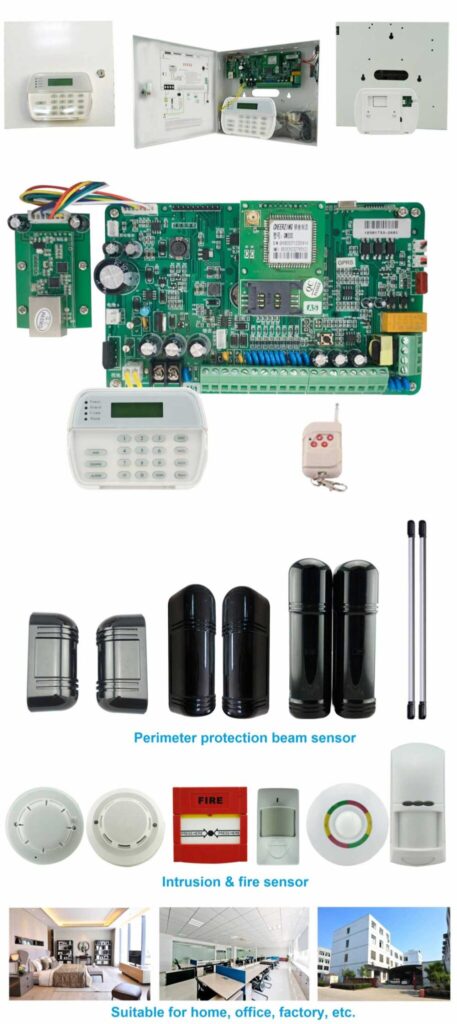
Why Traditional Zone Management Falls Short in Real-World Deployments
Traditional burglar alarm control panel zoning is straightforward: each wired or wireless input is assigned a zone number tied to a physical area (perimeter door, interior motion, glass-break, etc.). When that zone trips, the panel reacts according to a basic rule—immediate alarm, delayed alarm, or chime-only—then signals sirens, dialers, or central stations.
On paper it sounds efficient. In practice, especially at scale, it creates three critical problems that procurement teams and installers see constantly:
- False alarm overload – A single motion detector in a high-traffic warehouse can generate dozens of events per shift from forklifts, staff movement, or even HVAC drafts. Each one requires verification, burning through monitoring budgets and eroding trust in the system.
- Lack of context – Zones operate in isolation. A door contact opening at 2 a.m. might be a legitimate breach—or an employee who forgot to disarm. Without logic linking multiple sensors or time-of-day rules, the panel cannot distinguish between them.
- Slow or inappropriate response – Sophisticated threats often bypass single zones or create cascading events that overwhelm operators. A perimeter breach followed by interior movement should escalate priority instantly; traditional zoning treats both as equal-level events.
Real-world data from large-scale deployments shows that facilities using only basic zoning experience false alarm rates of 70-90% in busy environments. That translates directly into higher operational costs, slower genuine threat response, and, in extreme cases, regulatory or insurance compliance headaches. Additional issues include difficulty scaling across multi-building sites, limited event history for post-incident analysis, and vulnerability during power fluctuations or communication disruptions—common pain points in institutional settings.
The good news? Modern alarm control panels—especially industrial-grade models with powerful processors, expandable bus architecture, and multi-channel communication—provide the hardware foundation to move far beyond these limitations. The missing piece is intelligent logic design, and that’s what we’re building here.
Defining Intelligent Alarm Panel Logic: From Reactive Zones to Proactive Decision Engines
Intelligent logic transforms your burglar alarm control panel from a simple event recorder into a real-time threat analyzer. Instead of “zone X tripped → alarm,” the system evaluates combinations of inputs, timing, sequences, and external data before deciding the appropriate action.
Key building blocks include:
- Conditional triggering: Alarms only activate when multiple conditions are met (e.g., “perimeter zone + interior motion within 30 seconds”). This prevents isolated false triggers while confirming genuine intrusions through cross-verification.
- Pattern recognition: The panel learns or is programmed to identify normal vs. suspicious activity sequences (e.g., repeated failed access attempts followed by a forced door). It uses event counters and timers to spot probing behavior that single-zone systems completely miss.
- Threat priority sorting: Events are ranked by severity, location criticality, time of day, and verification confidence, then routed to the correct response channel (local siren only, guard dispatch, police direct, or silent monitoring). This ensures the most critical threats get immediate attention while low-risk events are logged quietly.
These capabilities turn your intrusion alarm panel into a decision-making engine that mirrors how experienced security operators think—except it never tires, never forgets, and scales across thousands of zones. With features like high-speed 32-bit ARM processing and seamless integration, panels can handle complex rules without lag, making them ideal for high-security environments such as banks, warehouses, and multi-site facilities.
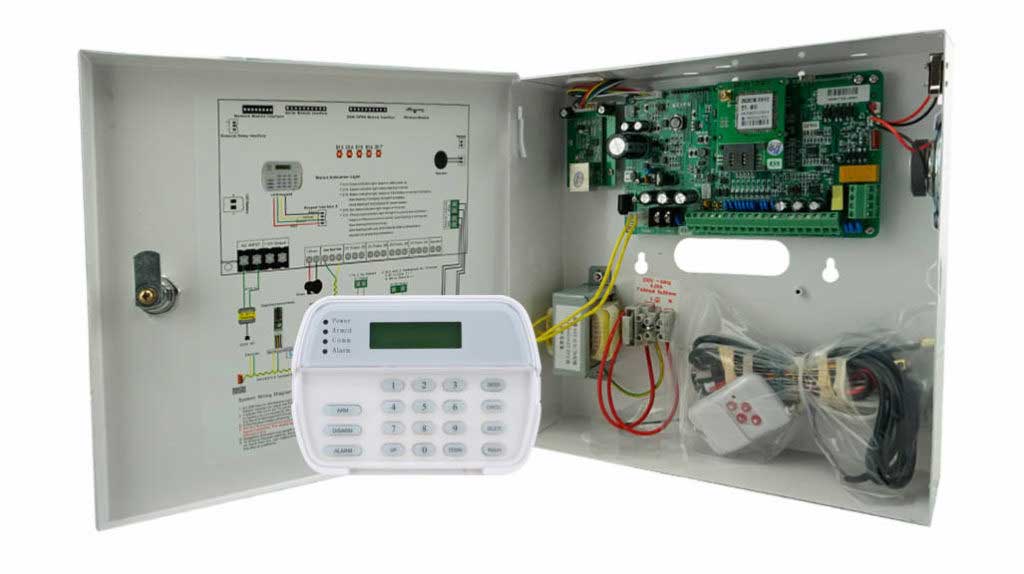
Core Hardware Requirements for Intelligent Logic (What to Specify in Your Next Bulk Procurement)
Before diving into design, ensure your burglar alarm control panel hardware can support advanced logic. Look for:
- 32-bit ARM or equivalent processor for fast rule evaluation.
- Support for 1000+ addressable zones via bus expansion (wired + wireless + addressable modules)—specifically, base configurations offering 16 wired zones and 30 wireless zones, expandable up to 1,656 bus zones using address modules for true scalability in large installations.
- Multi-path communication (PSTN + 4G + TCP/IP) with event buffering for uninterrupted alerts even during network outages.
- Onboard event logging (1500+ events) plus cloud synchronization for detailed forensic analysis and remote auditing.
- Programmable output relays and linkage modules for automated responses, including integration with sirens, CCTV presets, and external equipment.
- Keypad and software interfaces that allow Boolean-style rule creation, plus user-friendly options like voice prompts, SMS control, and multi-user passwords (up to 11 levels) for secure operation.
- Additional reliability features such as backup battery support, automatic short-circuit/overload protection, anti-surge safeguards (up to 4kV), and tamper detection for power failures, battery issues, or line cuts.
Panels built on these foundations (such as the expandable AS-9000 series architecture with models supporting 4G, IP, or PSTN) already handle the heavy lifting; your job is to layer intelligent rules on top. These specs ensure your system remains operational 24/7 and can process complex logic in milliseconds, directly addressing the limitations of older zone-only setups.
Step-by-Step: How to Design and Implement Intelligent Logic in Your Burglar Alarm Control Panel
Here is the exact operational playbook. Follow these steps whether retrofitting existing panels or commissioning new ones. Each phase includes detailed actions, menu navigation examples (generalized for common professional panels like the AS-9000 series), and pro tips from large-scale deployments to help you avoid common setup errors.
Phase 1: System Assessment and Threat Mapping (1-2 weeks)
Map every physical zone and assign risk scores.
- Walk the entire facility with operations and security teams to understand daily workflows.
- Create a spreadsheet: Zone ID | Location | Sensor Type | Normal Activity Pattern | Critical Assets Nearby | Historical False Alarm Rate.
- Categorize zones: Perimeter (high priority), Interior Follower, High-Value (vaults, server rooms), Low-Risk (staff areas during business hours).
- Identify correlation opportunities: Which zones naturally pair (e.g., lobby door + lobby motion)? Note any environmental factors like HVAC vents or high-traffic paths that could cause false triggers.
Pro tip: Involve end-users early—this step prevents over-engineering rules that ignore real operational needs.
Phase 2: Hardware and Basic Configuration
- Wire or address all sensors per manufacturer guidelines (EOL resistors for wired zones, bus addressing for expandables, wireless enrollment at 315/433 MHz frequencies where supported).
- Set global parameters: Arming modes (Away, Stay, Night), entry/exit delays, and user partitions for multi-area control.
- Enable event logging and multi-channel reporting to ensure every event is captured for later logic refinement.
Phase 3: Building Conditional Trigger Rules (The Heart of Intelligent Logic)
Most professional alarm control panels offer “linkage” or “cause-and-effect” programming menus. Here’s how to configure them:
Step 1: Access the programming interface (enter Installer code on the keypad or launch dedicated alarm management software).
Step 2: Navigate to “Linkage Rules” or “Advanced Logic” section.
Step 3: Create a new rule with Boolean syntax. Example:
– IF (Zone 101 = Perimeter Door Open) AND (Zone 105 = Interior Motion) WITHIN 45 seconds
– THEN Activate Full Alarm + Send Priority SMS to Guard Team + Trigger CCTV Preset on Camera 3.
Step 4: Add time-based conditions: Same rule only active between 22:00–06:00. Use the panel’s built-in timers for precise windows.
Step 5: Set verification delays for lower-priority zones (e.g., 15-second hold before escalating) to allow quick disarm by authorized users.
Repeat for 8–12 core rules covering 80% of common scenarios. Test each rule in a controlled “walk-test” mode by simulating triggers and checking the event log for correct activation.
Phase 4: Implementing Pattern Recognition
Pattern recognition uses sequence logic rather than single events.
Example rule for “probing attack” detection:
- IF three consecutive “Access Denied” events on any reader WITHIN 60 seconds
- AND followed by a forced door contact on the same partition
- THEN Immediate silent alarm to central station + lock all egress doors + notify on-site security lead.
Configure this using the panel’s event counter and timer functions. Many panels allow “consecutive event” counters up to 10 triggers with programmable windows. Review the 1500-event history log regularly to fine-tune these patterns based on actual site data.
Phase 5: Threat Priority Sorting and Automated Response Routing
Assign every possible alarm event a priority level (1–5) and map it to response channels:
- Priority 1 (Confirmed breach in high-value area): Direct police dispatch + full siren + all outputs.
- Priority 2 (Unverified perimeter): SMS + push to mobile app + guard patrol request.
- Priority 3 (Maintenance or low-confidence): Log only + email report.
In the panel software, create a “Priority Table” that the processor evaluates first. Modern panels process this in milliseconds thanks to ARM architecture, ensuring no delays even during multi-zone events.
Phase 6: Integration Layer
Link the alarm control panel to CCTV, access control, and building management via dry contacts, IP APIs, or RS-485. Example:
- Alarm event triggers specific camera presets and records 30-second pre-event buffer.
- Access control denial feeds into pattern recognition rules.
- Cloud synchronization allows remote monitoring of rule performance across multiple sites.
Phase 7: Testing, Training, and Go-Live
- Simulate 50+ real-world scenarios (day/night, forced entry, tailgating, environmental).
- Train operators on the new logic dashboard (most panels now show “rule status” and “why this alarm triggered” with clear voice prompts or LCD explanations).
- Monitor first 30 days via cloud logs and fine-tune thresholds—adjust debounce settings if sensors are overly sensitive.
Real-World Threat Scenarios and How Intelligent Logic Crushes Them
Scenario 1: The Sophisticated Perimeter Probe
Traditional zoning: Multiple door rattles at night each trigger separate low-level events.
Intelligent logic: Pattern of three perimeter zones tripped within 90 seconds + no valid credential = Priority 1 breach with immediate response. Result: Intruder deterred before entry.
Scenario 2: Employee After-Hours Movement
Traditional: Interior motion at 11 p.m. causes full alarm.
Intelligent: Rule checks “valid user code entered on keypad in same partition within last 5 minutes” → Chime only + log. No false dispatch.
Scenario 3: Coordinated Multi-Zone Breach
Intelligent logic instantly correlates sequence, sorts by asset value, and routes the highest-priority alert while suppressing noise from secondary zones.
Scenario 4: Environmental False Trigger During Business Hours
A motion sensor near loading docks trips repeatedly due to forklift activity. Conditional rules ignore it unless paired with an unauthorized perimeter breach, automatically routing to “log only” during daytime.
Large banking clients using this approach have reported 85%+ reduction in false alarms and 40% faster verified threat response times. These upgrades also simplify insurance audits by providing clear, prioritized event logs.
Best Practices, Common Pitfalls, and Troubleshooting
- Start conservative: Overly complex rules create new false positives. Begin with 5–8 high-impact rules and expand gradually.
- Document every rule with comments in the software (who approved, date, rationale) for easy team handovers.
- Schedule quarterly rule audits—facilities change, threats evolve, and sensor performance can drift over time.
- Pitfall: Ignoring power-fail and tamper events. Always link these to highest priority to maintain system integrity.
- Troubleshooting: If a rule fails to trigger, check event log timestamps first, then verify sensor debounce settings and wiring integrity. Use the panel’s diagnostic tools to test individual zones in real time. For communication issues, confirm multi-path setup (PSTN/4G/IP) and backup battery status.
Always prioritize user-friendly interfaces—keypads with voice prompts and software dashboards make daily operation intuitive for non-technical staff.
Future-Proofing Your Intrusion Alarm Panel Investment
Specify panels with over-the-air firmware updates, open API support, and AI-ready processing headroom. Cloud-based logging and remote rule editing will become standard, allowing you to adjust logic across 50 sites from one dashboard. This ensures your burglar alarm control panel investment stays effective as threats and technologies evolve.
Ready to Move Beyond Zones?
You now possess the complete operational blueprint to transform any capable burglar alarm control panel into an intelligent guardian that thinks like your best security operator—only faster, more consistent, and infinitely scalable. The difference between a system that merely detects and one that truly protects comes down to the logic you design today.
If you manage bulk procurement or system design for commercial, financial, or institutional clients, the next step is simple: audit your current alarm control panel installations against the criteria in this guide, then contact our technical team for a no-obligation logic optimization workshop. We’ll review your site plans, demonstrate live conditional rules on industrial-grade hardware, and provide customized programming templates that deliver immediate ROI through reduced false alarms and faster threat response.
Your facilities deserve more than basic zoning. They deserve intelligent, adaptive protection engineered for the real world.
Start designing that logic today—your teams (and your bottom line) will thank you tomorrow.