

As a security professional with over two decades in the burglar alarm industry, I’ve seen monitoring centers evolve from basic call-list operations to sophisticated command hubs. Yet one truth remains unchanged: the core challenge for every security company CEO, product manager, and system designer is delivering reliable protection without drowning in false alarms, delayed responses, or skyrocketing labor costs. Traditional alarm monitoring software simply can’t keep up anymore.
That’s why the future of burglar alarm monitoring software is already here—and it revolves around three game-changing capabilities: AI-driven detection, video verification, and remote guarding powered by cloud platforms. These aren’t buzzwords. They are practical, implementable tools that slash false alarm rates by up to 95%, accelerate real-threat response times to under 10 seconds, and cut operational costs by 40-60% while giving your teams superhuman efficiency.
In this ultimate step-by-step guide, I’ll walk you through exactly how to transform your existing burglar alarm monitoring software into a next-generation AI alarm monitoring software platform. You’ll discover why legacy systems are becoming obsolete, how to integrate AI classification and video verification, how to migrate to cloud alarm monitoring platforms, and how to build remote guarding operations that don’t just react—they prevent incidents before they escalate. Every section includes real-world implementation steps, proven tactics, and measurable ROI examples tailored for security companies handling residential and commercial burglar alarm systems at scale.
If you’re responsible for bulk procurement, system design, or operations in the burglar alarm space, this guide will give you the actionable blueprint you need to future-proof your business, reduce liability, satisfy verified-response police policies, and turn your monitoring center into a competitive advantage. Let’s dive in.
Why Traditional Alarm Monitoring Software Is Becoming Obsolete
Traditional alarm monitoring software—think on-premise network alarm center platforms with SQL databases, manual event sorting, basic video pop-ups, and multi-protocol support for Contact ID, SIA, 4+2 Express, or even older formats like C&K CFSK III—worked brilliantly in the 2000s and early 2010s. These systems could handle thousands of users, display flashing maps (often integrated with Baidu or bitmap overlays), automatically print reports, classify events by affair type for faster operator handling, and link a few Hikvision or Dahua cameras so operators saw an automatic real-time video pop-up when an alarm triggered. They scaled reasonably well for metropolitan-level centers with 5,000+ subscribers, supported multi-level TCP/IP networking, and even included features like caller ID for detecting line issues or automatic forwarding to other centers.
But today’s reality exposes their fatal flaws.
First, false alarms. Industry data consistently shows 90-99% of burglar alarm activations are false—triggered by pets, weather, employees forgetting to disarm, sensor drift, or even communication failures that legacy caller-ID modules can flag but not prevent. That translates to millions of unnecessary dispatches annually in major markets, costing law enforcement billions and triggering escalating fines or outright refusal of police response under verified-response ordinances in hundreds of cities worldwide. Even with automated printing, sounding, and basic video linkage, operators still spend most of their shift manually verifying everything.
Second, response efficiency. In a traditional setup, an operator must manually acknowledge every signal, review logs, call the subscriber, and then dispatch authorities. Average verification time? 30-90 seconds or more. Real intruders don’t wait. By the time police arrive (often 10-30 minutes later), the damage is done—or the opportunity is lost. Flashing map hotspots and video pop-ups help locate the zone quickly, but they still require human judgment every single time.
Third, labor costs. Monitoring centers staffed 24/7 with multiple operators per shift face burnout, high turnover, and salaries that keep climbing. Add training, overtime, and the cognitive load of sorting hundreds of daily events—plus managing user data, fee reminders for arrears, and multi-operator permission levels—and you’re looking at six-figure annual expenses just to maintain basic coverage.
Fourth, scalability and maintenance headaches. On-premise servers (typically running Windows Server with SQL Server 2008 or similar) need constant backups, hardware upgrades, and dedicated IT staff. Multi-level networking works via TCP/IP, but adding new sites or integrating modern IP cameras often requires custom coding, middleware, or secondary development through open DDE/Socket interfaces. Cybersecurity vulnerabilities in legacy systems—especially those without end-to-end encryption or regular penetration testing—are another ticking time bomb. Even dual-system failover and online backups, while helpful, can’t match true elasticity.
I’ve consulted with dozens of security companies still running variations of these traditional platforms, including those with modular designs that let you add functions without downtime or handle over 100,000 devices across distributed servers. The common refrain? “We’re spending more time chasing false alarms than protecting clients.” One mid-sized operator told me they were dispatching police on 94% false alarms last year—resulting in $47,000 in fines and lost credibility with local departments. Another struggled with manual event queries and statistics even though the software supported exporting to Excel or Word.
The good news? AI-powered alarm monitoring software, combined with advanced video verification and cloud infrastructure, solves every single one of these pain points. The transition isn’t theoretical—it’s happening right now, and the companies that implement it first are winning market share, reducing insurance premiums, delivering verifiable ROI to their customers, and easily meeting police verified-response requirements by attaching video evidence automatically.

AI-Powered Alarm Classification: The Intelligent Brain of Modern Alarm Monitoring Software
The first leap forward is moving from reactive event logging and manual affair classification to proactive AI classification. Instead of every sensor trigger landing on an operator’s screen as “possible intrusion,” AI alarm monitoring software instantly analyzes multiple data streams—motion sensors, door contacts, glass-break detectors, initial video frames, and even environmental factors—to classify the event with 95%+ accuracy right at the edge or in the cloud.
How does it work in practice? Modern systems use machine-learning models (often edge-deployed for low latency on compatible cameras) trained on millions of labeled burglar-alarm events. They distinguish humans from animals or vehicles from wind-blown branches, recognize authorized users by behavior patterns, and even predict escalation risk (for example, someone loitering near a back door after hours). This builds directly on your existing protocol support—Contact ID, SIA, or 4+2—without replacing your receivers.
Step-by-Step Implementation Guide for AI Classification
- Audit Your Current Setup (1-2 weeks)
Map every alarm panel, sensor type, communication protocol, and existing video linkage in your burglar alarm monitoring software. Identify high-false-alarm zones using historical logs (most traditional platforms export this easily via query tools). Calculate your current false-alarm rate as a baseline KPI. Pay special attention to sites with pets or high-traffic doors—these are your quickest wins. - Choose the Right AI Engine (Week 3)
Look for platforms compatible with your existing receivers (Contact ID, SIA, etc.) and offering pre-trained models specifically tuned for burglar alarm scenarios. Leading options integrate edge AI (on-camera processing) with cloud fallback. Prioritize vendors supporting open APIs for seamless connection to your current on-premise software, so you don’t lose your multi-level networking or user database during transition. - Data Preparation and Initial Training (Weeks 4-6)
Export 3-6 months of anonymized alarm data (including any video clips you already store). Label a sample set (human review of 500-1,000 events) or use vendor-assisted auto-labeling while respecting GDPR and local privacy laws. Upload to the AI platform. Most systems require only 1-2 weeks of supervised learning before achieving 80% accuracy; continuous learning improves it weekly. Common pitfall: Don’t skip labeling edge cases like seasonal weather changes or new customer installations—these cause most post-go-live issues. - Integration and Testing (Weeks 7-8)
Connect via API or SDK. Configure rules: e.g., “If AI classifies as ‘pet movement’ and no secondary sensor confirms, suppress and log only; notify subscriber via automated SMS instead of operator call.” Run parallel testing—route 20% of live alarms through the new AI layer while keeping traditional processing as backup. Monitor false-positive/negative rates daily for two weeks. Test thoroughly with simulated intrusions to catch any protocol translation glitches. - Go-Live and Optimization (Week 9 onward)
Switch 100% of traffic. Set up dashboards showing classification confidence scores (anything below 85% should still route to an operator for review). Retrain monthly on new edge cases. Integrate with your billing system so verified low-risk events trigger automated subscriber notifications instead of operator calls. Pro tip: Start with high-traffic commercial sites for quickest ROI—the learning curve is steepest where data volume is highest.
Real Results I’ve Seen
One commercial client with 3,200 burglar alarm accounts reduced operator workload by 68% and false police dispatches by 91% within four months. Another residential-focused operator cut average verification time from 45 seconds to 4 seconds. The AI doesn’t replace humans—it elevates them to handle only the 5-10% of events that truly matter, freeing them from the endless manual sorting that traditional systems still require.
Video Verification for Alarm Confirmation: Turning Suspicion into Certainty
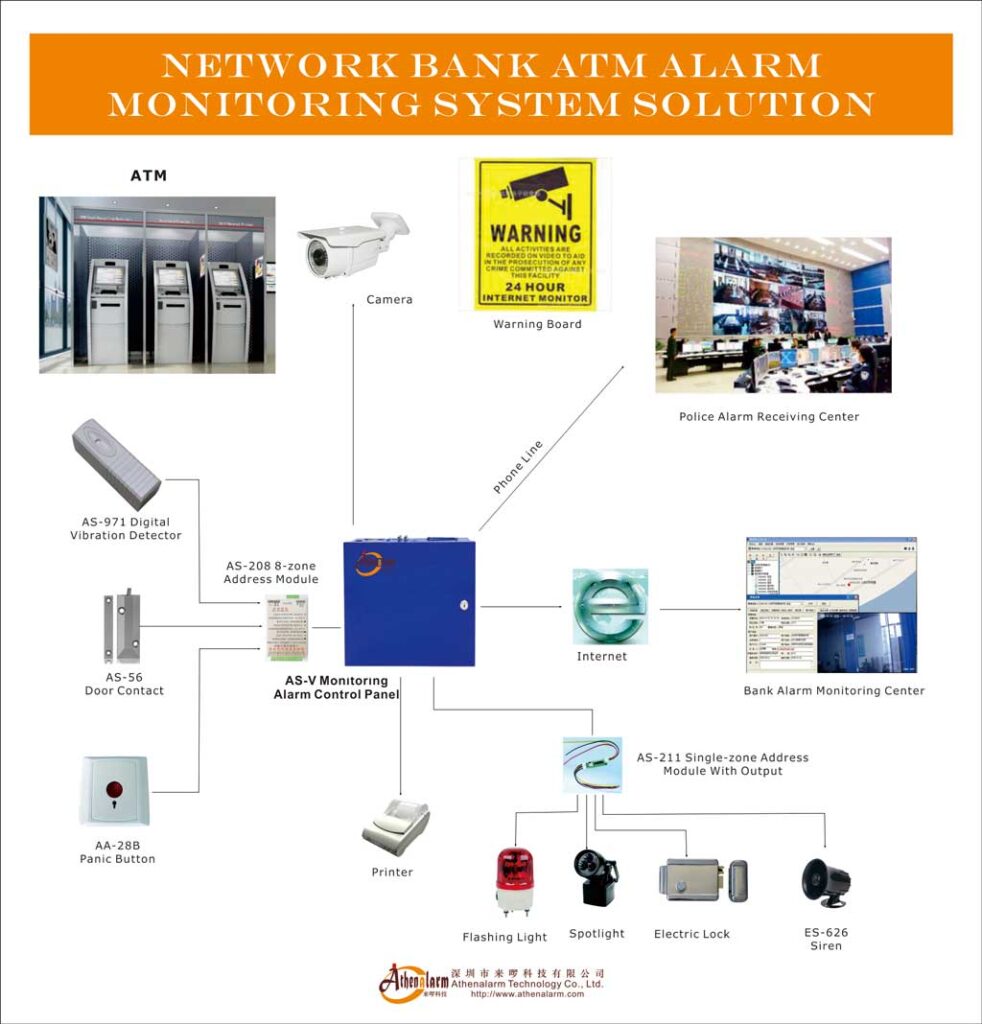
AI classification becomes unstoppable when paired with video verification alarm monitoring. Instead of relying on a single sensor or the basic auto pop-up video linkage found in traditional platforms (which simply shows a live feed without analysis), the system instantly pulls live or recorded clips from relevant cameras, applies computer vision analytics, and presents operators with a verified event in seconds—complete with annotations.
This isn’t the old “pop-up video.” Modern video verification uses AI to draw red boxes around people, timestamp motion paths, filter out irrelevant movement like swaying trees, and automatically generate a 10-15 second clip uploaded to the cloud for instant review. You still get full compatibility with your existing Hikvision, Dahua, or equivalent cameras—no rip-and-replace required.
Detailed Operational Workflow and Implementation Steps
- Camera and Infrastructure Assessment
Inventory every customer site. Ensure at least one camera covers each alarm zone (entry points, perimeter, high-value areas). Upgrade to 1080p+ IP cameras with H.265 compression only where needed—most modern systems work with your current hardware. Critical tip: Test field of view and lighting at night; poor coverage is the #1 reason video verification fails. - Software Integration (1-3 weeks)
Link your alarm monitoring software to a video management platform via ONVIF or proprietary SDK. Configure alarm-triggered rules: “Zone 3 breach → pull camera 4 feed + 5 seconds pre-roll and 10 seconds post-roll.” Retain your existing video pop-up as fallback during testing. - AI Video Analytics Configuration
Enable object detection, loitering analysis, and line-crossing rules tailored to burglar alarm zones. Set confidence thresholds (e.g., only escalate if human or vehicle detected with 85%+ confidence). Test with simulated intrusions using your existing panels—walk in front of a motion sensor and verify the clip arrives annotated. - Operator Console Redesign
Update workstations so verified events appear with thumbnail clip, AI annotations, confidence score, and one-click options: “Confirm Threat,” “False – Pet,” “Dispatch with Video Evidence,” “Speak to Intruder via Two-Way Audio,” or “Log and Notify Subscriber.” - Training and Verification Protocol
Train operators on the new interface (2-4 hours max). Establish standard operating procedures: Review clip within 8 seconds, cross-reference with AI classification, decide action, and log every decision for audit and continuous improvement. Include legal training on voice-down warnings to avoid liability.
Proven Impact
Security companies using video verification report 75-90% reduction in unnecessary dispatches. Police departments prioritize verified alarms, often responding 2-3x faster. One retailer client prevented $180,000 in theft last year because remote operators saw the intruder on video, issued a live voice-down warning through site speakers, and dispatched with precise suspect description and license-plate data. Bonus: Video clips become powerful evidence for insurance claims and court cases—another revenue and liability reducer for your clients. Common mistake to avoid: Failing to archive clips for at least 30 days; set automatic cloud retention policies now.
Cloud-Based Monitoring Platforms: The Scalable Backbone
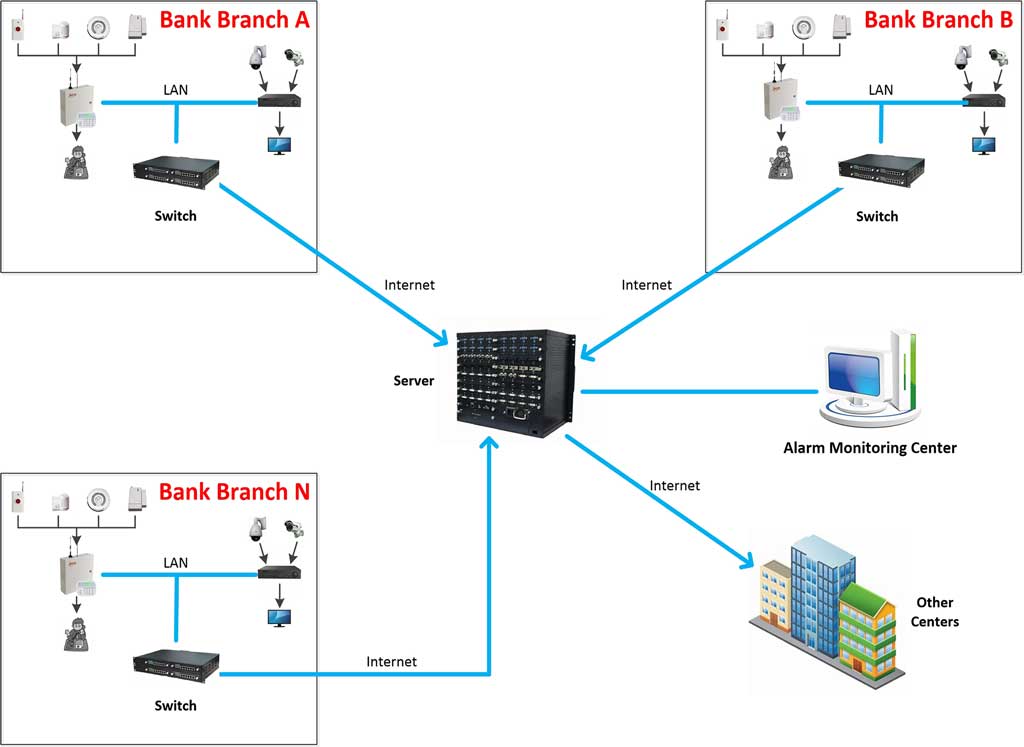
On-premise servers served us well, but cloud alarm monitoring platforms deliver elasticity, redundancy, and analytics that traditional software can’t match. You gain real-time dashboards accessible from anywhere, automatic updates, built-in cybersecurity (end-to-end encryption, MFA, regular penetration testing), seamless integration across thousands of sites without buying new hardware, and easy migration of your existing SQL data and multi-level networking setup.
Migration Roadmap (8-12 Weeks)
- Readiness Assessment
Inventory data volume, bandwidth at monitoring center and client sites, and compliance needs (GDPR, SOC 2, local data-sovereignty rules). Map your current user database, event logs, and video archives. - Hybrid Pilot
Run cloud in parallel with your existing SQL server for 30 days. Sync user data, alarm logs, video, and even fee-management records. This lets you keep serving clients without interruption. - Full Migration
Transfer historical records (most platforms handle millions of events automatically). Cut over receivers to cloud endpoints. Configure geo-redundant storage and automatic failover—far more robust than traditional dual-system backups. - Feature Activation
Enable mobile apps for your response teams, predictive maintenance alerts (e.g., low-battery sensors), advanced analytics (false-alarm trend reports by zone, time of day, or panel type), and automated reporting that replaces manual Excel exports. - Optimization
Set role-based access (mirroring your old multi-level operator permissions), API connections to your CRM and billing systems, and custom dashboards for CEO-level oversight. Test everything end-to-end before full cutover.
Security concerns? Modern cloud platforms are audited far more rigorously than most on-premise setups I’ve reviewed. You’ll sleep better knowing automatic updates patch vulnerabilities the same day they’re discovered.
Mobile Response Team Integration: From Monitoring to Action
Cloud platforms shine when paired with mobile apps for your guard or technician teams. Real-time push notifications with annotated video clips, GPS routing, ETA tracking, and two-way communication turn passive monitoring into coordinated, on-the-ground response—without the delays of traditional phone calls.
Implementation Steps
- Deploy branded mobile apps linked directly to your cloud platform (iOS/Android).
- Configure geofencing, automatic ETA updates, and in-app video review with one-tap evidence capture (photo/video upload).
- Train teams on quick actions: acknowledge, view clip, mark resolved, or request police backup with attached evidence.
- Measure KPIs weekly: arrival time (target <8 minutes), resolution rate, and customer satisfaction scores via post-incident surveys.
One operator I worked with cut average response travel time by 35% simply by giving guards live video context before they even left the vehicle.
Remote Guarding Operations: Proactive Deterrence at Scale
This is where burglar alarm monitoring software truly becomes preventive. Trained remote operators, assisted by AI, monitor live video feeds, issue verbal warnings through site speakers, activate sirens, control PTZ cameras, and coordinate mobile response—all without sending expensive on-site guards 24/7.
Building Your Remote Guarding Operation
- Staffing and Training
Hire or re-train 2-3 operators per shift specifically for video intervention (focus on de-escalation language, legal compliance, and handling verified threats). Many traditional operators transition easily after 8-12 hours of targeted training. - Technology Setup
Ensure two-way audio, PTZ control, and AI-assisted event queuing so operators see only confirmed threats. Integrate with your existing camera fleet—no extra hardware needed. - Standard Operating Procedures
Tiered response: AI filters 90% of events → operator verifies in <8 seconds → voice-down warning → mobile dispatch or police with video evidence if needed. Document every interaction for liability protection. - Performance Metrics
Track deterrence rate (typically 75-90% of incidents stopped verbally), response time, incident reduction, and customer retention. Review monthly and adjust AI rules based on real outcomes.
Clients love it: lower monitoring fees, higher perceived value, and measurable crime reduction. One warehouse operator cut on-site guarding costs by 65% while increasing incident prevention by 82%. Another residential complex saw break-in attempts drop 70% after voice-down warnings became standard.
The Future Security Monitoring Ecosystem
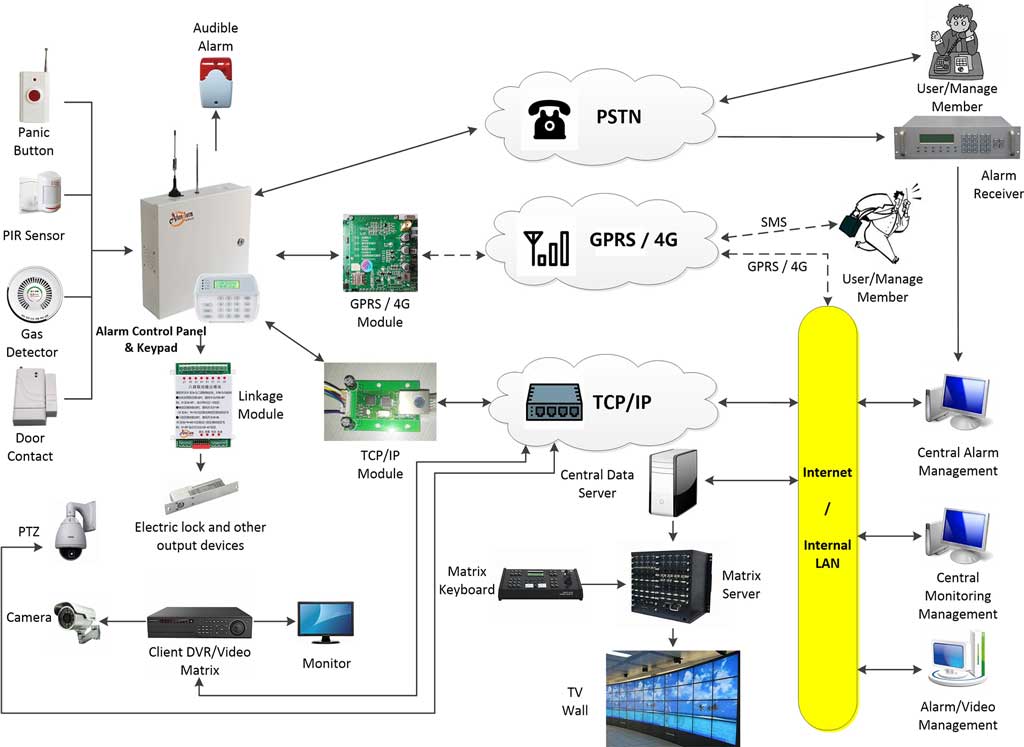
Looking ahead to 2026 and beyond, expect predictive analytics (AI forecasting high-risk windows based on historical patterns), seamless IoT integration (smart locks, environmental sensors, and glass-break detectors feeding the same platform), 5G edge processing for zero-latency decisions even in remote areas, and fully unified dashboards combining burglar alarms, fire detection, access control, and video into one interface. Your existing multi-protocol panels will continue working as the foundation while AI and cloud layers add intelligence on top.
The companies that implement today will dominate tomorrow—offering verified-response monitoring that police actually prioritize and customers willingly pay a premium for.
Your Complete Implementation Roadmap and Next Steps
Follow the phased approach above: start with a pilot of 50-100 high-value accounts (mix residential and commercial), measure KPIs every 30 days (false-alarm rate, response time, cost per monitored site, customer retention, and police acceptance rate), and scale aggressively. Common pitfalls to avoid: rushing full migration without parallel testing, or skipping operator training—both lead to temporary spikes in missed events.
You now have the complete blueprint to revolutionize your burglar alarm monitoring software. The technology exists. The ROI is proven in hundreds of installations worldwide. The only question is how quickly you act.
Ready to eliminate false alarms, slash costs, and deliver the fastest, smartest protection in your market? Contact our team today for a free system audit and customized implementation plan. We’ll show you exactly how AI-driven detection, video verification, and remote guarding will transform your operations within weeks—not years.
Your clients—and your bottom line—deserve nothing less.