

Introduction: The Hidden Crisis Inside Many Alarm Monitoring Centers
Across the global security industry, thousands of alarm monitoring centers process millions of alarm signals every day. Intrusion alarms, tamper alerts, motion triggers, panic buttons, power failures, and communication faults continuously flow from protected sites into monitoring software platforms.
However, despite advances in sensors and communication networks, one fundamental operational problem still plagues alarm monitoring centers:
Too many alarm signals and not enough actionable intelligence.
In many legacy systems, monitoring operators are forced to manually interpret signals, verify events, contact responsible parties, and dispatch response teams. This manual workflow leads to several critical operational challenges:
- High volumes of false alarms
- Slow alarm verification
- Operator fatigue and decision errors
- Inefficient dispatch coordination
- Poor situational awareness
For monitoring companies managing thousands or even hundreds of thousands of protected premises, these inefficiencies directly translate into higher operating costs and reduced service quality.
Modern Alarm Monitoring Software must therefore evolve beyond simple signal reception. The next generation of alarm monitoring platforms focuses on intelligent automation, where software actively interprets events, orchestrates response workflows, and verifies alarms before operators even touch the system.
This article provides a deep technical and operational guide to building automation-driven alarm monitoring workflows. We will explore how modern alarm monitoring software can transform raw signals into verified incidents, dramatically improving operational efficiency while reducing false alarms.
The Evolution of Alarm Monitoring Software
From Signal Receivers to Intelligent Security Platforms
Early alarm monitoring systems were designed primarily as signal receivers.
Their responsibilities were limited to:
- Receiving signals from alarm panels
- Displaying events on an operator console
- Logging signals into a database
- Allowing operators to manually process alarms
This approach worked decades ago when alarm networks were small. However, today’s monitoring centers face drastically different conditions.
Modern alarm ecosystems include:
- Intrusion alarm panels
- Video surveillance systems
- IoT sensors
- Access control systems
- Mobile panic devices
- Environmental monitoring sensors
Each device continuously generates data. Without intelligent filtering and automation, monitoring centers become overwhelmed.
Modern Alarm Monitoring Software must therefore function as an automation platform, not merely a signal receiver.
The key capabilities include:
- Event correlation
- Automated verification workflows
- Video integration
- Smart notifications
- Response dispatch automation
- Intelligent false alarm reduction
Together, these features enable alarm centers to move from signal processing to incident management. In practice, platforms with modular designs let you add features like video linkage or map-based dispatch without rebuilding the entire system, keeping your operation efficient as your customer base grows.
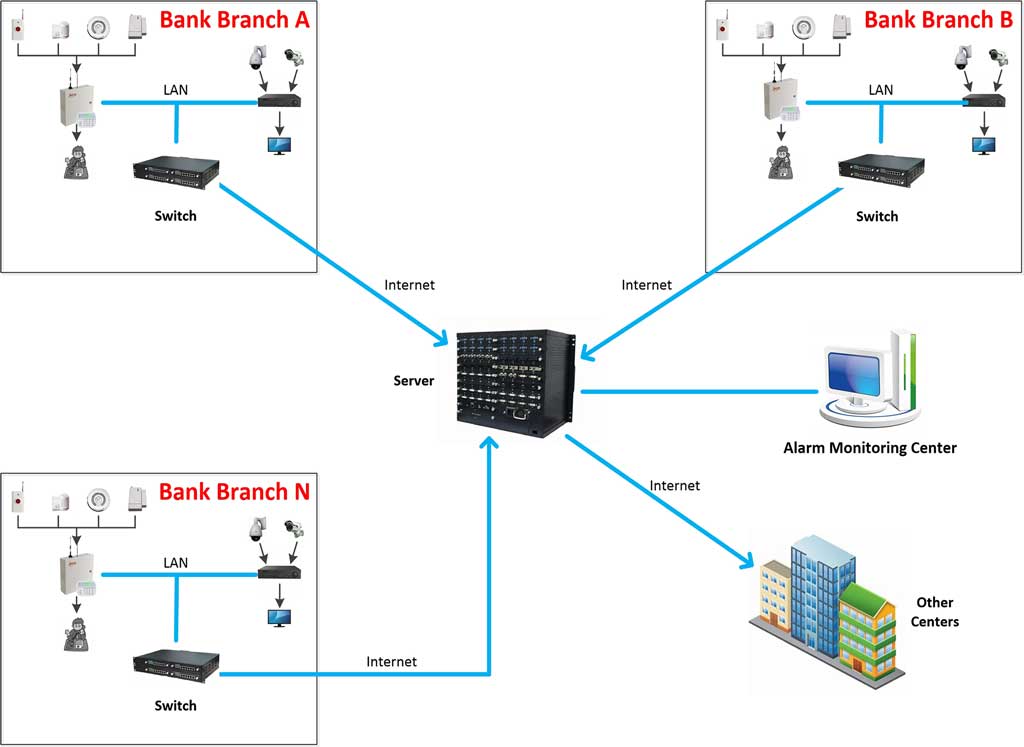
Understanding the Alarm Signal Lifecycle
To design intelligent automation, it is essential to understand the complete lifecycle of an alarm signal within monitoring software.
A well-designed alarm monitoring platform processes events through several stages.
Stage 1: Signal Reception
Alarm signals originate from field devices such as:
- Intrusion detectors
- Door contacts
- Glass break sensors
- Panic buttons
- ATM alarm sensors
- Environmental sensors
These devices communicate with alarm panels, which transmit signals to the monitoring center using various communication methods:
- TCP/IP
- GPRS / LTE
- PSTN
- Radio networks
- Satellite communications
Modern alarm monitoring software must support multiple communication protocols such as:
- Contact ID
- SIA
- Ademco
- Proprietary device protocols
- C&K CFSK III
- ADEMCO 4+2 Express
Reliable signal reception is the foundation of the monitoring system. Leading platforms also integrate dedicated alarm receiver hardware—including modems, professional receiving cards, and multi-manufacturer receivers—to handle mixed networks reliably. Features like caller ID detection help identify line faults or malicious blocks early.
Key technical requirements include:
- Redundant communication channels
- High-throughput signal processing
- Signal integrity validation
- Timestamp synchronization
Once received, signals enter the event processing engine. Many systems also auto-route test signals and maintenance notifications away from the main operator queue, preventing unnecessary distractions during live burglar alarm events.
Stage 2: Signal Normalization
Raw alarm signals often arrive in different formats depending on device manufacturers.
For example:
- Different event codes
- Device-specific message structures
- Different timestamp formats
- Varying location identifiers
The monitoring software must normalize these signals into a unified event structure.
Typical normalized event fields include:
- Event type
- Device ID
- Site ID
- Zone number
- Timestamp
- Alarm priority
- Signal source
Normalization ensures that all events can be processed consistently by automation workflows. This step is especially critical in mixed-vendor burglar alarm installations where one panel might send “Zone 3 Open” while another uses a different code for the same door contact.
Stage 3: Event Classification
Not every signal requires immediate action.
A well-designed alarm monitoring system must classify signals into categories such as:
- Intrusion alarm
- Tamper alarm
- Fire alarm
- Environmental alert
- System fault
- Maintenance notification
- Communication failure
Classification determines the response workflow that will be triggered.
For example:
| Event Type | Priority | Response Required |
|---|---|---|
| Intrusion Alarm | High | Immediate verification |
| Tamper Alarm | Medium | Investigate |
| Communication Fault | Low | Maintenance follow-up |
| Environmental Alert | Medium | Notify responsible party |
Automated classification ensures consistent incident handling. Operators can then focus on true threats instead of sifting through noise.

Intelligent Event Filtering and Correlation
One of the most powerful capabilities in modern Alarm Monitoring Software is event correlation.
Instead of treating every signal independently, intelligent systems analyze relationships between events.
Why Event Correlation Matters
Many false alarms occur due to isolated sensor triggers.
Examples include:
- Motion sensors triggered by animals
- Wind affecting outdoor detectors
- Electrical interference
- User errors during arming/disarming
By correlating multiple signals, the system can determine whether an event represents a real intrusion.
Multi-Sensor Correlation
A powerful filtering technique is multi-sensor confirmation.
Example logic:
IF motion sensor triggered
AND door contact opened
WITHIN 30 seconds
THEN classify as verified intrusion
If only a motion sensor triggers without additional activity, the system may treat it as a low-confidence event.
Time-Based Correlation
Event timing also provides valuable intelligence.
Example workflow:
- Motion alarm occurs
- User disarms system within 20 seconds
This likely indicates authorized access, not intrusion.
The software can automatically downgrade the alarm priority.
Site Activity Pattern Analysis
Advanced systems analyze historical patterns.
For example:
- Regular deliveries every morning
- Cleaning staff access after hours
- Routine maintenance events
If alarms occur during expected activity windows, the system can apply contextual logic before triggering emergency response.
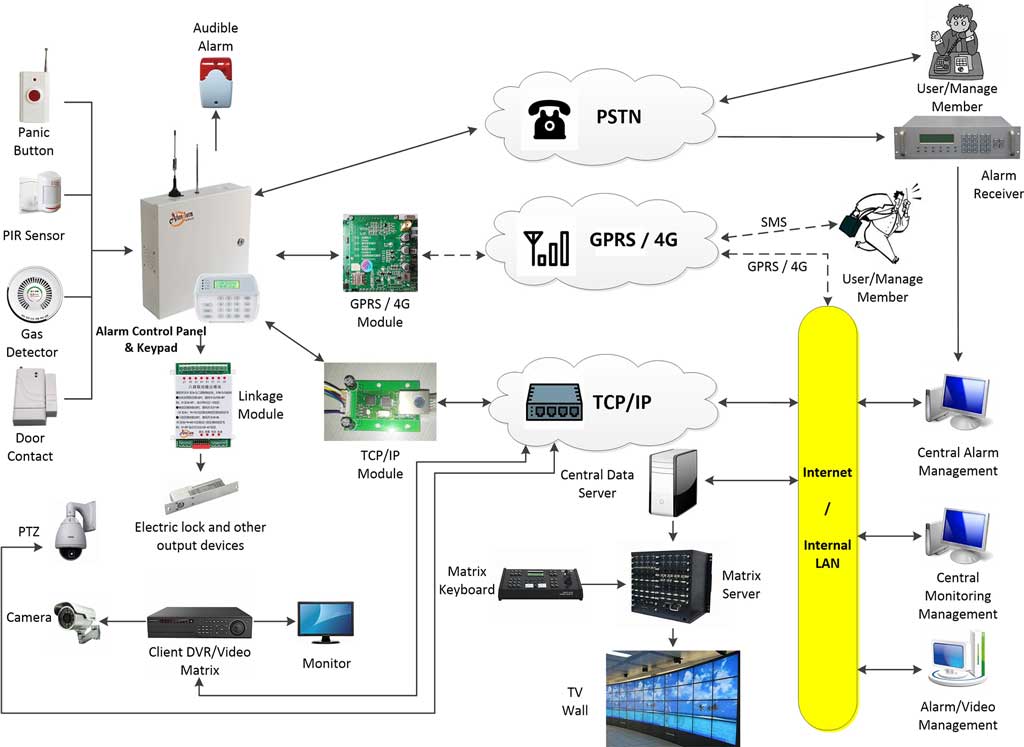
Designing an Automated Alarm Verification Workflow
False alarms cost monitoring companies and law enforcement agencies millions of dollars annually.
Automation plays a critical role in verifying alarms before dispatching response resources.
A modern verification workflow typically includes multiple stages.
Step 1: Event Trigger
The process begins when the monitoring software receives a high-priority alarm signal.
Example triggers:
- Intrusion detection
- ATM tampering
- Panic alarm
- Safe vibration alarm
The event enters the automated verification pipeline.
Step 2: Sensor Cross-Validation
The system checks for related signals such as:
- Additional motion detectors
- Door or window sensors
- Glass break detectors
- Shock sensors
If multiple sensors confirm the event, the system escalates the alarm.
Step 3: Video Verification
If integrated cameras exist, the monitoring software automatically activates video verification.
Typical workflow:
- Retrieve camera linked to alarm zone
- Pull live video stream
- Record event clip
- Display footage to operator
In advanced systems, AI video analytics may detect human presence or suspicious behavior. In many platforms the video automatically pops up on the operator console the moment the alarm is classified, saving precious seconds.
Step 4: User Notification
If the alarm remains unverified, the system automatically contacts responsible parties.
Notification channels may include:
- Mobile app push notifications
- SMS alerts
- Automated voice calls
- Email alerts
Users can confirm or cancel alarms directly from the notification interface.
Step 5: Alarm Escalation
If the alarm cannot be canceled or verified by users, the system escalates the event.
Escalation actions may include:
- Notifying security personnel
- Dispatching response teams
- Alerting law enforcement
- Activating sirens
Automation ensures this escalation happens quickly and consistently. A practical 30–60 second delay window before full escalation gives legitimate users time to disarm accidental triggers without slowing real responses.

Integrating Video Verification into Alarm Monitoring Software
Video verification dramatically improves incident accuracy.
Instead of relying solely on sensor data, operators can visually confirm events.
How Video Integration Works
The monitoring platform connects with video systems through:
- ONVIF protocols
- RTSP streaming
- Video management system APIs
Each alarm zone is mapped to one or more cameras. Leading software supports direct linkage with popular brands such as Hikvision, Dahua, EZVIZ, and Uniview.
When an alarm occurs, the system automatically retrieves video.
Automated Video Retrieval Workflow
Typical process:
- Alarm received
- Identify associated cameras
- Retrieve live stream (or pop it up instantly)
- Capture pre-event footage
- Display on operator interface
- Store video clip as evidence
This workflow allows monitoring centers to verify alarms within seconds. To set it up correctly, go to your zone configuration screen, select the defense zone, enter the camera IP or ONVIF address, and test the link with a simulated trigger—many centers miss real intrusions simply because the mapping was never verified in live conditions.
Smart Notification Routing
Efficient communication is essential during alarm events.
Modern alarm monitoring software includes intelligent notification routing.
Multi-Channel Communication
Notifications can be delivered through multiple channels:
- SMS
- Mobile apps
- Automated voice calls
- Security dispatch systems
The system selects the best channel based on urgency and contact preferences.
Escalation Logic
Example notification sequence:
- Send mobile push notification
- Wait 30 seconds
- Send SMS message
- Wait 60 seconds
- Initiate voice call
If the primary contact does not respond, the system automatically notifies secondary contacts.
Contact Role Management
Contacts may include:
- Property owners
- Facility managers
- Security guards
- Maintenance personnel
- Monitoring supervisors
Each role can have customized notification rules. You can also set up special handling for arrears users or scheduled maintenance windows so routine messages never clutter the emergency queue.
Response Dispatch Automation
Once an alarm is verified, the monitoring center must initiate an appropriate response.
Manual dispatch processes are slow and error-prone.
Automation dramatically improves efficiency.
Automated Dispatch Workflow
Example response workflow:
- Alarm verified
- Identify site location
- Determine response zone
- Assign nearest response unit
- Send dispatch instructions
- Track response progress
Integration with security patrol management systems enables real-time coordination.
GPS-Based Guard Dispatch
Modern dispatch systems integrate with GPS tracking.
Workflow example:
- System identifies nearest guard
- Dispatch instructions sent to mobile device
- Guard confirms receipt
- System tracks arrival time
This ensures faster response times and improved accountability. Many platforms overlay alarms on electronic maps (Baidu maps or bitmap overlays), with the affected zone flashing in real time so dispatchers instantly see the exact building or perimeter point—no more reading addresses over the phone.
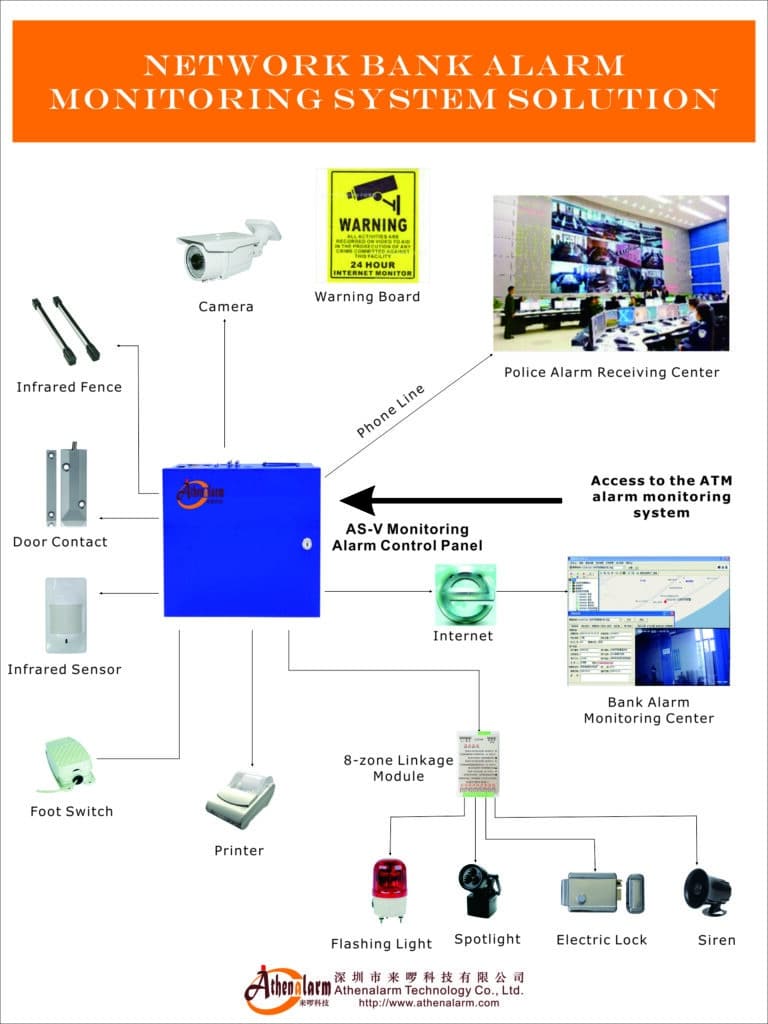
Reducing False Alarms Through Workflow Logic
False alarms remain the biggest operational challenge in alarm monitoring.
Automation can reduce false alarms by implementing intelligent workflow rules.
Common False Alarm Causes
Typical causes include:
- User errors
- Poor sensor placement
- Environmental conditions
- Equipment faults
- Network issues
Workflow Strategies to Reduce False Alarms
Verification Delays
Short delays allow users to disarm systems after accidental triggers.
Example:
IF alarm triggered
WAIT 20 seconds
CHECK disarm status
IF disarmed
Cancel alarm
Multi-Sensor Confirmation
Require multiple sensor triggers before escalation.
User Confirmation
Allow users to cancel alarms via mobile app.
AI Event Analysis
Advanced systems use AI to detect:
- Human presence
- Suspicious movement
- Vehicle activity
These techniques significantly reduce false dispatches. In my experience working with centers, combining these rules with proper user familiarization training (the first 30–90 days after installation) routinely cuts false alarms by 60–80 %. Always include a simple manual override button so operators can escalate if the automation feels too conservative.
Ensuring Scalability, Reliability, and Operator Management in Large Alarm Centers
For operators running metropolitan or multi-site networks, automation only works if the underlying platform stays stable under load.
Modern systems handle this through:
- SQL Server databases that support millions of records and over 5,000 active users with room to grow
- Distributed multi-server architecture (one server for reception, another for video and dispatch)
- Automatic failover between dual systems so a hardware glitch never drops an intrusion signal
- Multi-level operator permissions—system administrators control rules while line operators only see verified events
- Comprehensive reporting tools that export alarm statistics, user lists, and handling logs to Excel for monthly reviews
Set up automated daily backups and test your failover monthly. Centers that follow this approach report almost zero downtime even during peak holiday seasons when false alarm volume spikes.
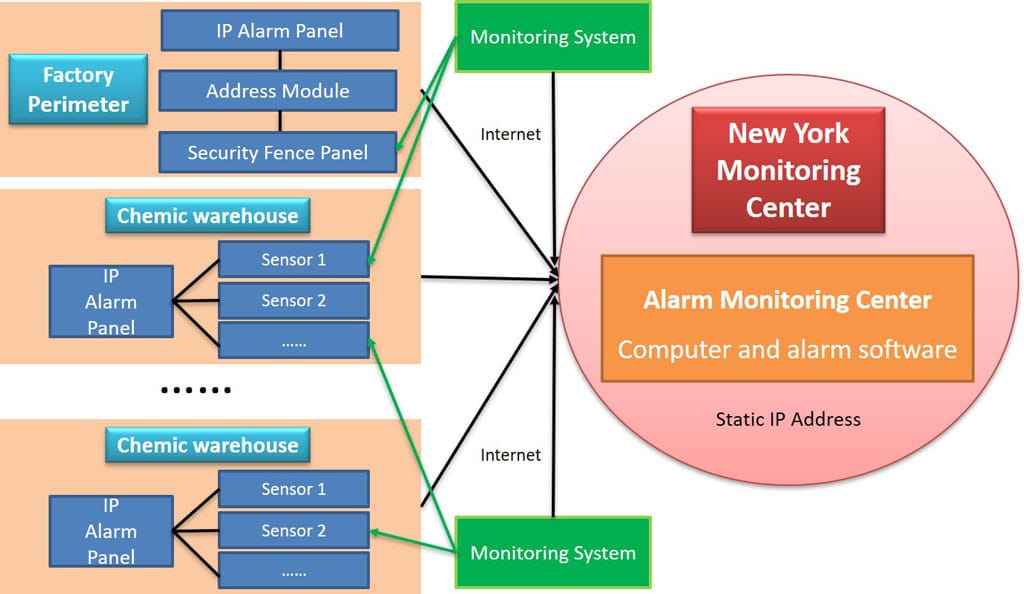
Step-by-Step Implementation Guide for Intelligent Alarm Automation
Organizations planning to upgrade their monitoring platforms should follow a structured implementation strategy.
Step 1: Evaluate Existing Monitoring Infrastructure
Review current systems including:
- Alarm panels
- Communication protocols
- Monitoring software
- Video systems
- Operator workflows
Identify inefficiencies and bottlenecks. Run a 30-day audit of alarm logs to spot the top five false alarm sources.
Step 2: Define Automation Objectives
Set measurable goals such as:
- Reduce false alarms by 40%
- Reduce operator workload
- Improve response times
- Increase incident verification rate
Step 3: Design Automation Workflows
Create workflow diagrams covering:
- Alarm classification
- Verification processes
- Notification routing
- Dispatch logic
Use the software’s built-in rule builder—most platforms let you drag-and-drop conditions without coding.
Step 4: Integrate Supporting Technologies
Key integrations may include:
- Video management systems
- Mobile applications
- Dispatch platforms
- AI analytics engines
Start with video linkage: map every intrusion zone to its camera first.
Step 5: Configure Alarm Monitoring Software
Implement workflow rules within the monitoring platform.
Key configurations include:
- Event filtering rules
- Notification schedules
- Verification procedures
- Escalation logic
Test each rule with simulated signals before going live.
Step 6: Train Monitoring Operators
Operators must understand:
- Automation logic
- Manual override procedures
- Incident management workflows
Run hands-on sessions using recorded alarm clips so everyone knows exactly when to trust the system and when to step in.
Step 7: Monitor Performance Metrics
Key performance indicators include:
- False alarm rate
- Average verification time
- Operator workload
- Response time
Review these weekly and tweak rules. Most centers see measurable improvements within the first month.
Future Trends in Alarm Monitoring Automation
The next generation of Alarm Monitoring Software will include even more advanced capabilities.
Key trends include:
AI-Powered Alarm Classification
Machine learning algorithms will classify events based on patterns across thousands of sites.
Edge-Based Event Processing
Alarm panels and cameras will perform initial analysis before sending signals.
Predictive Security
Systems will detect suspicious patterns before alarms occur.
Cloud-Based Monitoring Platforms
Cloud infrastructure enables scalable monitoring centers with automatic updates and remote management.
Conclusion: Transforming Alarm Signals into Intelligent Security Operations
The role of Alarm Monitoring Software is undergoing a major transformation.
Modern security operations require platforms capable of:
- Intelligent signal processing
- Automated verification
- Video integration
- Smart notifications
- Response dispatch automation
- False alarm reduction
By implementing automation-driven workflows, monitoring centers can convert overwhelming streams of alarm signals into verified incidents and coordinated responses.
For alarm monitoring operators, security integrators, and technology providers, investing in intelligent automation is no longer optional—it is essential for building efficient, scalable, and reliable alarm monitoring operations.
Organizations that embrace this transformation will achieve:
- Faster incident response
- Lower operating costs
- Reduced false alarms
- Improved service quality
- Higher customer satisfaction
In an industry where every second counts, intelligent alarm monitoring automation becomes the foundation of modern security operations. Start small—pick one workflow (video verification is usually the quickest win)—and you’ll quickly see why thousands of centers are making the switch today.