

I. Introduction
A regional logistics warehouse once experienced repeated after-hours trespassing attempts. Despite having a standard alarm system, the default configuration allowed multiple access code abuses and left several interior zones unmonitored during night shifts. After the system was fully re-programmed—assigning role-based user codes, restructuring zone configurations, implementing automated arming schedules, and refining real-time notification rules—the intrusion attempts were detected immediately, and no further breach succeeded.
This scenario illustrates a key reality: burglar alarm system programming is not simply about enabling basic detection—it is about tailoring a security ecosystem to the client’s operational patterns, risks, and compliance requirements.
This technical guide explains how programming user codes, zone configurations, arming/disarming schedules, and notification options ensures a fully customized burglar alarm solution. It is intended for security technicians, product managers, and procurement professionals responsible for designing or selecting professional intrusion detection systems.
II. Understanding the Basics of Burglar Alarm System Programming
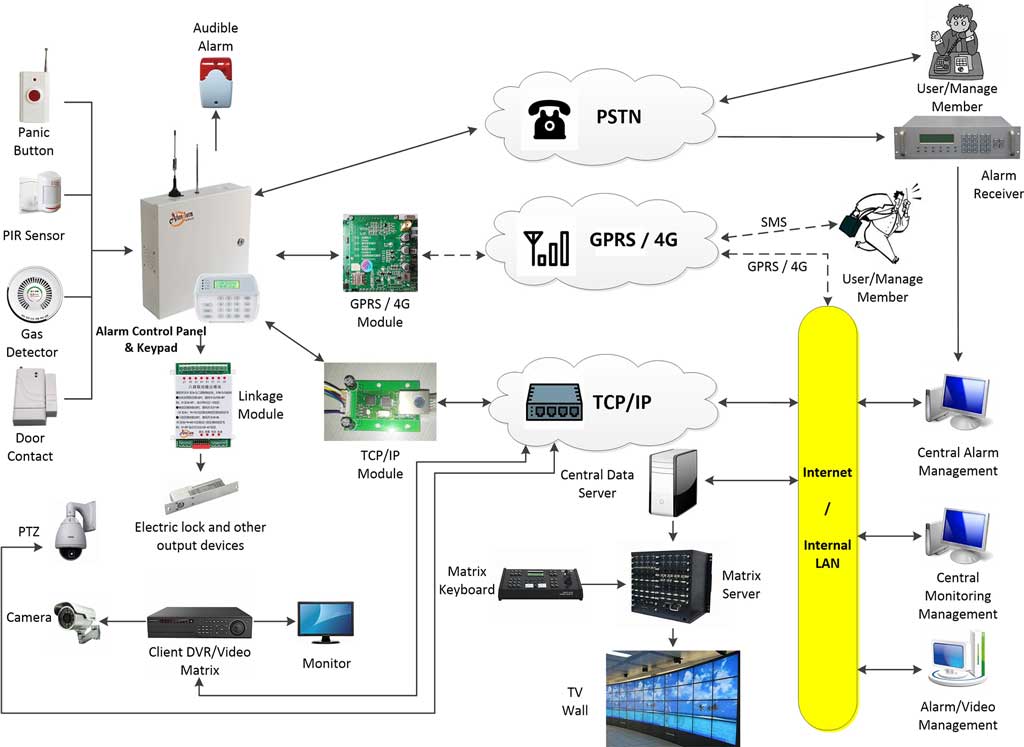
Burglar alarm system programming refers to the configuration process that defines how an alarm system behaves, who can access it, how each zone responds to threats, and how alerts are delivered. Modern alarm panels—whether wired, wireless, or hybrid—allow deep customization through onboard keypads or proprietary software.
Key programming components include:
- User Codes: Define access privileges and system control authority.
- Zone Configurations: Determine how doors, windows, motion sensors, and specialty detectors behave.
- Arming/Disarming Schedules: Automate system states to reduce human error.
- Notification Options: Control how alerts are communicated to users or monitoring centers.
Standards from the Security Industry Association (SIA) emphasize that intruder alarms should be adaptable to site-specific conditions and usage patterns. When these elements are properly programmed, the system transforms from a generic installation into a precision-aligned security solution.

III. Programming User Codes for Personalized Access
User code programming is central to access control and system integrity. Professionals typically configure user codes through:
1. Assigning and Managing Unique Codes
- Access the control panel or programming software.
- Create unique codes for each user or user group.
- Define permissions such as arming only, disarming only, full master access, or temporary access.
2. Tailoring Codes Based on User Roles
Segmenting users by operational roles prevents unauthorized control:
- Commercial sites: Shift workers, cleaning teams, maintenance staff, supervisors.
- Residential systems: Family members, tenants, service providers.
3. Best Practices
- Use code hierarchies (e.g., master, manager, user).
- Set expiration dates for temporary contractors.
- Enable audit trails to track when and by whom the system was used.
- Avoid shared user codes to maintain traceability.
Example Application
A commercial building with three operational shifts can assign separate access levels for each team and limit nighttime disarm permissions to supervisors. This eliminates unauthorized after-hours entry while maintaining efficiency.
IV. Configuring Zones to Match Client Environments
Zones define how the alarm panel interprets and reacts to events from connected sensors. Proper zone configuration programming ensures accurate detection and fewer false alarms.
1. Understanding Zone Types
Common types include:
- Perimeter zones: Doors, windows, roller shutters.
- Interior zones: PIRs, dual-tech motion sensors, glass-break detectors.
- Fire, gas, or environmental zones: Depending on system integration.
2. Customization Strategies
- Adjust sensitivity for motion detectors near HVAC vents or reflective surfaces.
- Enable bypass options for maintenance activities.
- Program response types: instant, entry-delay, follower zones, 24-hour zones.
For homes with pets, configuring pet-immune PIR settings prevents unnecessary alarms while maintaining intruder detection reliability.
3. Tools and Techniques
- Use keypad programming for small installations.
- Use vendor software for large-scale, multi-zone sites to organize zone attributes efficiently.
- Adhere to UL 634 and UL 639 guidance for reliable sensor and zone integration.
Case Study
A retail store can prioritize high-value merchandise zones by assigning them instant alarm responses, while stockroom access may have entry delays. This allows procurement teams to invest in coverage where it matters most.
V. Setting Up Arming and Disarming Schedules
Automated arming/disarming schedules reduce operational errors and ensure consistent protection.
1. Why Scheduling Matters
Manual arming is prone to human error. Time-based scheduling ensures the system aligns with the client’s daily routine without relying on staff habits.
2. Implementation Steps
- Access scheduling features through the alarm panel interface or software.
- Set weekday and weekend patterns.
- Add exceptions for holidays, seasonal changes, or special events.
3. Advanced Features
- Integration with smart building systems or digital calendars.
- Automatic override when unexpected activity occurs.
- Adaptive schedules triggered by occupancy sensors.
Benefits
According to data from the Electronic Security Association (ESA), automated arming significantly reduces false alarms caused by incorrect manual operation and improves long-term system consistency.
VI. Customizing Notification Options for Effective Response
Configuring the right notification settings ensures that security events trigger the appropriate response level.
1. Notification Types
- SMS or email alerts.
- Mobile app push notifications.
- Direct transmission to a central monitoring station via Contact ID, SIA DC-09, or other protocols.
2. Tailoring Alerts
- Prioritize urgent events (e.g., intrusion alarms, tamper events) for immediate delivery.
- Set lower-priority alerts (e.g., low battery, AC loss) on delayed or system log notification.
- Program escalation rules for high-risk sites.
3. Integration Tips
- Use redundancy by enabling multiple communication channels.
- Ensure compliance with GDPR or local data protection regulations when sending alerts offsite.
- For multi-site organizations, unify notification protocols to standardize management processes.
Real-World Example
A chain of warehouses can use identical notification templates and routing rules so that all alerts flow into a centralized management dashboard, streamlining supervision across dozens of locations.
VII. Best Practices and Common Pitfalls in Burglar Alarm Programming
Best Practices
- Test each programmed element before handover.
- Document all configuration changes.
- Train end-users, especially on scheduled arming and user code rules.
- Review firmware and communication module updates regularly.
Common Pitfalls
- Overlooking environmental factors when programming motion detector zones.
- Failure to remove expired user codes for contractors.
- Misconfigured entry/exit timers causing unnecessary alarms.
- Lack of monitoring path redundancy in high-risk facilities.
VIII. Conclusion
Effective burglar alarm system programming transforms a standard intrusion alarm into a customized security platform. By carefully adjusting user codes, zone behaviors, arming schedules, and notification workflows, professionals can create robust systems tailored to each client’s operational needs and risk profile.
Technicians, product managers, and procurement specialists are encouraged to regularly evaluate programming configurations and consult certified security experts to ensure optimal performance as threats and technologies evolve.
References
- Security Industry Association (SIA) – Standards and best practices for alarm system configuration.
https://www.securityindustry.org - Underwriters Laboratories (UL) – UL 634 (Switches), UL 639 (Intrusion Detection Units), and related certifications for alarm equipment.
https://www.ul.com - Electronic Security Association (ESA) – Reports on industry trends, false alarm reduction, and installation guidelines.
https://www.esaweb.org - National Institute of Justice (NIJ) – Research on effective security and intrusion detection technologies.
https://nij.ojp.gov