
Introduction: The Critical Evolution of the Modern Alarm Monitoring System
For decades, alarm monitoring centers have operated using a relatively simple model: receive alarm signals, display them to operators, and manually determine the response. While this approach worked when alarm volumes were low and systems were simple, it is no longer sustainable in today’s security landscape.
Modern security environments generate enormous volumes of signals. Commercial sites, banks, retail chains, warehouses, ATM networks, and industrial facilities may generate thousands of events per day. These events include:
- Intrusion alarms
- Tamper alerts
- System faults
- Environmental alerts
- Video analytics triggers
- Access control exceptions
The challenge is that a large portion of these signals are false alarms or low-priority events. When operators must manually verify and process every signal, alarm centers experience three serious operational problems:
- Operator overload
- Delayed response to real incidents
- High operational costs
This is why the modern alarm monitoring system must evolve beyond simple signal reception. Today’s monitoring platforms must incorporate intelligent automation workflows capable of transforming raw alarm signals into verified security incidents that can be acted upon immediately.
The shift from traditional monitoring software to intelligent alarm automation platforms introduces capabilities such as:
- Intelligent signal classification
- Event correlation and filtering
- Automated alarm verification
- Integrated video confirmation
- Smart notification routing
- Automated dispatch of response teams
These technologies allow alarm monitoring centers to drastically reduce false alarms while significantly improving response speed and operational efficiency.
This article provides a comprehensive implementation guide explaining how modern alarm monitoring software can automate the entire alarm lifecycle—from signal reception to verified incident response. Whether you run a central station handling thousands of burglar alarm accounts or manage security for a large enterprise network, the practical steps below will help you build a system that actually works in the real world.

Understanding the Alarm Signal Lifecycle in an Alarm Monitoring System
Before designing automation workflows, it is essential to understand how alarm signals move through the monitoring system. Every alarm event follows a lifecycle that includes multiple stages.
In traditional monitoring systems, most of these stages are performed manually by operators. In modern alarm monitoring software, these steps can be automated.
Stage 1: Alarm Signal Generation
The lifecycle begins when a security device generates an alarm signal. Common devices include:
- PIR motion detectors
- Door/window contacts
- Glass break sensors
- Panic buttons
- ATM vibration sensors
- Safe tamper sensors
- Environmental sensors
These devices transmit signals through alarm panels or gateways using communication technologies such as:
- IP networks
- GPRS / LTE
- PSTN lines
- Radio communication
The alarm signal contains essential information including:
- Device ID
- Alarm type
- Time stamp
- Zone information
- Site location
In high-density security environments, hundreds of signals may arrive simultaneously.
Without automation, operators must manually review each signal, which introduces delays and increases the risk of human error. In burglar alarm systems, this is especially critical because a missed genuine intrusion can have devastating consequences, while unchecked false alarms erode trust and drain resources.
Stage 2: Signal Reception and Protocol Processing
Once generated, signals are received by the alarm monitoring system server.
Professional monitoring platforms support multiple alarm transmission protocols, such as:
- Contact ID
- SIA
- Modbus alarm signals
- Proprietary IP protocols
- ADEMCO 4+2 Express
- C&K CFSK III
The software converts these signals into standardized event records.
At this stage, the monitoring platform must ensure:
- High reliability signal reception
- Redundant communication paths
- Real-time signal decoding
- Automatic event logging
However, signal reception alone does not create a meaningful incident. At this point, the system simply has raw alarm data.
The next step is determining whether the signal represents a real security event.
Intelligent Event Filtering: The First Line of False Alarm Reduction
False alarms are the single largest problem facing alarm monitoring centers.
Industry studies consistently show that over 85% of intrusion alarms are false alarms. These may be triggered by:
- Environmental interference
- User operation errors
- Equipment faults
- Pets or moving objects
- Network instability
If every alarm reaches operators without filtering, the monitoring center becomes overwhelmed.
This is where intelligent event filtering becomes critical.
Rule-Based Alarm Filtering
Modern alarm monitoring software allows administrators to configure filtering rules based on:
- Alarm type
- Device priority
- Site classification
- Time schedules
- Historical behavior
Example filtering rules may include:
- Ignore motion alarms during authorized working hours
- Downgrade repeated alarms from faulty sensors
- Escalate alarms from high-risk sites such as banks or jewelry stores
To set these up effectively, log into the administrator console, navigate to the rule engine, create a new condition (e.g., “Alarm Type = Motion AND Time = Business Hours”), assign action “Log Only – No Operator Alert,” and test with simulated signals. Always start conservative—over-filtering can hide real threats.
These rules ensure that low-value signals do not disrupt operators.
Event Correlation and Multi-Sensor Logic
More advanced monitoring systems use event correlation logic.
Instead of analyzing signals individually, the system evaluates relationships between multiple signals.
Examples include:
Example 1: Multi-Zone Verification
If a single motion detector triggers, the system may classify it as a low-confidence alarm.
However, if:
- Motion detector triggers
- Door contact opens
- Glass break sensor activates
within a short time window (typically 30–60 seconds), the system recognizes a high probability intrusion event.
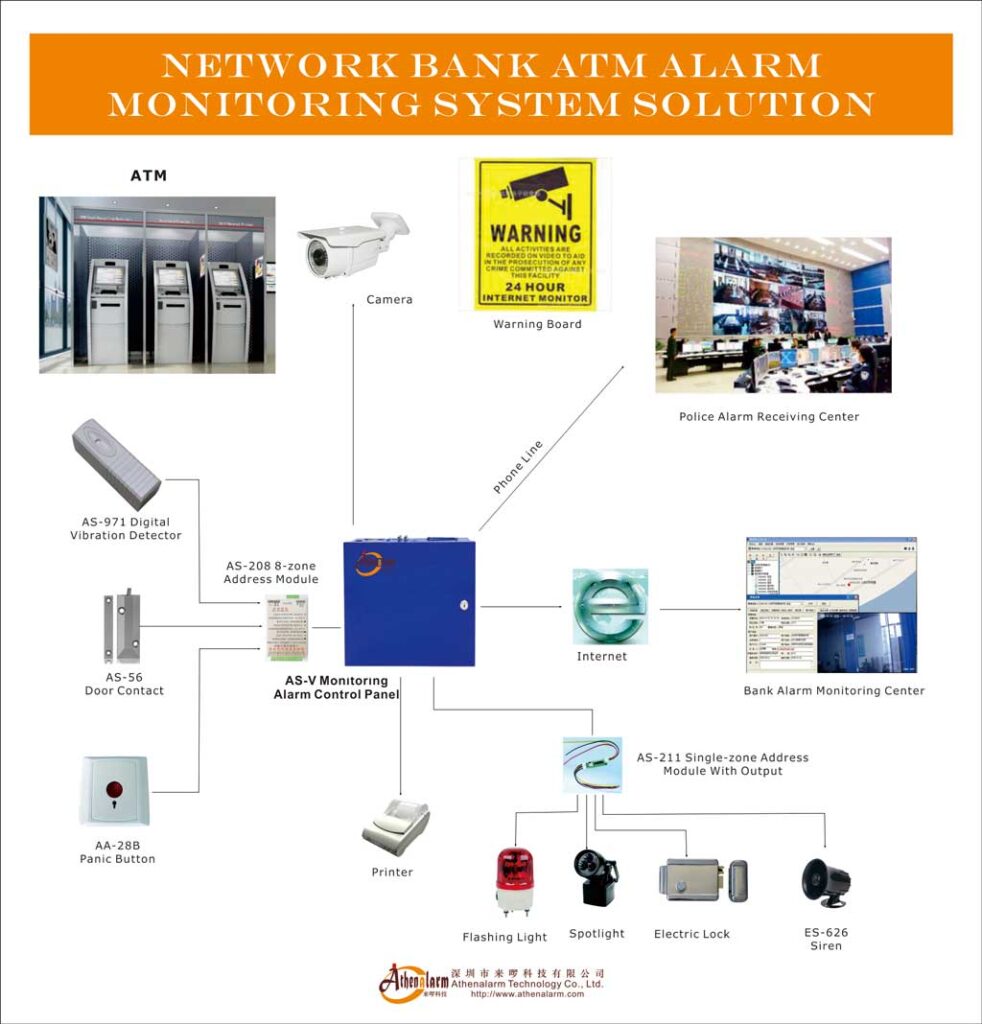
Example 2: ATM Security Correlation
ATM monitoring environments often include sensors such as:
- Seismic sensors
- Safe door contacts
- Power tamper alarms
If vibration is detected together with cabinet tampering, the monitoring system can automatically classify the event as a possible ATM attack.
This type of correlation significantly reduces false alarms while improving detection accuracy.

Automated Alarm Verification Workflows
After filtering and correlation, the next stage is alarm verification.
Verification determines whether an alarm represents a real security incident before dispatching response teams.
In traditional alarm monitoring systems, operators perform verification manually by:
- Calling site contacts
- Reviewing cameras
- Checking alarm history
Modern alarm monitoring software can automate much of this process.
Step-by-Step Automated Verification Workflow
A well-designed automation workflow typically follows these steps:
Step 1: Alarm Priority Classification
When an alarm enters the system, the software automatically assigns a priority level.
Example classification:
| Alarm Type | Priority Level |
|---|---|
| Panic alarm | Critical |
| ATM tamper | Critical |
| Multi-zone intrusion | High |
| Single sensor trigger | Medium |
| System fault | Low |
Priority determines the verification workflow. A common pitfall is treating all alarms equally—always review and adjust priorities quarterly based on your actual incident data.
Step 2: Automatic Video Verification
If cameras are integrated with the alarm system, the monitoring software can automatically retrieve video feeds associated with the alarm zone.
The system performs the following actions:
- Locate cameras associated with the alarm device
- Pull live video stream
- Display recorded clips from the alarm time window
- Present footage to operators
In advanced systems, AI analytics can automatically detect:
- Human presence
- Suspicious movement
- Forced entry
The platform should automatically pop up the real-time video of the exact defense zone on the operator screen, start recording the event, and allow instant playback. This happens in seconds and eliminates guesswork.
Step 3: Automated Contact Verification
The software can automatically contact responsible personnel using predefined escalation lists.
Communication channels may include:
- SMS alerts
- Mobile application notifications
- Automated voice calls
- Email alerts
If the primary contact does not respond within a defined time window (e.g., 45 seconds), the system automatically escalates to the next contact.
This significantly reduces operator workload.
Smart Notification Routing in Alarm Monitoring Systems
Notification management is one of the most important components of alarm automation.
Poorly designed notification systems can overwhelm users with unnecessary alerts.
Modern monitoring software uses smart notification routing.
Multi-Channel Notification Strategy
Effective alarm notification uses multiple channels simultaneously.
Typical channels include:
- SMS alerts for urgent notifications
- Mobile app push alerts for real-time updates
- Automated voice calls for critical events
- Email reports for system logs
The monitoring system automatically selects the most appropriate channel depending on alarm severity.
Intelligent Escalation Logic
Escalation logic ensures that alarms are not ignored.
Example workflow:
- Send mobile push notification to site manager
- If no response within 60 seconds → send SMS
- If still no response → initiate voice call
- If still unconfirmed → notify monitoring center operator
This automated escalation dramatically improves incident response rates.
Integrating Video Verification into the Alarm Monitoring System
Video verification has become one of the most effective tools for reducing false alarms.
When monitoring software integrates directly with video management systems, alarms can be visually verified in seconds.
Benefits of Video-Integrated Monitoring
Video verification provides several advantages:
- Immediate visual confirmation of intrusion
- Reduced dispatch of unnecessary response teams
- Improved evidence collection
- Faster police response approval
Many police departments now prioritize verified alarms.
Practical Implementation Steps
Organizations implementing video verification should follow these steps:
Step 1: Map cameras to alarm zones
Link every burglar alarm sensor (motion, door contact, etc.) to the nearest cameras in the software interface. Test each linkage by triggering a test alarm.
Step 2: Configure automatic video triggers
Set the system to retrieve live and recorded footage instantly when an alarm fires.
Step 3: Store alarm video clips
Automatically attach video evidence to the event log for easy retrieval later.
Step 4: Enable mobile viewing
Give authorized users secure remote access so site managers can confirm events from anywhere.
Compatible platforms work seamlessly with leading brands such as Hikvision, Dahua, and others, pulling feeds without extra hardware.
Automated Response Dispatch
Once an alarm is verified, the system must initiate a response.
Traditionally, dispatch is handled manually by operators.
Modern alarm monitoring software allows automated response dispatch.
Dispatch Automation Workflow
A typical automated dispatch process includes:
- Alarm verification completed
- Incident classified as real threat
- Response team selected automatically
- Dispatch notification sent
Dispatch teams may include:
- Security guards
- Mobile patrol units
- Police contacts
- Technical service teams
The system can also display navigation routes and incident details to responders. Integrating digital mapping (GIS or Baidu-style overlays) lets alarm locations flash on-screen, showing exact building positions and hotspots for faster arrival.
Workflow Logic for Reducing False Alarms
Reducing false alarms requires carefully designed workflow logic.
Key strategies include:
Historical Alarm Analysis
Monitoring systems should analyze alarm history to identify:
- Frequently triggered sensors
- Faulty devices
- Environmental patterns
This data can automatically adjust alarm thresholds. Export monthly reports showing false-alarm percentages per site or sensor—use these insights to schedule maintenance or retrain users.
Adaptive Alarm Thresholds
Sensors that trigger too frequently can have adaptive sensitivity.
For example:
- Require multiple triggers within 10 seconds
- Require confirmation from another sensor
User Behavior Monitoring
Some false alarms occur because users forget to disarm systems.
Monitoring software can detect patterns such as:
- Repeated morning disarm alarms
- Incorrect keypad entries
The system can notify users to prevent future errors. Proactively reach out to high-false-alarm clients with simple tips: “Arm only after everyone leaves,” or schedule free sensor cleaning visits.
Alarm Reporting and Analytics for Continuous Improvement
A truly intelligent system doesn’t stop at response—it learns. Modern platforms include powerful reporting engines that let you query any combination of events, generate statistics, and export to Excel, Word, or PDF.
Use these reports to track key metrics:
- False-alarm rate per site (target <15%)
- Average verification time
- Dispatch success rate
- Operator workload distribution
Review weekly: identify top false-alarm culprits, refine rules, and share client-specific summaries. This turns raw data into actionable intelligence and proves value to your customers.
Designing the Architecture of an Intelligent Alarm Monitoring System
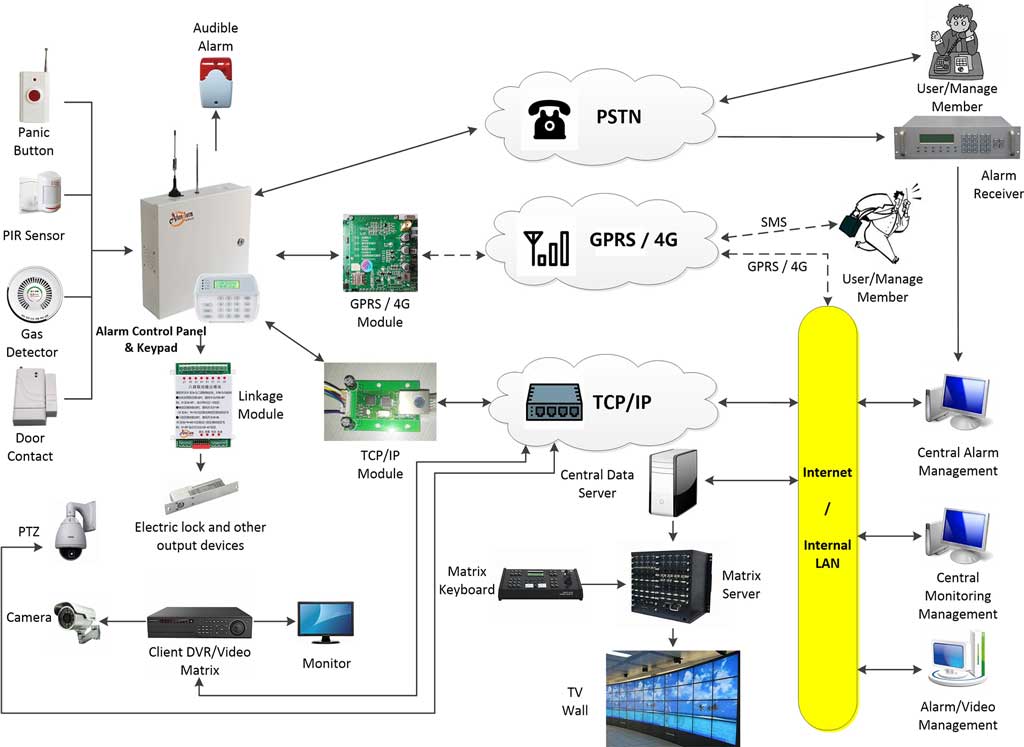
An effective alarm monitoring platform typically includes the following core components:
- Signal receiver servers
- Monitoring software platform
- Event processing engine
- Automation workflow engine
- Video integration module
- Notification gateway
- Mobile client applications
- SQL database server (handling millions of records)
- Dual-system backup servers
The workflow engine is the heart of automation.
It controls how alarms are processed and responded to. Choose a modular, scalable architecture that supports distributed servers (from one site to 100+), multi-level networking via TCP/IP, and automatic failover—so your center never goes down during peak events.
Best Practices for Implementing Alarm Monitoring Automation
Organizations implementing automated monitoring systems should follow several best practices.
- Start with a pilot deployment
Test automation workflows with a small number of sites before full rollout. - Define clear alarm priority policies
Different alarm types require different response logic. - Train monitoring operators
Automation reduces workload but does not eliminate human oversight. - Continuously refine automation rules
Workflow logic should evolve based on operational data.
Additional proven tips:
- Implement role-based access (administrator, senior operator, junior) so staff only see what they need.
- Schedule automated daily backups of alarms, users, and logs.
- Use open interfaces (DDE, Socket) for custom integrations if your center has unique requirements.
- Conduct quarterly false-alarm audits and share results with clients to build long-term partnerships.
The Future of Alarm Monitoring Systems
Alarm monitoring technology continues to evolve rapidly.
Emerging technologies include:
- AI-driven event classification
- Edge computing verification
- Predictive security analytics
Future monitoring systems may predict security incidents before they occur.
Conclusion: Turning Alarm Data into Actionable Security Intelligence
The role of the alarm monitoring system has fundamentally changed.
It is no longer sufficient for monitoring software to simply receive alarm signals. Modern security environments require intelligent systems capable of transforming raw signals into verified incidents.
By implementing automation technologies such as:
- Intelligent event filtering
- Alarm correlation logic
- Automated verification workflows
- Video verification integration
- Smart notification routing
- Automated response dispatch
monitoring centers can dramatically reduce false alarms, improve response times, and operate far more efficiently.
For organizations operating large security networks—such as banks, retail chains, logistics centers, and critical infrastructure—deploying an intelligent alarm monitoring system is no longer optional.
It is essential for maintaining effective, scalable security operations in an increasingly complex threat environment.
Security professionals who embrace automation will not only reduce operational costs but also dramatically improve the reliability and credibility of their alarm monitoring services.
The future of alarm monitoring belongs to intelligent, automated, and verified security response systems. Start small, measure everything, and watch your false alarms disappear while real protection gets stronger. Your operators—and your customers—will thank you.