

As a security professional with over 25 years in the anti-theft alarm industry, I’ve seen countless network alarm systems deployed across banks, retail chains, office buildings, and residential communities. They promise reliable burglary protection through centralized monitoring via TCP/IP or 4G networks, seamless CCTV linkage, and instant alerts to monitoring centers. Yet one persistent nightmare undermines them all: false alarms. Up to 95% of intrusion alerts in traditional setups turn out to be nothing more than wind-blown debris, passing animals, or sensor glitches. These false positives drain response teams, rack up fines, erode client trust, and inflate operational costs for everyone from installers to bulk procurers.
Enter the game-changing combination of edge computing and AI. By shifting intelligent processing to the local device level—right at the alarm panel, smart camera, or on-site gateway—you create what the industry now calls an edge alarm system or AI alarm. This isn’t theoretical hype. Real-world deployments consistently deliver 80% or greater reductions in false alarms while maintaining the robust network alarm architecture you already rely on. No more flooding central servers with raw video streams. No more cloud latency delaying critical burglary detection. Just real-time, on-device recognition that distinguishes genuine intruders from harmless events.
This practical guide is written specifically for security system decision-makers, technical installers, operations managers, product procurers, and bulk buyers in the burglary alarm space. Whether you’re managing a chain of stores, upgrading bank vaults, or scaling community perimeter protection, you’ll walk away with actionable steps to transform your existing network alarm system into a high-precision powerhouse. We’ll cover the technical upgrade from cloud-heavy processing to local AI recognition, detailed implementation steps, ROI calculations, and troubleshooting guidance. By the end, you’ll know exactly how to achieve that 80% false alarm reduction while boosting reliability, cutting costs, and future-proofing your deployments.
Let’s solve the false alarm crisis once and for all.
What Is a Network Alarm System? A Quick Foundation
Before diving into edge computing, it’s worth anchoring exactly what a network alarm system is—because the upgrade path depends on understanding the baseline architecture.
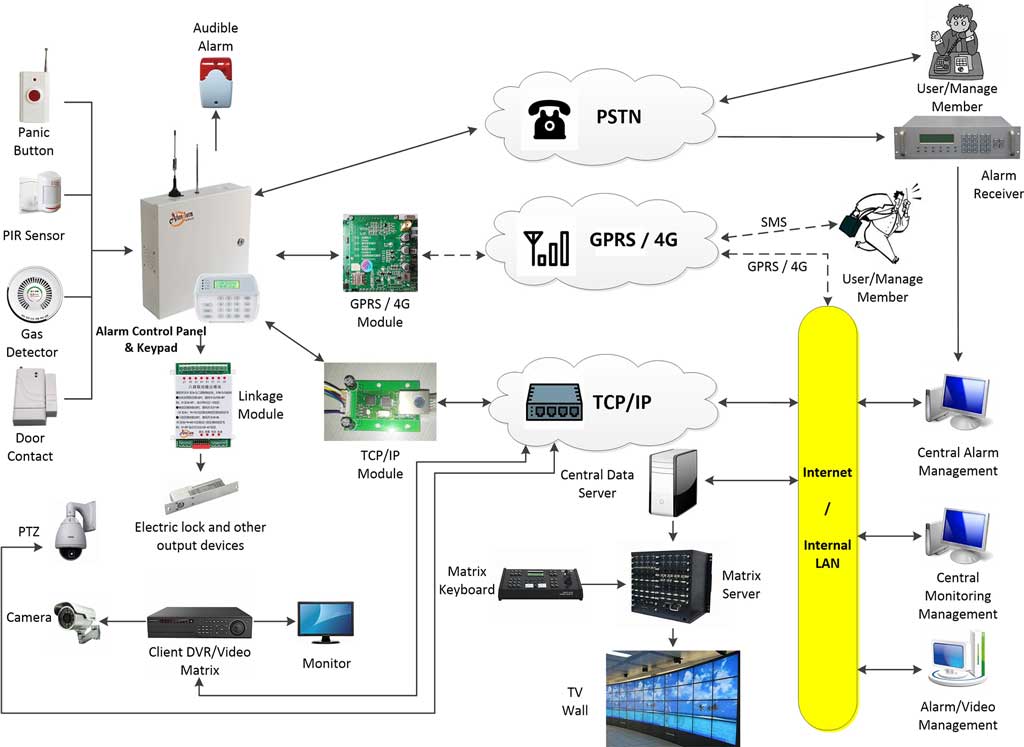
A network alarm system is a centralized security management platform that connects alarm control panels, intrusion detectors, CCTV cameras, and monitoring software via TCP/IP wired networks or 4G wireless networks. When a burglary event is detected—whether triggered automatically by sensors or manually via a panic button—the system transmits alarm data to a remote monitoring center. At the center, the management software automatically pops up live video of the alarm site, records footage, logs the event, and dispatches a response.
Modern network alarm systems like those built around the AS-9000 series alarm control panels and AS-ALARM network alarm center management software are designed to support a wide range of sites simultaneously. The software runs on a Windows Server environment with client terminals accessible from any internet-connected PC. Compatible CCTV systems—including products from major brands—integrate seamlessly via standard protocols.
These systems are suitable for nearly every deployment type:
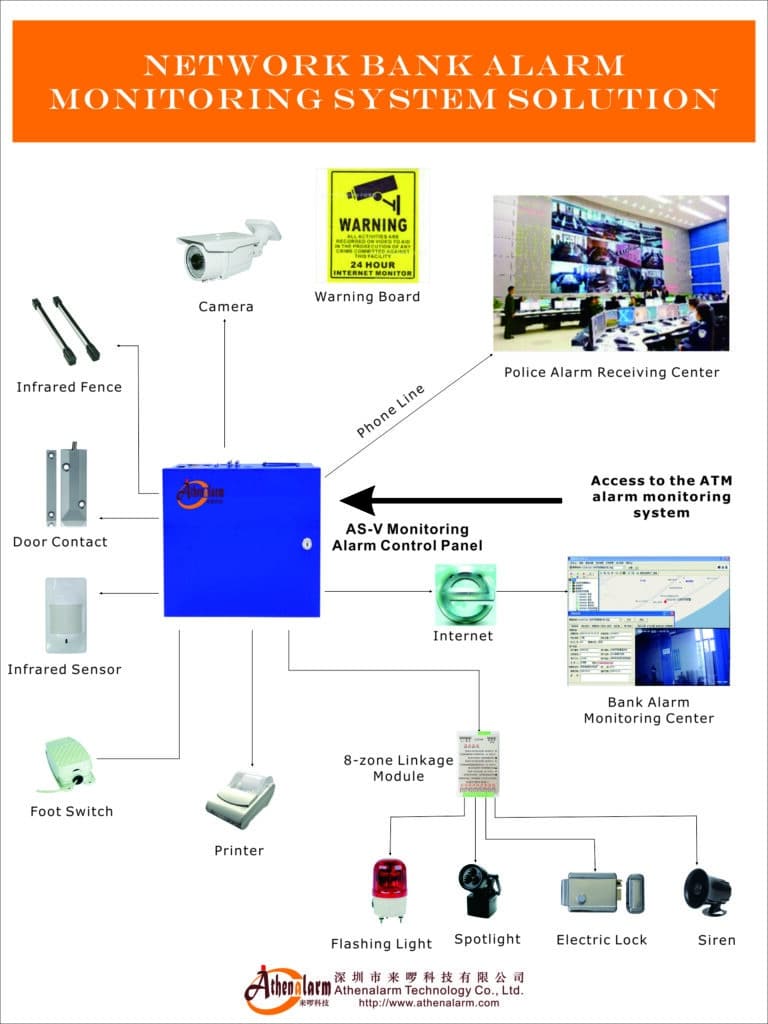
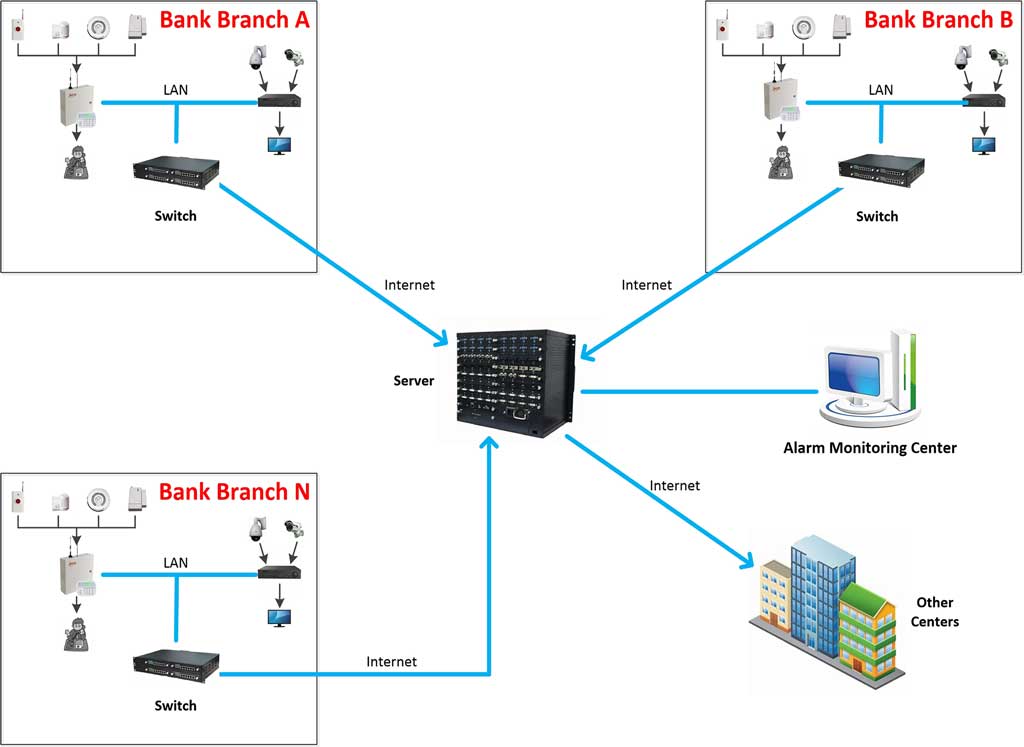
- Bank alarm systems: Covering ATM locations, bank vault areas, counter zones, and cash rooms, with multi-layer defense and automatic forwarding of alarm data between monitoring centers.
- Community and residential alarms: Protecting villa gates, perimeter fences, entry lobbies, and individual apartments with automatic video pop-up and owner notification.
- Hotel alarm systems: Covering guest room corridors, back-of-house areas, parking garages, and VIP floors, with alarm events linked directly to on-duty security personnel.
- Store and retail alarms: Covering after-hours storefront monitoring, cash register zones, stockrooms, and loading docks, with live video automatically surfaced during alarm events.
- Enterprise and factory alarms: Integrating production floor monitoring, perimeter intrusion detection, and access control into a unified management platform.
- Perimeter alarm systems: Using active infrared beam detectors, vibration sensors, and fence-mounted devices linked to CCTV for wide-area intrusion detection across large properties.
Understanding this architecture is essential because the edge AI upgrade we’re about to detail is designed to work within—and enhance—this exact framework, not replace it.
The Persistent Pain of False Alarms in Traditional Network Alarm Systems
Network alarm systems represent the backbone of modern burglary protection. These systems use 4G modules, TCP/IP connectivity, and centralized management software to link alarm control panels, detectors, and CCTV cameras. When an intrusion event triggers—whether manual or automatic—the system transmits data to a monitoring center, pops up live video of the alarm site, records footage, and enables rapid response. Applications span ATMs, bank vaults, retail stores, hotels, factories, hospitals, and residential communities. The integration of alarm and video monitoring creates a powerful, unified platform for centralized security management.
Yet traditional network alarm architectures suffer from a fundamental flaw: they rely heavily on cloud or central-server processing for event analysis. Sensors and cameras send raw or lightly filtered data over the network. Simple motion detection or basic threshold rules decide whether to escalate an alert. The result? Massive false alarm volumes.
Industry data paints a stark picture. Studies consistently show that 90–99% of security alarms are false positives. In the United States alone, this translates to tens of millions of unnecessary dispatches annually, costing billions in wasted police resources, private security labor, and fines imposed on property owners. For security companies handling bulk deployments, each false alarm means unnecessary truck rolls, technician hours, and frustrated end-users who begin to ignore or disable systems altogether.
The Root Causes of False Alarms in Burglary Alarm Deployments
Understanding why false alarms happen is the first step toward eliminating them. In my experience across hundreds of deployments, the triggers break down into six consistent categories:
1. Environmental interference at the sensor level. PIR motion sensors are highly sensitive to heat differentials. Wind moving foliage, passing vehicle headlights sweeping across a room, sunlight shifting through a window, or HVAC airflow can all trigger a zone alert. Standard PIR sensors cannot distinguish between a human body generating infrared radiation and a heat source created by direct sunlight hitting a concrete floor.
2. Animal intrusion false positives. Cats, dogs, rodents, and birds are among the most common non-threat triggers in both interior and perimeter zones. A medium-sized dog crossing a PIR detection zone generates a heat signature similar enough to a crouching human to trigger a standard sensor. Perimeter infrared beam detectors are particularly vulnerable to small animals passing through beam paths at ground level.
3. Authorized personnel misclassified as intruders. Cleaning crews arriving at unusual hours, delivery personnel accessing loading docks, maintenance technicians working during off-hours, or early-arriving employees entering before the system is disarmed are all common sources of unnecessary alarm activations. Systems without identity-context awareness cannot differentiate between a known authorized person and an actual intruder.
4. Transmission delays and network latency in cloud-processed systems. In a cloud-dependent architecture, the event sequence runs like this: detector triggers → signal travels over 4G or TCP/IP to remote server → server processes the event → alert is sent back down to monitoring center → operator reviews → response is authorized. At each step, latency accumulates. By the time analysis is complete, the “event” may already have resolved naturally—but the alert has already been escalated. This produces what operators call “ghost alarms”: events that cannot be verified or explained after the fact.
5. Bandwidth bottlenecks causing data degradation. Sites relying on 4G connectivity—particularly remote locations, outdoor ATM sites, or temporary construction deployments—frequently experience bandwidth contention during peak hours. When multiple cameras attempt to stream simultaneously, video quality degrades, frames drop, and the central server receives incomplete data. Incomplete data leads to misclassification. Misclassification generates false positives.
6. Detector hardware issues and installation errors. Sensitivity set too high on PIR sensors, vibration detectors mounted on surfaces subject to traffic vibration, glass break sensors positioned too close to air conditioning vents, or door contacts with slightly misaligned magnets—all of these generate nuisance alarms that have nothing to do with burglary activity. Even well-installed systems drift over time as buildings settle, environmental conditions change, and hardware ages.
These issues don’t just waste time—they damage your business. Bulk procurers report higher churn rates when clients experience repeated false alarms. Monitoring centers become overwhelmed, response times slow for genuine threats, and insurance premiums rise. In high-stakes environments like bank vaults or unattended industrial facilities, the stakes are even higher: a missed real burglary amid alarm fatigue can be catastrophic.
The shift to edge computing combined with AI directly addresses all six of these root causes by moving intelligence where it belongs—locally, at the detection source.

Understanding Edge Computing: The Foundation for Next-Generation Network Alarm Systems
Edge computing processes data at or near the source rather than shipping everything to a distant cloud server. In a network alarm system context, this means embedding computing power directly into alarm control panels, IP cameras, smart sensors, or local gateways installed on your premises.
Traditional cloud-based systems send every motion event or video frame upstream for analysis. Edge computing flips the model: the device itself runs lightweight AI models to evaluate the event in real time. Only verified threats—genuine human intrusions, forced entry attempts, or suspicious behavioral patterns—are forwarded over the network to your central monitoring software.
Key Technical Advantages for Burglary Alarm Applications
Ultra-low latency. Decisions happen in milliseconds instead of seconds. A potential intruder is identified before they even reach the perimeter. In bank vault or jewelry store deployments where response speed is measured in seconds, this difference is not academic—it is operationally decisive.
Bandwidth efficiency. Instead of streaming gigabytes of video 24 hours a day, the system transmits only compact alert metadata or short verified clips. This is crucial for 4G-connected sites common in network alarm deployments, where monthly data costs can be significant and connectivity can be unreliable.
Enhanced reliability through offline capability. Systems continue functioning even during internet outages. Local processing ensures burglary detection never goes offline because of an ISP problem, a 4G signal outage, or a denial-of-service attack on the central server. When connectivity returns, the edge device syncs its event logs automatically.
Privacy and regulatory compliance. Sensitive video footage never leaves the premises unless a real threat is confirmed. This architecture directly supports compliance with GDPR, CCPA, China’s Personal Information Protection Law (PIPL), and equivalent regional data protection frameworks—a growing concern for enterprise clients and residential communities alike.
Scalability for bulk and multi-site deployments. Each edge node operates independently. Adding a new site does not increase the processing load on the central server. A monitoring center managing 500 edge-equipped sites handles roughly the same server load as one managing 50 cloud-dependent sites, because 90% of event filtering now happens locally.
Local Recognition vs. Cloud Recognition: Why the Shift Delivers 80% Fewer False Alarms
This is the heart of the technical upgrade. Here is a direct, side-by-side comparison with concrete metrics relevant to network alarm systems.
Cloud Recognition (Traditional Approach)
- Data travels from sensor or camera to a central server or cloud platform for analysis.
- Analysis depends on stable, high-bandwidth network connectivity.
- Prone to false positives because context is limited—servers process aggregated data streams without awareness of real-time local conditions such as a specific camera’s blind spots, known environmental factors, or the particular behavioral patterns normal at that site.
- Latency per event: 500 milliseconds to several seconds.
- Bandwidth cost: High, especially with continuous CCTV linkage across multiple sites.
- False alarm rate: Often 90% or higher in unoptimized deployments.
- Single point of failure: Cloud server downtime or network outages disable the entire analytical capability.
- Video verification: Delayed by round-trip latency, making real-time operator intervention difficult.
Local (Edge) Recognition with AI
- Processing occurs on-device using specialized AI chips—Neural Processing Units (NPUs) in modern cameras or embedded AI modules in alarm control panels.
- Immediate context awareness: The edge device analyzes the exact scene, cross-references with local sensor data (PIR signal + video frame + vibration sensor + door contact status), and applies machine learning models trained on burglary-specific scenarios.
- Only high-confidence threat detections trigger network transmission to the central AS-ALARM-style monitoring software.
- Latency per event: Under 50 milliseconds.
- Bandwidth savings: Up to 90% reduction in data transmitted over the network.
- False alarm reduction: Documented 80–95% in real-world deployments through object classification, behavioral anomaly detection, and adaptive environmental learning.
- Resilience: Fully operational during internet outages; syncs event data when connectivity is restored.
- Video verification: Triggered immediately with verified clips, allowing operators to respond confidently within seconds.
Real-World Validation
The 80% figure is not a marketing claim—it comes from documented deployments across multiple industries. AI-powered edge solutions in intrusion detection routinely filter out 90% or more of nuisance alerts by distinguishing harmless motion from genuine burglary attempts. One retail chain deployment saw monthly alarm volume drop by more than 57% per site after edge AI rollout. A bank ATM network achieved over 90% false alarm reduction, dramatically reducing police dispatch fees and improving the monitoring center’s ability to focus on genuine events. A residential community perimeter system reduced nighttime false alarm dispatches from over 200 per month to fewer than 20 after deploying edge AI cameras along the fence line.
In your network alarm system, this means the existing TCP/IP or 4G backbone remains intact for carrying verified alerts and video clips—but now those alerts are trustworthy. The CCTV linkage becomes genuinely intelligent: real-time video only surfaces for confirmed events, preserving the automatic video pop-up and recording features that make the network alarm architecture valuable while eliminating the noise that has always undermined it.

The AI Alarm Revolution: How Machine Learning Powers Edge Recognition in Burglary Protection
AI in edge alarm systems is not a black box. It uses computer vision algorithms and behavioral analytics specifically trained for burglary detection scenarios. Understanding what is happening inside these systems helps you configure them correctly, set realistic expectations for your clients, and troubleshoot performance issues when they arise.
Core AI Capabilities Running at the Edge
1. Object Detection and Classification
Modern edge AI models—including lightweight variants of architectures such as YOLO and MobileNet—can identify and classify objects within a camera’s field of view with accuracy exceeding 97% under normal lighting conditions. The system differentiates between:
- Adult humans vs. children (relevant for after-hours school or childcare facility monitoring)
- Humans vs. animals of various sizes
- Humans vs. vehicles
- Stationary objects vs. moving objects
- Known personnel (using facial recognition where permitted) vs. unrecognized individuals
This single capability eliminates the largest single category of false alarms in most deployments: animal intrusion triggers and environmental motion triggers that standard PIR sensors cannot distinguish from human activity.
2. Behavioral Analysis and Intent Recognition
Object classification alone is not sufficient for burglary detection. A human presence during business hours is expected. A human presence at 2:00 a.m. attempting to scale a fence, using a tool on a door lock, or moving in a loitering pattern near a cash register is not. Edge AI systems analyze behavioral patterns to detect:
- Loitering: A person remaining in a restricted area for longer than a configurable threshold without purposeful movement toward an exit
- Perimeter climbing: Upward body movement consistent with fence or wall scaling
- Tool use at entry points: Hand and arm movements consistent with lock picking, glass cutting, or door forcing
- Running in areas where running is anomalous (e.g., after-hours in a bank lobby)
- Object removal: Detection of items being carried away from shelving or display areas
- Group behavior: Multiple individuals converging on a single point of entry simultaneously
3. Environmental Adaptation and Self-Learning
One of the most practically valuable features of modern edge AI systems is their ability to adapt to site-specific conditions automatically. During an initial learning period (typically 1–2 weeks of normal operation), the system builds a behavioral baseline for that specific location:
- What is the normal level of vehicle traffic in the parking area at 11:00 p.m.?
- Do tree shadows move across Camera 3’s field of view during windy conditions?
- Is there a reflective surface near Camera 7 that causes lighting anomalies during sunrise?
Once the baseline is established, the system adjusts detection thresholds dynamically. Environmental conditions that would generate false positives in a factory-default configuration are recognized as normal and filtered out. This self-learning process continues throughout the system’s operational life, automatically adjusting when seasonal changes alter lighting conditions or landscaping.
4. Multi-Sensor Fusion for Contextual Decision-Making
The most sophisticated edge alarm deployments combine data from multiple sensor types before making a detection decision. In a typical deployment:
- A PIR sensor detects motion in Zone 4 (weight: moderate confidence)
- The camera covering Zone 4 confirms a human shape (weight: high confidence)
- The door contact on the Zone 4 emergency exit is simultaneously showing an open state (weight: high confidence)
- The vibration sensor on the emergency exit door shows impact consistent with forced entry (weight: high confidence)
The edge processor fuses these four inputs and generates a composite confidence score. If the combined score exceeds the configured alarm threshold, a verified alert is transmitted to the monitoring center with a pre-event video clip attached. If only the PIR triggers (perhaps because a cleaning crew opened the door legitimately), the system notes the event in a local log but does not generate a central alert.
5. Anomaly Detection Against Site Behavioral Baselines
Beyond classifying individual objects or actions, edge AI systems can detect statistical anomalies in overall site activity patterns. Examples include:
- An unusual number of individuals entering a retail store through the back entrance after closing time
- A vehicle parked in a loading bay for significantly longer than the historical average
- A bank ATM vestibule showing no activity for an unusually long period (potentially indicating the ATM has been physically disabled in preparation for an attack)
These anomaly detections supplement the real-time object and behavior classification with a longer-term pattern-awareness capability that catches threat scenarios that would otherwise be missed.
Practical Hardware Requirements for Edge AI
Edge AI processing runs on specialized hardware. When evaluating or procuring edge-capable equipment for your network alarm system upgrade, look for:
- Neural Processing Units (NPUs): Dedicated AI inference chips in IP cameras or edge gateways that process AI workloads with dramatically lower power consumption than general-purpose CPUs. Examples include cameras incorporating Ambarella, HiSilicon, or Novatek SoCs with integrated NPU blocks.
- Minimum processing benchmarks: For real-time object detection at 1080p resolution with sub-100ms latency, look for edge devices capable of at least 1–2 TOPS (tera-operations per second) of AI inference throughput.
- Local storage for event buffering: Minimum 64GB onboard or SD card storage for buffering pre-event and post-event video clips during network outages.
- Compatible communication interfaces: Devices should support ONVIF Profile S for video integration and standard alarm panel protocols (RS-485, TCP/IP) for integration with existing AS-9000 series or equivalent alarm control panels.
Selecting the Right Sensors and Detectors for Edge AI Integration
The sensors feeding data into your edge AI system are as important as the AI algorithms themselves. Garbage in, garbage out—no amount of AI sophistication compensates for a poorly selected or incorrectly installed detector. Here is what matters at the sensor level when deploying an edge alarm system:
PIR Motion Sensors: Selection and Placement for AI-Integrated Systems
Standard single-element PIR sensors are adequate for basic alarm triggering but generate the highest false alarm rates in uncontrolled environments. For edge AI deployments, consider:
Dual-element or quad-element PIR sensors. These use multiple pyroelectric elements and require simultaneous detection across elements before triggering. A small animal crossing through the detection zone typically activates only one element. A human walking through activates multiple elements in sequence. Dual-element sensors reduce animal-triggered false alarms by 60–70% on their own, before any AI processing.
Pet-immune PIR sensors. Specifically engineered to ignore infrared signatures below a configurable weight threshold (typically 20–30 kg). Essential for residential and retail deployments where animals are present.
Temperature-compensated PIR sensors. In environments where ambient temperature approaches human body temperature (e.g., industrial facilities in tropical climates, bakeries, laundry rooms), standard PIR sensitivity decreases dramatically. Temperature-compensated models maintain consistent detection performance across a wide ambient temperature range.
PIR curtain sensors for doorway and window monitoring. Unlike wide-angle PIR sensors that cover a broad detection cone, curtain sensors create a narrow vertical detection plane across a doorway or window opening. They are far less susceptible to environmental false triggers because they only activate when something physically crosses the detection plane.
Placement rules that reduce false alarms at the hardware level:
- Mount PIR sensors at 2.1–2.4 meters height for optimal human detection geometry.
- Orient sensors so that intruders will move across the detection beam rather than directly toward it (lateral movement generates a much stronger signal than direct approach).
- Never aim sensors at windows, exterior glass doors, or HVAC vents.
- Maintain a minimum 2-meter separation from heat-generating equipment (refrigerators, computer servers, radiators).
- In outdoor or semi-outdoor applications, use weatherproof sensors rated to IP54 or higher with temperature stability between -20°C and +50°C.
Vibration Detectors for High-Security Applications
Digital vibration detectors are particularly valuable in bank vault, ATM, and high-value storage applications because they detect the physical act of attacking a structure before an intruder actually achieves entry. When integrated into an edge AI system, vibration sensor data provides one of the highest-confidence inputs available:
- Vibration matching the frequency signature of an angle grinder attacking a vault wall generates near-certain alert confidence.
- Vibration matching passing heavy vehicle traffic on an adjacent road does not trigger an alert.
Placement guidelines for vibration detectors:
- Mount directly to the protected surface (vault wall, ATM casing, safe door) rather than on adjacent structural elements.
- Use self-adhesive or screw-mount configurations depending on surface material—adhesive mounts work on smooth metal and glass, while screw mounts are required for concrete.
- Configure sensitivity to the lowest setting that still detects the target attack scenario, then verify with live testing.
- In multi-sensor fusion configurations, link vibration detector zones to the corresponding camera zones in the edge AI processor so vibration events trigger immediate video analysis.
Door Contacts and Window Sensors
Magnetic door contacts are among the most reliable and false-alarm-resistant detectors in any alarm system when correctly installed. They generate very few nuisance alarms because the triggering mechanism—separation of two magnets—is unambiguous. In edge AI systems, door contact status is used as a confirmation input rather than a primary trigger:
- Camera detects human near exit door → door contact opens → edge AI combines inputs → high-confidence alert generated.
- Wind vibrates a loose door → door contact stays closed (door has not actually opened) → no alert generated, even if PIR triggers.
Critical installation detail: The magnet and switch must maintain a gap of no more than 6–8mm when the door is closed. Gaps larger than this cause intermittent false opens as building vibration shifts the door slightly. Use surface-mount contacts on wooden doors and flush-mount (recessed) contacts on metal doors for the most reliable performance.
Step-by-Step Implementation Guide: Deploying Edge Computing in Your Network Alarm System
Here is the complete practical blueprint. Follow these steps to integrate edge AI into your existing network alarm infrastructure while preserving full compatibility with control panels, 4G/TCP/IP modules, and central management software.
Step 1: Conduct a Comprehensive System Audit (1–2 Weeks)
Before touching any hardware, spend time understanding your current state with precision. Incomplete audits lead to procurement errors, integration failures, and disappointing results.
What to document:
- Complete inventory of all alarm control panels per site, including model, firmware version, zone configuration, and communication module type (4G, TCP/IP, or dual-path).
- Complete detector inventory per zone: sensor type, manufacturer, age, and last maintenance date.
- CCTV camera inventory: resolution, frame rate, onboard processing capability, current AI features (if any), and storage configuration.
- Network infrastructure: Available bandwidth per site, connectivity type, average latency to the central monitoring server, and frequency of connectivity outages over the past 12 months.
- False alarm log analysis: Pull at least 6 months of alarm event data from your monitoring software. Categorize each false alarm by probable cause (animal, environmental, authorized person, hardware fault, unknown). Calculate your current false alarm rate as a percentage of total alarm events.
- Response cost baseline: Calculate the average cost per false alarm dispatch, including monitoring operator time, guard dispatch cost (where applicable), police fine exposure, and technician investigation time.
Output: A site-by-site priority ranking based on false alarm rate and dispatch cost, which determines where to pilot the edge AI upgrade first.
Step 2: Select and Procure Edge-Enabled Hardware (Procurement Phase)
With your audit data in hand, you can make procurement decisions based on actual site requirements rather than generic specifications.
AI-enabled IP cameras:
Select cameras with integrated NPUs capable of running object detection and behavioral analysis on-device. Key specifications to request from vendors:
- AI inference throughput: Minimum 1 TOPS for single-camera deployments; 2+ TOPS for multi-stream edge processing.
- Supported AI functions: Object classification (human/vehicle/animal), behavioral detection (loitering, perimeter crossing, tampering), and anomaly detection.
- Night vision performance: IR illumination range adequate for the camera’s coverage zone, with AI performance validated at minimum illumination levels (cameras that work well in daylight but fail in low light are common—test this specifically).
- ONVIF Profile S compliance for integration with AS-ALARM or equivalent monitoring software.
- IP rating: IP66 minimum for outdoor installations.
- Operating temperature range: Verify this matches your deployment environment. Tropical outdoor sites, cold-storage facilities, and industrial environments all present temperature extremes that standard cameras cannot handle.
Edge gateways for existing camera fleets:
If your client sites have existing CCTV cameras that are not AI-capable, edge gateways can be installed between the camera and the network to perform AI processing on the video stream. This preserves the existing camera investment while adding AI capability. Look for gateways supporting:
- Minimum 4 simultaneous camera streams with real-time AI processing.
- Compatible alarm output interface (dry contact or RS-485) for direct connection to existing alarm control panels.
- Local storage for event clips (minimum 128GB internal or SD card).
- Remote management capability for firmware updates and model retraining without physical site access.
Procurement strategy for bulk buyers:
Request volume pricing on complete edge upgrade kits consisting of matched cameras, edge gateway modules, and integration licenses for your monitoring software. Negotiate firmware update commitments from the vendor—AI models improve over time, and the value of your deployment depends on receiving those updates. Verify that the vendor can supply consistent hardware across your entire deployment base; mixing incompatible hardware from multiple vendors in a network alarm system creates integration headaches that offset the false alarm savings.
Step 3: Integrate Edge AI with Existing Network Infrastructure (2–4 Weeks per Site Cluster)
Installation approach:
Deploy edge devices in parallel with existing equipment rather than replacing legacy hardware immediately. This zero-downtime parallel installation approach allows you to run the new edge AI system alongside the old cloud-dependent system while testing, without any gap in burglary protection coverage.
Physical installation checklist:
- Install edge AI cameras at the same coverage points as existing cameras. Adjust mounting height and angle to optimize both visual coverage and AI detection geometry (see Step 4 for zone configuration details).
- Run Cat6 or fiber cable to edge gateway location (typically in the IT room or near the alarm control panel). Use weatherproof conduit for outdoor cable runs.
- Connect edge gateway alarm output to alarm control panel’s zone input terminals. Configure the zone as a normally closed (NC) or normally open (NO) circuit per the panel’s configuration.
- Connect edge AI cameras to the edge gateway via the local network switch. Configure camera IP addresses within the site’s local subnet.
- Verify that the edge gateway communicates with the central AS-ALARM monitoring software: log in to the software’s management console and confirm that the new site node is visible and transmitting heartbeat signals.
Network configuration:
- Allocate a dedicated VLAN for alarm system traffic to prevent bandwidth contention with office IT traffic.
- Configure QoS (Quality of Service) rules to prioritize alarm event packets over routine data traffic on the 4G router or wired broadband connection.
- Set up a secondary communication path (e.g., if the primary path is TCP/IP wired broadband, configure 4G as automatic failover) to ensure alarm transmission even during primary network outages.
Software integration:
In the AS-ALARM network alarm center management software:
- Create a new site profile for each upgraded location.
- Define alarm zones corresponding to each edge AI camera’s coverage area.
- Configure the automatic video pop-up rule to display the corresponding camera feed when an AI-verified alarm event is received from that zone.
- Set alert forwarding rules to transmit verified alarm events to backup monitoring centers or directly to law enforcement dispatch interfaces where applicable.
Step 4: Configure and Train AI Models for Optimal Performance (1 Week per Site)
This step is where most implementations succeed or fail. Generic, out-of-the-box AI configurations generate acceptable results, but site-specific tuning is what achieves the 80%+ false alarm reduction documented in the best deployments.
Zone definition and assignment:
Log in to the edge gateway or camera’s AI configuration interface. Define detection zones within each camera’s field of view:
- Draw perimeter breach zones covering fence lines, walls, and controlled entry points. Set these zones to maximum sensitivity—any human presence here is suspicious.
- Draw interior monitoring zones covering high-value areas (cash registers, ATM machines, server rooms, jewelry display cases). Set these to trigger on human presence during configured non-business hours.
- Draw exclusion zones covering areas where false triggers are expected (HVAC exhaust vents, reflective surfaces, areas with heavy authorized pedestrian traffic). Exclude these areas from AI analysis entirely.
- If the system supports directional detection (motion in a specific direction triggering an alert rather than motion in any direction), configure this for zones where intruders would move in a predictable direction (e.g., movement toward a vault rather than away from it).
Confidence threshold configuration:
Each AI detection generates a confidence score between 0% and 100%. Set the alert transmission threshold based on the risk tolerance and environment of each site:
- High-security sites (bank vaults, jewelry stores, data centers): 85–90% confidence threshold. This may miss a small number of genuine threats but will virtually eliminate false alarms.
- Standard commercial sites (retail stores, office buildings): 75–85% confidence threshold. Balanced between detection sensitivity and false alarm rejection.
- Perimeter monitoring (community fences, factory boundaries): 70–80% confidence threshold. Slightly lower threshold acceptable because human presence at a perimeter is inherently more suspicious than human presence inside a building.
Initial learning period:
Activate the edge AI system’s environmental learning mode for 7–14 days before going live. During this period:
- The system observes normal activity patterns and builds site-specific baselines.
- Review the system’s learning logs daily to verify that it is correctly classifying normal events as non-threats.
- If the system generates learning-mode alerts for clearly normal events, investigate and address the root cause (poorly positioned detector, environmental condition not anticipated during installation) rather than simply raising the confidence threshold.
Test and validate before deactivating the legacy system:
Before switching off the old cloud-dependent system:
- Conduct controlled intrusion simulations with authorized testers during off-hours. Have testers approach the site from multiple directions, scale the perimeter at multiple points, and attempt to open alarmed doors and windows.
- Verify that every simulated intrusion generates an AI-verified alert within the configured latency target (under 50ms local detection; under 5 seconds from detection to monitoring center notification).
- Verify that none of the authorized non-threat activities that previously generated false alarms (cleaning crew arrival, delivery personnel, authorized after-hours access) now generate alerts.
- Document the test results before deactivating the legacy system.
Step 5: Full Testing and Validation (2 Weeks)
Run the edge AI system and the legacy cloud system in parallel, with both feeding into your monitoring software simultaneously.
Key performance indicators to track:
- False alarm rate: Number of false alarms per week as a percentage of total alarm events. Target: 80% or greater reduction from your pre-upgrade baseline.
- Detection latency: Time from physical intrusion event to monitoring center notification. Target: Under 5 seconds for network transmission; under 50ms for on-device detection.
- Verified detection rate: Percentage of genuine intrusion events (simulated or real) that are correctly detected and reported. Target: Greater than 99% detection rate for human intruders in configured detection zones.
- Bandwidth consumption: Megabytes per day transmitted from each site to the central server. Target: 80–90% reduction from pre-upgrade baseline.
- Offline resilience: Simulate a network outage during a simulated intrusion event. Verify that the edge AI system continues detecting locally and logs the event for transmission when connectivity is restored.
Operator feedback:
Interview monitoring center operators weekly during the validation period. They are the end users of the alarm information the system produces, and their qualitative feedback on alert quality—Are alerts actionable? Are the pre-event video clips useful? Are there categories of false alarms the AI is still missing?—is essential for fine-tuning the configuration before full deployment.
Step 6: Rollout, Monitoring, and Ongoing Optimization
Phased deployment approach:
After successful pilot validation, deploy to remaining sites in clusters rather than all at once. A practical phasing strategy:
- Phase 1 (Months 1–3): Pilot sites (your highest false-alarm-rate locations). Document results rigorously.
- Phase 2 (Months 4–6): High-priority sites (bank and financial institution deployments, high-value retail). These locations benefit most from reduced false dispatch costs and have the highest ROI on the upgrade investment.
- Phase 3 (Months 7–12): Standard commercial and residential community sites.
- Phase 4 (Ongoing): New site deployments use edge AI as the standard configuration from day one.
Remote management and firmware update process:
- Configure remote access to each edge gateway’s management interface via your secure VPN.
- Subscribe to the AI model vendor’s firmware update service and apply updates during scheduled maintenance windows (typically off-hours on a weekday to minimize disruption risk).
- When an AI model update is available, test it on a subset of pilot sites before deploying network-wide.
- Document each firmware version deployed at each site for troubleshooting reference.
Quarterly performance reviews:
- Pull false alarm rate data from your monitoring software’s reporting module.
- Compare against the pre-upgrade baseline.
- Identify any sites where performance has degraded (common causes: camera position shifted by building maintenance, seasonal environmental change requiring AI threshold adjustment, new construction altering the detection zone).
- Rerun site-specific tuning for underperforming locations.
Operator training:
Operators in your monitoring center need to understand how AI-verified alerts differ from traditional threshold-triggered alerts:
- AI-verified alerts carry a confidence score. Train operators to factor this score into their response prioritization (a 97% confidence human-at-fence alert in an after-hours retail deployment warrants immediate police dispatch; a 78% confidence alert warrants camera review before dispatch).
- Pre-event clips attached to AI alerts are typically 5–15 seconds of video captured before the alert trigger. Train operators to review these clips before taking action, as they often provide enough information to verify or dismiss an alert without waiting for a live camera connection.
- Teach operators to use the monitoring software’s feedback mechanism to mark alerts as confirmed intrusions or false alarms. This feedback trains the AI model to improve accuracy at that specific site over time.
Step 7: Measure ROI and Scale
After 90 days of full deployment, conduct a formal ROI assessment:
Metrics to calculate:
- Dispatch cost savings: (Average cost per false alarm dispatch) × (Number of false alarms eliminated per month) = Monthly savings.
- Bandwidth cost savings: (Pre-upgrade monthly data cost per site) × (Reduction percentage) × (Number of sites) = Monthly savings.
- Monitoring labor efficiency: Reduction in operator time spent reviewing nuisance alerts, expressed as FTE hours recovered per month.
- Client retention improvement: Track churn rate among clients who received the edge AI upgrade versus those still on legacy systems. In my experience, clients with edge AI systems renew contracts at rates 15–25 percentage points higher than those on legacy cloud-dependent systems.
- Hardware investment: Total capital expenditure on edge cameras, gateways, installation labor, and training.
- Payback period: Total investment divided by monthly savings. Typical range for well-executed deployments: 6–9 months.
Application-Specific Implementation Notes
Bank ATM and Vault Alarm Systems
ATM sites present specific challenges for edge AI implementation:
- ATM vestibules are small enclosed spaces where camera angles are limited. Position AI cameras to cover the entire vestibule from corner angles rather than straight-on, to capture the widest possible behavioral context.
- Configure the AI system to detect specific high-risk behaviors at ATMs: card skimmer installation attempts (prolonged hand contact with the card slot), cash trapping device installation (tool use at the cash dispenser), and shoulder surfing (a second person positioned too close to the primary user).
- For vault areas, combine edge AI cameras with digital vibration detectors mounted on vault walls and doors. Configure the multi-sensor fusion rule so that vibration plus video confirmation generates an immediate verified alert, while vibration alone (common during building movement or nearby construction) generates a local log entry only.
- Implement time-of-day rules: human presence in a vault area during business hours is normal; the same presence at 2:00 a.m. is not. Configure the AI confidence threshold to drop by 15–20 percentage points during off-hours to increase sensitivity when it matters most.
Retail Store and Chain Deployment
Retail chains benefit most from the bandwidth savings of edge AI because they typically have large numbers of sites connected via 4G with significant monthly data costs:
- Configure the AI system to distinguish between customers (who should not trigger alerts during business hours) and individuals remaining in the store after closing (who should trigger immediate alerts).
- Use the AI system’s object classification capability to identify specific high-risk behaviors in retail: concealment of merchandise inside clothing or bags, unusual dwell time near high-value display cases, and group behavior consistent with coordinated shoplifting.
- For after-hours protection, configure the AI system in its most sensitive mode during non-business hours. The only expected presences are authorized cleaning crew and security guard patrols—program the system to recognize these expected patterns and filter them out.
Community and Residential Perimeter Alarm Systems
Perimeter monitoring generates the highest false alarm rates of any application category because the detection environment is completely uncontrolled:
- Deploy edge AI cameras at fence line entry points rather than attempting to cover the entire fence perimeter with closely spaced cameras. Position cameras to cover sections of fence most likely to be used for climbing (corners, areas with trees or structures adjacent to the fence, sections adjacent to vehicle access areas).
- Configure the AI behavioral detection to specifically identify climbing: upward body movement with hands making contact with a fence or wall surface. Exclude detection of vehicles, animals, and pedestrians on the public side of the fence.
- In communities with active wildlife (deer, large dogs, or other animals capable of triggering standard PIR sensors), configure the AI’s animal vs. human classification with high priority. In validated deployments, this single configuration change typically eliminates 40–60% of all false alarms in wildlife-adjacent perimeter deployments.
Industrial Facility and Enterprise Alarm Systems
Industrial facilities present unique challenges due to environmental conditions, authorized after-hours operations, and the complexity of large multi-building campuses:
- Segment the campus into security zones with different operating schedules and authorized personnel profiles. Configure the AI system with time-of-day and zone-specific rules that reflect actual authorized activity patterns.
- In facilities with active night-shift operations, use the AI system’s personnel tracking capability to maintain a real-time count of authorized individuals present in each zone. An unaccounted-for person detected in a restricted zone triggers a high-priority alert even if the zone is nominally occupied.
- For outdoor areas with heavy vehicle traffic (loading docks, truck yards), configure the AI primarily for vehicle behavior analysis: vehicles remaining stationary for unusually long periods, vehicles approaching from unexpected directions, or pedestrians in designated vehicle-only zones.
Overcoming Common Implementation Challenges
Even well-planned edge AI deployments encounter obstacles. Here are the most common challenges I have seen across deployments and how to resolve them:
Challenge 1: AI Performance Degrades at Night or in Poor Lighting
Symptoms: False alarm rate increases significantly during nighttime hours or in low-light conditions.
Root cause: The edge AI model was trained primarily on daytime footage, and infrared illumination produces different image characteristics (grayscale, altered contrast patterns) than the model was optimized for.
Resolution:
- Verify that the edge camera’s IR illumination is functioning correctly and covers the entire detection zone. IR LEDs degrade over time—replace any cameras where IR range has decreased by more than 20%.
- Check whether the AI model vendor provides a separate low-light or IR-specific model version. Many do. Request and install this version for cameras covering outdoor or poorly lit areas.
- If a separate low-light model is not available, reduce the AI confidence threshold by 5–10 percentage points during nighttime hours and compensate by increasing the required number of confirming sensor inputs before generating an alert.
Challenge 2: High False Alarm Rate in Specific Zones Despite Edge AI
Symptoms: One or two cameras continue generating frequent false alarms after edge AI deployment, while the rest of the system performs well.
Root cause: Specific environmental conditions at those camera positions are generating visual patterns that confuse the AI classifier. Common culprits include highly reflective surfaces, flags or banners moving in the wind, water features, and complex shadow patterns.
Resolution:
- Review the 10 most recent false alarm clips from the affected camera. Identify the specific visual trigger in each clip.
- If the trigger is a specific object or area (e.g., a flagpole, a reflection from a glass facade), create an exclusion zone covering that area in the AI configuration.
- If the trigger is a lighting condition (sunrise or sunset creating strong directional light), configure a time-of-day exclusion for the affected period.
- If the trigger is environmental motion (wind-blown vegetation), ensure the AI’s environmental adaptation is enabled and allow an additional 1–2 week learning period specifically for that camera position.
Challenge 3: Integration Issues Between Edge Devices and Legacy Monitoring Software
Symptoms: Edge AI cameras are detecting events correctly, but alerts are not appearing in the central AS-ALARM monitoring software, or video pop-up is not triggering correctly.
Root cause: Protocol mismatch between the edge device’s alert transmission format and the monitoring software’s expected input format.
Resolution:
- Verify ONVIF Profile S compliance on the edge camera. Open the camera’s web interface and navigate to the ONVIF settings. Confirm that Profile S is active and that the event subscription is configured to use the same IP address and port as the monitoring software.
- In the AS-ALARM software, verify that the camera has been added using the correct ONVIF credentials and that the video stream URL format is correct. Use the software’s built-in camera test function.
- If direct ONVIF integration is unavailable, use the edge gateway’s alarm output relay (dry contact) to connect to the alarm control panel zone input. This provides reliable alarm transmission via the existing panel-to-software communication path, even if direct video integration requires additional configuration.
- Check the monitoring software vendor’s compatibility list for confirmed tested edge camera models. Using cameras from this list eliminates the majority of integration problems.
Challenge 4: Staff Resistance to AI-Verified Alert Procedures
Symptoms: Monitoring operators are bypassing AI-verified alert review procedures and responding to all alerts as if they were unverified, eliminating the operational efficiency gains from the upgrade.
Root cause: Operators distrust the AI system, typically because they have not been adequately trained on how to interpret AI confidence scores and pre-event clips, or because they experienced early-phase false AI verifications that undermined their confidence in the technology.
Resolution:
- Schedule a formal training session covering: what the confidence score means, how to read pre-event video clips, what actions are appropriate at each confidence level, and how to provide feedback to improve AI accuracy.
- Share the performance data from your pilot deployment with operators. Seeing concrete numbers—the system correctly filtered 847 false alarms and generated 3 genuine verified alerts during the pilot month—builds confidence more effectively than any amount of explanation.
- Implement a 30-day period where operators document their own assessment of each AI alert (confirmed genuine / confirmed false / uncertain) alongside the AI confidence score. Review these logs weekly. If operator assessments consistently match AI classifications (they usually do, within the first few weeks of use), operators naturally develop trust in the system.
Real-World Benefits and ROI for Bulk Procurers and Security Operations
For security companies and facility managers, the financial and operational benefits of edge AI deployment compound across multiple dimensions.
Reduced police dispatch costs and fines. In many jurisdictions, property owners and security companies are fined for repeated false alarm dispatches. Fines range from a few dozen dollars for the first offense to several hundred dollars per incident for repeat offenders, and some municipalities will suspend police response entirely for properties with excessive false alarm histories. An 80% reduction in false dispatches directly reduces fine exposure and preserves the police response relationship that is essential for genuine emergencies.
Monitoring center operational efficiency. A monitoring center operator can effectively manage far more sites when 80% of incoming alerts are genuine verified events rather than nuisance alarms requiring time-consuming investigation and dismissal. The same monitoring center staffing level can support a significantly larger client base after edge AI deployment—effectively reducing the per-site monitoring cost for your organization.
Client retention and contract renewal. False alarms are among the top three reasons clients terminate security monitoring contracts. Clients who experience frequent false alarms suffer disrupted sleep, strained relations with neighbors, friction with law enforcement, and loss of confidence in their security provider. Clients whose systems generate accurate, verified alerts renew contracts at substantially higher rates and refer new business more frequently.
Bandwidth cost reduction in 4G deployments. For sites connected via 4G cellular data plans, the 80–90% reduction in data transmission volume from edge AI deployment can generate significant monthly cost savings. At scale across a portfolio of 100+ 4G-connected sites, bandwidth savings alone can offset a substantial portion of the hardware upgrade investment.
Insurance premium reduction. Some commercial property insurers now offer premium discounts for properties equipped with AI-verified alarm systems. The logic is straightforward: AI-verified systems generate fewer false dispatches (reducing insurance company subrogation costs) and provide better documentation of actual intrusion events (reducing fraudulent claims). Check with your clients’ insurers early in the sales process—premium savings can be a compelling additional justification for the upgrade investment.
Cost analysis example. A security company managing 100 retail sites, each averaging 40 false alarms per month at an average cost of $35 per false dispatch (operator time, guard roll, client communication), is spending $140,000 per month on false alarm management. An 80% reduction saves $112,000 per month. At a hardware and installation cost of $800,000 for the complete 100-site edge AI upgrade, the payback period is approximately 7 months—before accounting for bandwidth savings, reduced fines, and improved client retention.
Privacy, Compliance, and Data Governance in Edge Alarm Systems
One aspect of edge AI deployment that is frequently underestimated during procurement decisions is its significant positive impact on data privacy compliance—and the corresponding risk reduction it provides your clients.
In a cloud-dependent network alarm system, video footage from every camera at every site travels over the network and is processed on remote servers. This creates several compliance challenges:
- Data residency requirements: Many jurisdictions require that video footage of individuals be processed and stored within specific geographic boundaries. Cloud processing may route data through servers in non-compliant jurisdictions.
- Retention and deletion compliance: Cloud servers accumulate enormous volumes of video data that must be managed according to applicable retention schedules. Managing deletion compliance across large-scale cloud video archives is operationally complex.
- Data breach exposure: Any video stored on cloud infrastructure is exposed to breach risk if the cloud provider experiences a security incident. High-profile cloud video breaches have occurred at major providers—the reputational and legal consequences for security companies whose clients’ footage is compromised are severe.
Edge AI eliminates most of these challenges by keeping video on-premises unless a verified threat event requires transmission:
- Normal operations generate no cloud video data, because the edge device filters all non-threat events locally and transmits only alert metadata.
- Verified alert clips (typically 15–30 seconds of pre-event and post-event footage) can be transmitted to the monitoring center and then deleted from cloud storage after the response workflow is complete.
- On-device storage uses encrypted local SD cards or embedded storage, protecting footage from network-based attacks.
- GDPR-compliant deployments in EU markets can configure the edge AI system to process video locally for detection purposes only, never storing or transmitting identifiable facial imagery unless an alert is generated.
Document your edge AI system’s data privacy architecture for each client during the sales process. The ability to demonstrate that their employees’ routine activities are never uploaded to a cloud server—only confirmed security events trigger any network transmission—is a meaningful differentiator that resonates particularly strongly with enterprise clients, financial institutions, and healthcare facilities operating under strict privacy regulations.
Conclusion: Take Action Today for Tomorrow’s Burglary Alarm Standard
Edge computing and AI are not future technology—they are the present solution to the false alarm epidemic that has plagued network alarm systems for decades. By shifting intelligence from the cloud to the local device level, you slash false alarms by 80% or more, deliver genuinely superior burglary protection, reduce operational costs across your entire deployment portfolio, and position your organization as the technically credible leader in your market.
The architecture is proven. The ROI is quantifiable. The implementation path is clear.
Start with your highest false-alarm-rate sites, document the results rigorously, and use that data to drive adoption across the rest of your portfolio. The network alarm system infrastructure you have invested in—the AS-9000 series panels, the AS-ALARM management software, the TCP/IP and 4G communication backbone—remains fully intact and is made more valuable, not replaced, by the edge AI upgrade.
Your clients deserve alarm systems that work reliably. Your monitoring center operators deserve alert queues filled with genuine verified threats rather than noise. Your business deserves the margin improvement that comes from eliminating the operational waste of false alarm management.
The upgrade path is in front of you. The 80% false alarm reduction is achievable. The time to act is now.
Ready to assess your network alarm system? Contact our technical team for a site-specific false alarm analysis and edge upgrade assessment. We work with security companies, monitoring centers, system integrators, and bulk procurers across banking, retail, residential, and industrial applications.