
Introduction
In recent years, cyberattacks targeting network-connected security devices have surged. Incidents involving compromised IP cameras, hijacked sensors, and exploited smart alarm hubs highlight a critical truth: even physical security systems are now cyberattack surfaces. According to multiple IoT vulnerability reports, more than 57% of networked alarm and surveillance devices operate with outdated firmware—making them prime targets for exploitation.
Network alarm systems—IP-enabled intrusion alarms, motion sensors, access controllers, video surveillance, and cloud-connected monitoring platforms—collect and transmit highly sensitive security data. When this data is exposed, attackers may bypass alarms, manipulate logs, or even gain live access to protected facilities.
This article provides a comprehensive guide on Data Security in Network Alarm Systems, covering vulnerabilities, recommended technologies, implementation best practices, and real-world case studies. Designed for security managers, IT administrators, and integrators, it aims to help you strengthen your alarm infrastructure against modern cyber threats.
1. Understanding Network Alarm Systems and Their Data Vulnerabilities
1.1 What Are Network Alarm Systems?
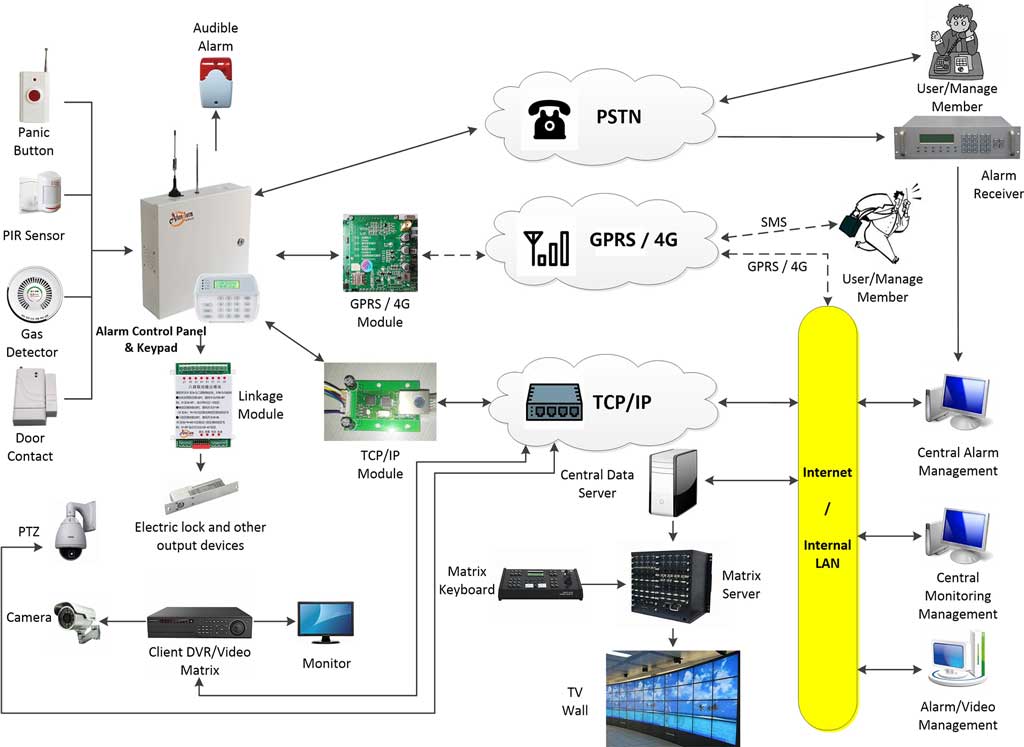
Modern network alarm systems rely on IP networks to transmit alarm events, sensor data, logs, video feeds, and system status. Common components include:
- Intrusion sensors (PIR, magnetic contacts, glass-break detectors)
- IP-enabled control panels and communicators
- Cloud monitoring platforms
- Mobile and web-based management applications
- APIs for third-party integration
- IoT protocols (MQTT, CoAP, ONVIF, RTSP)
Unlike standalone systems, these devices continuously exchange data across local networks and cloud services, expanding the cybersecurity attack surface.
1.2 Sensitive Data Within Network Alarm Systems
Alarm systems often handle:
- User credentials & administrative passwords
- Video streams and snapshots
- Alarm logs (entry events, timestamps, alarm types)
- System configuration files
- Building geolocation data
- Device identifiers (MAC addresses, certificates, tokens)
- API keys and integration tokens
A breach exposes not just personal data—but critical infrastructure security logic.
1.3 Key Vulnerabilities
Unencrypted communication
Older devices still transmit data in plaintext, enabling attackers to intercept alarm events or login credentials.
Weak authentication
Default passwords and outdated authentication methods leave many systems vulnerable to brute-force attacks.
DDoS and botnet infection
Network alarm devices have previously been targeted by malware such as Mirai, which exploited weak IoT security.
Supply chain and firmware risks
Unsigned firmware, unverified remote updates, and third-party SDK vulnerabilities are common.
1.4 Self-Assessment: Is Your System Vulnerable?
Use this quick checklist:
- □ Are devices using TLS 1.3 or still accepting HTTP traffic?
- □ Are default passwords still enabled?
- □ Is firmware older than 12 months?
- □ Does the system support MFA?
- □ Are alarm events sent over encrypted VPN or raw IP?
- □ Are APIs restricted by IP or open to the public internet?
- □ Are logs monitored for unusual traffic?
If you checked two or more, your system likely needs a security upgrade.
2. Core Technologies for Enhancing Data Security
2.1 Encryption: The Foundation of Alarm Data Security
AES-256 for Data at Rest
All stored logs, configuration files, and video snapshots should be encrypted using AES-256.
Implementation Tip:
Most alarm panels support encryption through firmware options. Ensure:
- Secure key storage
- Enabled encrypted partitions
- Automatic encryption post-firmware updates
TLS 1.3 for Data in Transit
All communications between sensors, control panels, cloud servers, and mobile apps must use modern TLS.
How to enable:
- Disable TLS 1.0/1.1/1.2 in device settings
- Upload valid certificates
- Use strong cipher suites (CHACHA20, AES-GCM)
2.2 Access Control and Authentication
Multi-Factor Authentication (MFA)
Mandatory for all administrative functions.
Role-Based Access Control (RBAC)
Restrict access for installers, operators, and administrators.
Zero-Trust Model for Alarm Systems
Verify every request between devices—even within the LAN.
MQTT Example (Secure Configuration)
listener 8883
protocol mqtt
cafile /etc/mosquitto/ca.crt
certfile /etc/mosquitto/server.crt
keyfile /etc/mosquitto/server.key
require_certificate true
tls_version tlsv1.3
2.3 Intrusion Detection and Monitoring
IDS/IPS Integration
Tools such as Snort or Suricata can monitor alarm device traffic for:
- Port scans
- Unauthorized login attempts
- Firmware tampering
- Abnormal packet frequency
Anomaly Detection
AI-driven traffic analysis identifies deviations such as sudden increases in outbound traffic (possible data exfiltration).
2.4 Firmware and Software Security
Secure Boot
Prevents modified firmware from running.
Regular Patch Cycles
Alarm manufacturers should push security patches every 90–180 days.
OWASP IoT Top 10
Use tools such as OWASP ZAP or IoTGoat to scan APIs, web interfaces, and cloud services.
2.5 Practical Encryption Checklist
- Enable TLS 1.3
- Use AES-256 for all stored logs and configs
- Replace HTTP with HTTPS
- Rotate encryption keys every 6–12 months
- Apply NIST-recommended secure configurations
- Disable outdated cipher suites
Following these steps can reduce breach risk by up to 80% according to NIST data.
3. Best Practices for Implementing Secure Network Alarm Systems
3.1 Network Segmentation
Use VLANs to Isolate Alarm Traffic
Example segmentation:
- VLAN 10 – Alarm devices
- VLAN 20 – IT systems
- VLAN 30 – Guest WiFi
Firewall Rules
Allow only whitelisted IPs for alarm servers and disable inter-VLAN routing.
Tools recommended:
- pfSense
- Ubiquiti UniFi Gateway
- Cisco ASA
3.2 Compliance and Standards
Depending on your business:
- GDPR – Data protection & breach notification
- HIPAA – Clinical facility alarms and monitoring
- ISO 27001 – Information security management
- SOC 2 – Vendor assurance
Perform audits using:
- Data inventory
- Encryption checks
- Access logs
- Vulnerability scans
- Incident response testing
3.3 Incident Response Planning (IRP)
Include:
- Detection and verification
- Disconnect compromised devices
- Preserve forensic evidence
- Patch vulnerability
- Rotate credentials & certificates
- Notify affected departments
- Conduct post-incident analysis
Provide a ready-to-use template for customers to implement.
3.4 Vendor Selection and Secure Integration
Choose vendors that provide:
- SOC 2 or ISO 27001 certification
- Regular security patch cycles
- Signed firmware
- Encrypted APIs
- Secure SDLC documentation
API Security Tips
- Use OAuth 2.0
- Restrict external calls to specific IP ranges
- Enforce rate limits
- Log all API requests
3.5 If Your System Is Already Compromised
Immediate actions:
- Disconnect affected devices
- Change all credentials
- Reset firmware to factory image
- Re-segment the network
- Conduct full vulnerability assessment
- Upgrade outdated hardware
- Implement monitoring tools
4. Case Studies and Real-World Applications
4.1 Success Story: Commercial Building Cyber Hardening
A large office facility migrated from legacy alarm communicators to encrypted IP alarm modules. After deploying TLS 1.3, secure boot, and segmentation:
- Unauthorized access attempts dropped by 92%
- SIEM alerts decreased significantly
- Compliance with local data protection standards improved
4.2 Lessons from Failures: Breach in Smart Security Cameras
A well-known consumer-grade camera system was exploited due to:
- Hardcoded credentials
- Unencrypted RTSP streams
- Outdated firmware
Attackers gained access to live camera feeds and alarm logs.
The outcome would have been avoided with:
- TLS 1.3
- RBAC
- Secure firmware update mechanisms
- Regular penetration testing
4.3 Emerging Trends
AI-Powered Threat Detection
Adaptive systems identify intrusion attempts before they cause damage.
Blockchain-Based Audit Logs
Tamper-proof recordkeeping enhances forensics and compliance.
Zero-Touch Deployment
Secure provisioning reduces human error and misconfiguration.
Conclusion
Securing network alarm systems is no longer optional—it’s a critical requirement. With cyber threats rising and alarm systems becoming increasingly interconnected, strong data protection measures ensure reliability, privacy, and compliance.
Key Takeaways:
- Encrypt everything (TLS 1.3, AES-256)
- Implement MFA, RBAC, and zero-trust
- Segment your alarm network
- Keep firmware updated
- Audit continuously
- Choose trusted vendors
Action Step:
Start by performing the self-assessment checklist in Section 1 and implement one security improvement today—even enabling MFA can significantly reduce attack risks.